

iFLYTEK AINOTE Air 2 Bundle – 8.2″ E Ink AI Note-taking Tablet with Stylus, 4096 Pressure Levels, Digital Notebook with Voice-to-Text Transcription, Multi-languages Support, Ideal for Meetings & Study
$398.99
Related Products





From the brand


Dedicated to the mission of “Create a Better World with AI”, iFLYTEK, established in 1999, is a visionary leader in the office, education, and healthcare sectors. We offer innovative AI products, including AINOTE Air 2, meticulously designed to meet the needs of customers.
Our solutions have gained widespread acclaim, becoming highly sought-after in 18 key markets, including the USA, Japan and the UAE.


AINOTE Air 2 Accessories
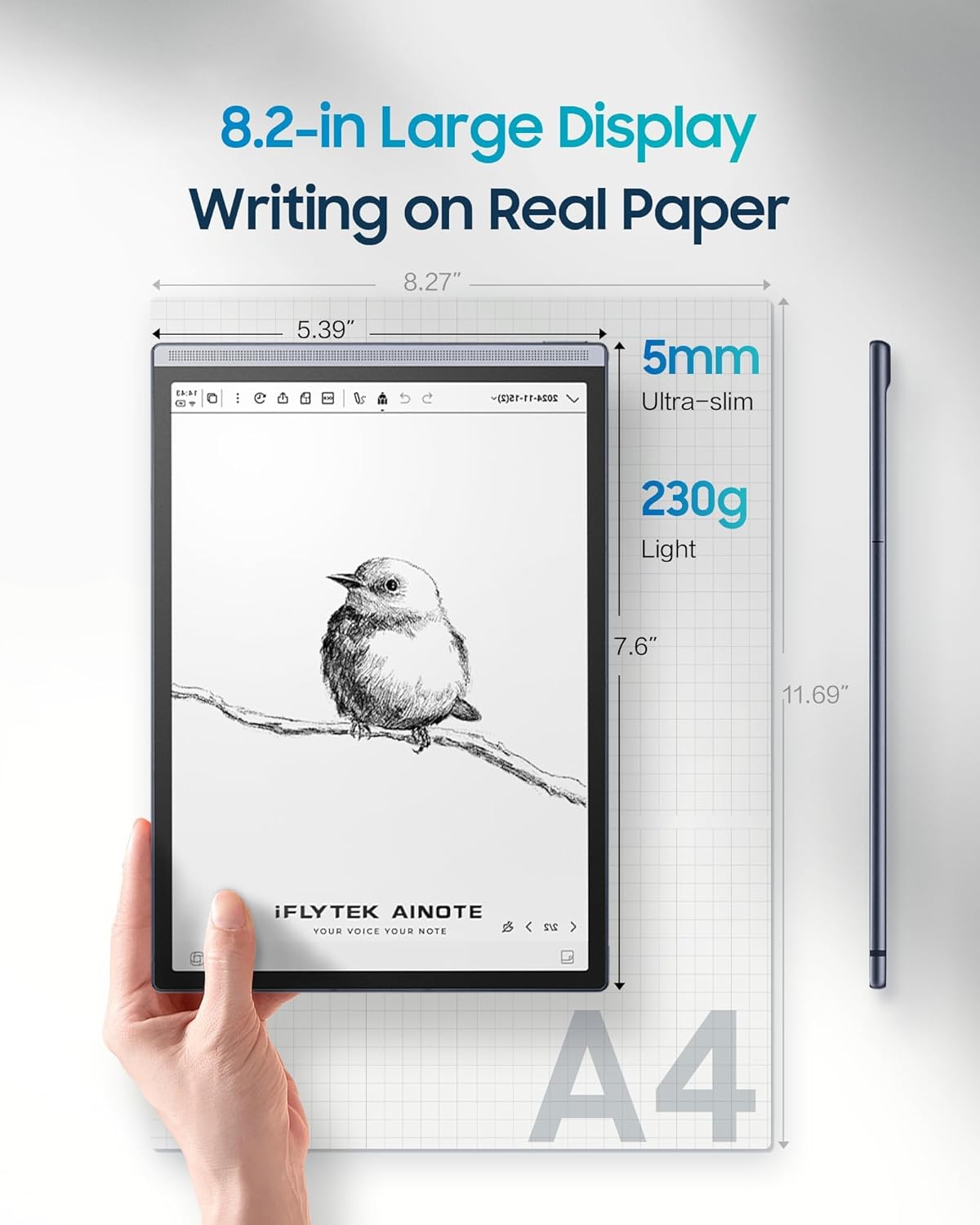
【8.2 inches AI Note-Taking & Meeting Summary】iFLYTEK AINOTE Air 2 – The ultimate digital notebook and note-taking tablet with real-time voice-to-text, multi-language translation, meeting summaries, and schedule management to enhance your productivity. A digital notebook perfect for various meeting scenarios.
【Multi-Language Transcription Support】iFLYTEK AINOTE Air 2 writing tablet for adults supports fast and accurate transcriptions in 17 languages (EN/ES/CN/TW/FR/VN/AR/KR/RU/DE/JP/HK/TH/HU/ID/MY/IT). Additionally, it converts handwritten notes to text in 83 languages, making it a versatile e ink tablet for global users. Please note: voice transcription and handwritten text conversion cannot be used simultaneously. Please wait for the ongoing transcription to finish before converting handwriting.
【Paper-Like Writing Experience】The iFLYTEK AINOTE Air 2 features an 8.2-inch E Ink screen with 4,096 pressure levels, delivering a natural, paper-like handwriting feel. 4 Diverse pen shapes make it ideal for professionals and students alike.
【AI Notetaker & Schedule Management】Mark up handwriting supernote effortlessly with special star, triangle, and circle symbols using the stylus pen to automatically create to-dos and attention items. Manage your personal schedule and display weekly work reports with ease. A perfect gift for friends, colleagues and client.
【Eye-Friendly Reading Audiobooks】The iFLYTEK e-paper tablet digital notepad features a dual-color reading light with 24 adjustable brightness levels, offering a strain-free, eye-friendly reading experience for work, study, or leisure. Allowing you to comfortably read PDFs or eBooks and take notes directly on them.
4 reviews for iFLYTEK AINOTE Air 2 Bundle – 8.2″ E Ink AI Note-taking Tablet with Stylus, 4096 Pressure Levels, Digital Notebook with Voice-to-Text Transcription, Multi-languages Support, Ideal for Meetings & Study
Add a review
$398.99
Tim Buys a Lot –
My Thoughts of iFLYTEK AINOTE Air 2
I’ve been using the AINOTE Air 2 for a while now, and honestly, this device surprised me in a good way. It’s not pretending to be a full Android tablet — and that’s actually why it works for me. It’s a writing-first E-Ink notebook, and in that category, it performs extremely well.Here’s the stuff that actually matters for daily use:***Writing Experience (the main reason I bought it)The writing feel is shockingly smooth for an E-Ink device.The pen has almost no lag — yes, the E-Ink delay is still there (you can’t avoid that on any brand), but the latency is minimal enough that I barely notice it once I get going. The surface texture is also nice, not that slippery glass feeling.***Display & Form FactorSuper lightweight, clean design, and easy to carry around.The screen contrast is good — not BOOX-level high contrast, but definitely comfortable for long writing or reading sessions. Doesn’t strain the eyes at all.***Battery LifeBattery life is kind of insane. I’m used to charging tablets daily; this thing just keeps going for days. I can take notes, doodle, draft stuff, go to class, whatever — still not dead.***Useful Features That Surprised Me*Syncing notes actually works*Handwriting recognition is pretty accurate*Templates and notebooks feel intuitive*No distractions — honestly a huge plusBut let me be real about the downsides (because nothing is perfect)***These are not deal-breakers for me, but worth knowing:*Screen sometimes looks slightly washed out depending on lighting*App interface could use some polishing*Not a full Android tablet (don’t expect Google Play everything)*You won’t get the flexibility of BOOX — but that’s not the point of this deviceStill, for what it claims to be — a lightweight E-Ink writing pad — it succeeds.***Bottom LineIf you want distraction-free writing, long battery life, and a smooth pen experience, AINOTE Air 2 is honestly a solid choice.Not perfect, but far better than I expected, and way more fun to use than staring at an iPad all day.Definitely staying with me. Solid 5 stars from my side.
Marylulu –
Perfect for meetings, note taking, and staying organized.
I use it daily for work and can’t go back to paper. It transcribes what I say in real time even in multiple languages and saves everything to the cloud. It’s lightweight, the battery lasts a long time, and writing with the pen feels natural, like paper. You can mark tasks with symbols and it automatically turns them into reminders. I also read documents or books without eye strain. Super useful if you work with notes, schedules, or languages.
Netcruzer21 –
Incredible Potential Ruined by Unstable Firmware and Google Lockouts
This device is a complete disappointment and should not be sold as a standard Android 11 tablet. The iFLYTEK AINOTE2 is so locked down, it borders on fraud. It fails to meet even the basic Android functionality expectations, which are not clear in the listing.Here’s what you’re not told until it’s too late:❌ No volume buttons — seriously. No screenshot combo possible.❌ No Developer Mode access — “Build Number” is hidden or removed.❌ Not Play Protect Certified — blocks Gmail, Drive, Docs, even Play Store.❌ ADB shell is blocked — can’t run system commands or extract device info.❌ ADB push fails — even file transfer to /sdcard/ is locked out.❌ Sideloading is limited — many APKs silently fail or crash.❌ Screenshot apps don’t work — “Screenshot Easy” won’t install.❌ File transfer mode missing — can’t drag files from PC to tablet.Even after installing the “Google Complete App,” I received this error:“This device isn’t Play Protect Certified. Contact the manufacturer to request a certified device.”That’s precisely what I plan to do—because this tablet appears to be one of three things:- A demo or developer unit- A region-locked export model- Or a deliberately crippled education/government editionWhatever it is, it has no business being sold to the public on Amazon, and this is particularly true given its primary marketing as Android 11 with productivity features.If you’re looking for a real writing tablet, digital notepad, or Workspace companion, do not waste your time or money on this. Get a Google-certified device like a BOOX Note Air 3, Lenovo Tab P11, or any Pixel/Chromebook that works. This tablet is going back.This is a follow-up to my original review — Since I resolved the “NON-Google Play Protect Certification issue.”However, I am now confronted with an issue relating to the device’s firmware that is proving to need a replacement product (Device).2nd Review:I wanted to love this device. I really did. The iFlytek AINOTE tablet has standout features: excellent voice-to-text transcription, an elegant E-Ink display, and a very useful camera + flashlight combo for document scanning.But after spending countless hours troubleshooting, I’m left with a sleek, promising device that refuses to function as advertised.The core issue? Google Play Store is broken. It either won’t open at all or displays the dreaded “Something went wrong. Try again.” message. And even worse: Google Play Protect certification cannot be verified, which cripples app compatibility and security.Even more alarming: the system hid core permissions after a firmware rollback—meaning I could no longer manage app access, system behavior, or reinstall critical components.I’ve done everything:• Factory resets• Reinstalls of Google services• Server toggles• Cold reboots• Clean networking setupsNothing resolves the core flaws. This points directly to a firmware-level defect or a system update designed to block or override Google’s services.Until iFlytek can prove it has stable, Google-certified firmware, I cannot recommend this device for anything beyond a digital notepad. And even then—you’ll always be watching over your shoulder waiting for it to self-sabotage.A replacement may fix it, but the experience has already cost me more time than any “smart” device should.Use caution. Or better yet—use something else.
JSloan –
Love the size and responsiveness
I’ve had a few tablets like this before and not had very much luck with them. This one is amazing. Super high quality and feel. I love the size of the unit as it allows me to easily carry it around, throw it in my briefcase or have it in my console in my truck. It’s super easy to just grab and jot down a few notes or to take notes during a long meeting. The responsiveness of the tablet and the stylist is fantastic. I’ve used ones before where it doesn’t always pick it up when you’re writing, but I’ve had no issues with that using this one. The battery life is super long as well. Allows me to go all day in meetings and not need to recharge. I’ve even gone multiple days when I forget it at the office and still can work all day.