

SOLAKAKA A99 Pro Wireless Mechanical Keyboard with BT5.0/2.4GHz/USB-C, LCD Screen & Metal Knob, Gasket-Mounted Gaming Keyboard, Full Hot-Swappable, RGB Creamy Keyboard for Win/Mac
$67.99
Related Products




Product description


1 Full Hot-Swappable
2 Linear Switch
3 Gasket Structure


1 Backlit Keyboard
2 High-Capacity Battery

Software download: solakakadriver.com (This software only supports Windows systems. Please run the driver in wired mode.)
What should I do if the plastic covering on the screen has scratches or curled edges?
The plastic covering on the screen’s surface protects it during transportation. If the plastic covering has scratches or curled edges, it can be peeled off without affecting the screen’s use.
Why can’t I run the driver software?
Please check if the driver software is running in USB-C wired mode. The driver software only supports wired mode and Windows systems.
How do I set up the GIF image?
You need to run the driver software in USB-C wired mode. And click the file download button to access the GIF image management page. Click “Upload” to upload the pre-downloaded GIF image. Click “Apply”. The GIF image will appear on the screen.
How can I prevent the GIF image on the screen from switching back to the home page after entering the sleep mode?
Please download and install the firmware of A99 Pro in wired mode. Download address: solakakadriver.com (please download the firmware for the corresponding keyboard). After the application, please reopen the mode switch and reconnect the keyboard.
How to Switch Systems?
1. Locate the“System”settings on the screen, rotate the knob to select it, then press the knob to confirm.
2. Shortcut Keys for Switching Systems. Press “Fn+W” to switch to Windows; Press “Fn+M” to switch to Mac.
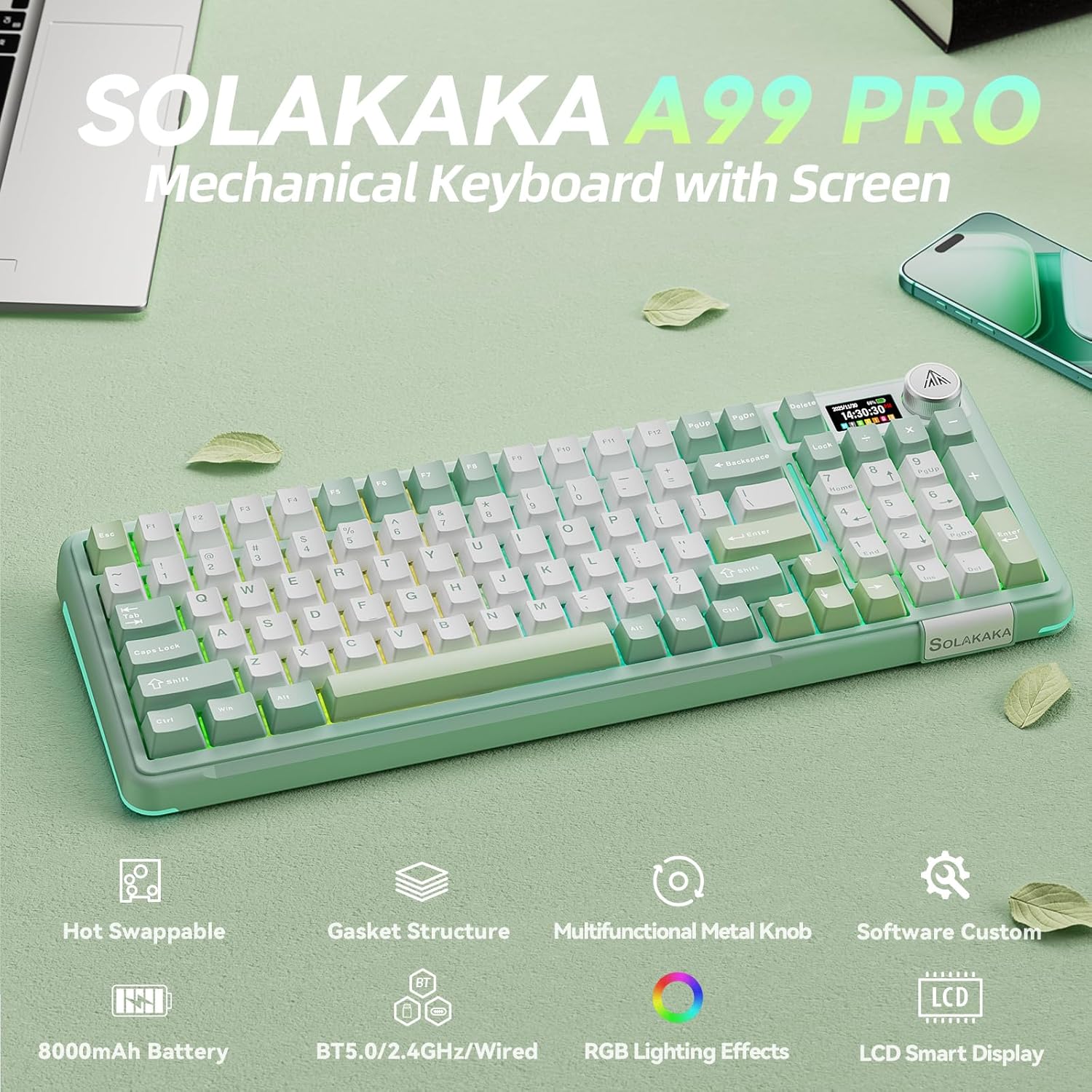
LCD Screen and Multi-Function Knob: To enhance mechanical keyboard usability, an LCD screen is included to display functions and information. Such as date, time, battery level, connected system, connection mode, RGB mode and colors. And the gaming keyboard features a multi-function knob. By rotating, short-pressing, or long-pressing the knob, you can easily set the time, switch systems, change lighting modes and colors, adjust brightness and control volume on the LCD screen. This allows you to easily customize the computer keyboard to your liking
Tri-Mode Connectivity & Multi-Device Support: This wireless keyboard features tri-mode connectivity, supporting BT5.0/2.4GHz wireless/USB-C wired connection. Each connection method offers zero latency and fast response. And it can support up to 5 devices simultaneously. Furthermore, it’s compatible with Windows/Mac/IOS/Android systems, overcoming limitations between different operating systems. And the wireless gaming keyboard supports locking the WIN key and full N-key rollover, preventing accidental presses during intense gaming sessions. Therefore, this wireless mechanical keyboard can meet most of your daily needs
Five-Layer Filling Structure: This creamy keyboard utilizes a gasket structure comprised of five layers of cushioning pads and a single-key slotted PCB. Noise-dampening cotton pads are placed between the pads and the positioning plate to eliminate internal cavity noise and unwanted sounds. This results in a comfortable hand feel and creamy sound. Our creamy mechanical keyboard can be a great companion for both gaming and work
Full Hot-Swappable: The SOLAKAKA A99 Pro mechanical gaming keyboard supports 3/5-pin full hot-swappable technology. It also comes with a keycap puller, allowing you to easily replace switches and keycaps. Replacement is straightforward and requires no soldering, making it easy for both beginners and experienced users. Furthermore, this hot swappable mechanical keyboard utilizes pre-lubricated LEOBOG star vector switches for smooth and stable keystrokes
Programmable Backlit Keyboard: This light up keyboard supports RGB and offers 16 lighting modes. To enhance the gaming atmosphere, side lights are also added to the rgb keyboard, offering 5 modes. And the led keyboard features south-facing LEDs for better light transmission. Furthermore, our custom keyboard supports customizable functions. Through the driver software, you can set sleep time, key mapping, key sensitivity, optimize key bounce, add GIF image to the LCD screen, switch backlight modes and colors(including music rhythm backlight), record macro files and more. Software download: solakakadriver.com (Note: The software supports Windows systems and wired mode only.)
96% Layout and 8000mAh Battery: This pc keyboard has 97 keys, retaining frequently used features such as the numeric keypad, arrow keys and essential function keys for gaming and office work. It saves space on your desktop. And the tablet keyboard utilizes double-shot PBT keycaps, which are sweat-resistant and durable. And the compact keyboard adopts an OEM height design, which can effectively alleviate hand fatigue during long-term keyboard use. Moreover, this office keyboard is equipped with an 8000mAh rechargeable battery, delivering robust battery life. It can sustain operation for approximately 61 hours with backlighting enabled and around 170 hours without backlighting.
8 reviews for SOLAKAKA A99 Pro Wireless Mechanical Keyboard with BT5.0/2.4GHz/USB-C, LCD Screen & Metal Knob, Gasket-Mounted Gaming Keyboard, Full Hot-Swappable, RGB Creamy Keyboard for Win/Mac
Add a review
$67.99
Christina –
Great sounding mechanical keyboard – works fantastic with my long nails!
This is my first mechanical keyboard since they became passe back in the late 90’s/early 2000s. Since then I’ve preferred the lower profile keyboards, similar in style to laptops. I’ve been debating a mechanical keyboard for well over 6 months but it felt frivolous to spend money on a keyboard when I had a really nice one that worked just fine. Then I saw a meme that said something like: I’ve been typing since Apple IIe and my typing accuracy has only gotten worse so something’s wrong with the keyboards, and I was like YES, and proceeded through checkout.I’ve been wearing my nails longer lately and wondering if switching back to mechanical might be the way to go – the short of it is, yes. I find I can type easier and lot more accurately on this than my lower profile Logi keyboard (that I do love). The down side is I do find my wrists hurting after just a short time of typing due to how much taller this keyboard sits, so I will need to purchase a wrist rest.I debated for about 6 months on what keyboard I wanted to go with. I wanted a reasonable price, aesthetic look, nice “creamy” sound, and I needed it to be nearly 100% keys. I like and use a 10-key often enough that I knew I needed that, but the mechanical keyboards are already so much bulkier/bigger than I’m use to that I didn’t want to go with a full 100% keyboard. I decided on this, knowing that small 0 might be an issue. It is, but I think I can get use to it, but I’ll be hitting that arrow key next to it a lot. I also don’t like that the Home and End key’s are built into the 10-key. Those are keys I do use often, but key functions can be swapped around within the software you can download for your computer, so I switched Page up/down to be Home/End instead.Something else I really do not like is how tinny the spacebar sounds. You don’t realize just how much you use a spacebar until it doesn’t sound like the other keys you’re typing on. It’s like nails on a chalkboard for me, so I stuck some quilt batting down into the space under the spacebar (rather than inside of it) and that did a great job of softening the noise the spacebar makes. The video does a fairly accurate job of showing how the spacebar sounds off, but the creaminess of the keys in general doesn’t come through as well (they are nice and creamy).I do appreciate that there are 2 tilt height options. I like that this can use the dongle (and that it has a convenient storage space) or Bluetooth. They keyboard has really good weight to it and the interface is pretty straight forward and easy to use.I gave it 5 stars because it is as advertised, but if I were rating it overall with all other keyboards, 4.5/5 stars because that spacebar key sound is off, the 0 is small (I know, that’s how they all do it), and no Home/End key when a compact keyboard can have them and still be compact (see Logi k470 keyboard layout). Overall, a great keyboard and very happy with my purchase.
Sky –
Worth the purchase! Absolutely love!
This is everything I dreamed of and more! The buttery smooth keys sound nice! It comes in lots of different colors and color patterns which i love. It is very light weight and the quality is amazing!
Andrea Sifontes –
Best keyboard ever
Best keyboard ever, it’s creamy, but has a perfect noise when you are typing, battery life is GREAT, I’ve been using it for 3 weeks and still at 30%, it’s worth the money if you are looking for quality, and also has many types of connection that it works for all sorts of need!
Vicki Canisales –
This keyboard is it!
I love how satisfying this keyboard is. Super high quality. The K and V key are slightly down which is why I am giving 4/5. I love it and the sound is great. The brown color is beautiful and it was super easy to connect.
derik han –
Works as intended, color options fun
Keyboard works well, unfortunately the clickiness of the key was a bit firm for my liking but overall looks nice and felt sturdy
LaCoyiaJ –
GREAT QUALITY BUILD
Wonderfully made! I can’t find not one fault with this keyboard. Both colorways available are nice but I went with what i call the brown, beige, and white edition. Connectivity is flawless, the RGB behave and respond nicely. Screen set up was such an easy process and I was not expecting it to be so simple. There is software available but unfortunately its not accessible on mac os and I cant download on my work system. I was able to set the clock my RGB’s and volume in a span of less than 5 minutes. Its not a super heavy KEEB but its a good weight. STURDY! The switches and key caps give a nice thocky sound. The keyboard is responsive with light tap and the placement of the keys allow for less strain on the wrist and fingers by the end of a shift. I definitely recommend and now have the green colorway on my list. I recommend this keyboard for Typist, Gamers, and KEEB Enthusiasts!
Celaida Dejoie –
Great keyboard
Love this keyboard. When I got the keyboard, it was 81% charged. I actually never hooked it up to charge it fully. I use it everyday as my work keyboard and I’m on week 2 of using it daily. The battery is at 72%. So it holds pretty well the only thing that throws me off is the size of the keyboard is smaller. So the arrow keys and number pad is closer together. Which I knew when I purchased it. It just takes some getting used to it. Also, the color options are awesome. I love the sounds the keys make and the feel of it. Great voice for the functionality of the keyboard. It’s perfect for me.
Kayjah –
Perfect!
I adore this keyboard! The color scheme is so cute, and it works like a charm. The way it sounds is an added bonus, and I appreciate how the settings are easy to navigate 🙌🏾