
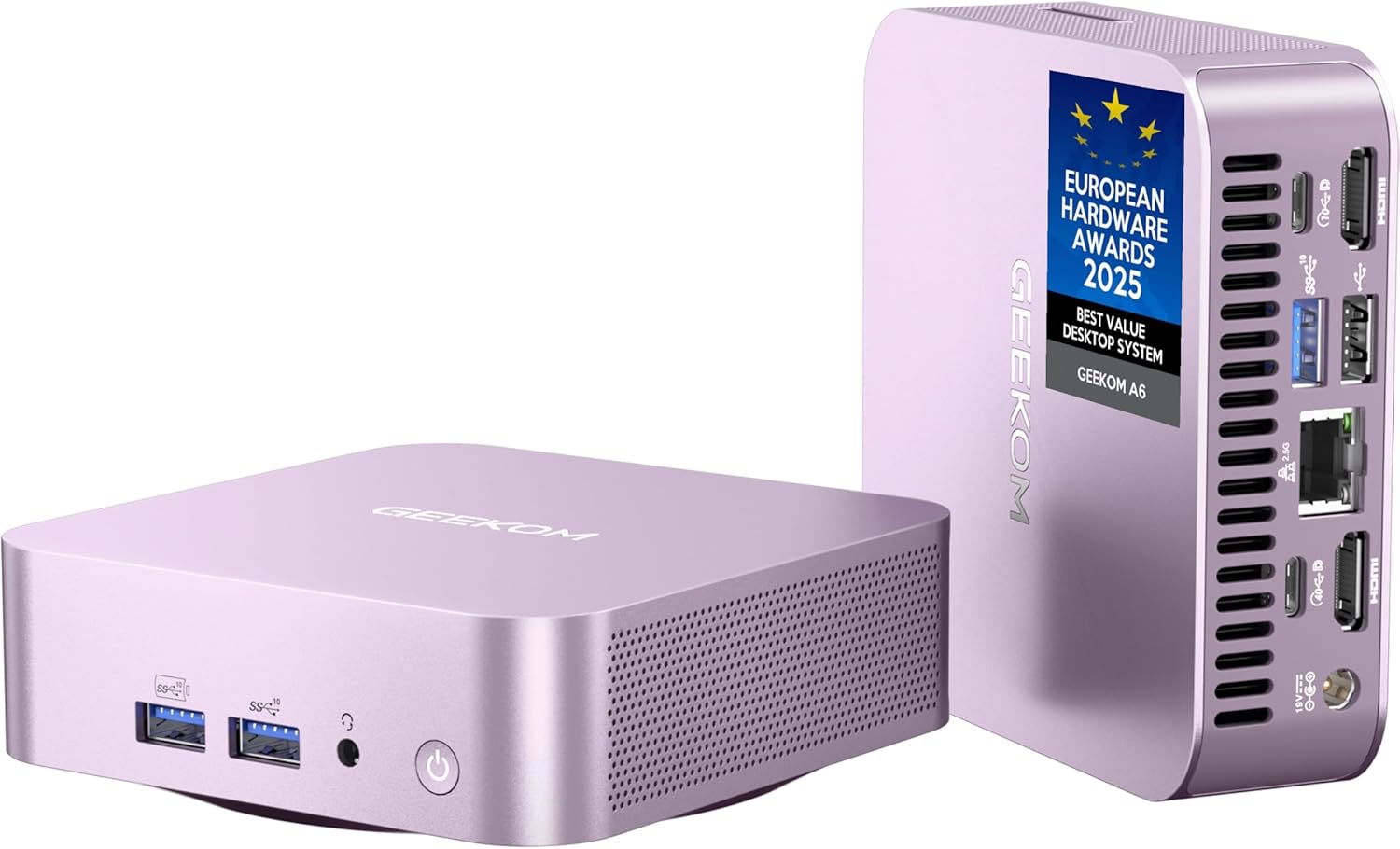
GEEKOM A6 Aurora Edition Mini PC with AMD Ryzen 7 6800H, 16GB DDR5 RAM 1TB PCIe 4.0 NVMe SSD, Radeon 680M, Compact Aluminium Design Windows 11 Pro Desktop Computer with USB4/8K UHD/Wi-Fi 6E/SD Slot
$549.00
Related Products




Product description

Key details about the GEEKOM A6 you might be interested in.
CPU with AMD Ryzen 7 6800H (8 Cores, 16 Threads 16MB Cache, up to 4.70 GHz) GPU with AMD Radeon 680M OS Windows 11 Pro Memory Offer 16GB DDR5-SODIMM, dual slots design, expandable up to 64GB Storage Offer 1 x M.2 2280 PCIe Gen 4×4 NVMe/SATA SSD, supports up to 4TB; Offer 1 x M.2 2242 SATA SSD slot, supports up to 2TB Wireless Connectivity Wi-Fi 6E & Bluetooth v5.2 Item Dimensions 4.4 x 4.4 x 1.34 in Item Weight 0.99 lbs Interface 1 x USB4 Gen 2 Type-C, 1 x USB 3.2 Gen 2 Type-C, 3 x USB 3.2 Gen 2 Type-A, 1 x USB 2.0 Type-A, 2 x HDMI 2.0, 1 x 3.5 mm headphone jack, 1 x 2.5G RJ45 LAN port, 1 x SD card reader, 1 x DC jack Package List 1 x A6 Aurora Edition Mini PC, 1 x HDMI Cable, 1 x VESA Mount, 1 x Power Adapter, 1 x User Guide Coverage Details 3 Years of Limited Coverage How to Enter BIOS Continuously press ‘F7’ or ‘Esc’ after powering on the device.


Advanced Connectivity


1 with AMD Ryzen 7 6800H
2 16GB RAM 1TB M.2 NVMe SSD
3 USB4, Support 8K
4 USB4, Support 8K
5 Wi-Fi 6E & Bluetooth v5.2


From Sleek to Stunning – Our Bestselling Mini PC Just Went AURORA!
The video showcases the product in use.The video guides you through product setup.The video compares multiple products.The video shows the product being unpacked. 1 1 1 1 1 Merchant Video
A PC in Alex‘s Pocket?! Redefining Mobile Workstation Possibilities
The video showcases the product in use.The video guides you through product setup.The video compares multiple products.The video shows the product being unpacked. A PC in Alex‘s Pocket?! Merchant Video
GEEKOM A6: The Perfect Home Server? Light Gaming & Streaming Demo
The video showcases the product in use.The video guides you through product setup.The video compares multiple products.The video shows the product being unpacked. 1111 1 1 1 Merchant Video
Mini PC, that’s GEEKOM.
For 22 years, we’ve asked, “How can we make it better?” Follow a GEEKOM engineer’s journey of refinement, resulting in Mini PCs that power your creativity, productivity, and play. More than a computer, it’s a bridge from our passion to your potential. Mini PC, that’s GEEKOM.
The video showcases the product in use.The video guides you through product setup.The video compares multiple products.The video shows the product being unpacked. 1 1 1 1 1 1 1 Merchant Video
IceBlast – Ready to Cool Down
Packing immense power into a compact design demands an innovative cooling solution. The A6 efficiently channels air through multiple system layers, expelling it seamlessly through the rear. Powered by GEEKOM’s cutting-edge IceBlast cooling technology, the A6 handles even the most demanding tasks with exceptional speed while staying cool, quiet, and efficient.
The video showcases the product in use.The video guides you through product setup.The video compares multiple products.The video shows the product being unpacked. FAN 1 1 1 Merchant Video
Crafting Quality with GEEKOM Precision
Backed by 339 rigorous tests and key certifications (FCC, UL, ENERGY STAR, and more), every GEEKOM Mini PC is crafted with precision for excellence. We prioritize quality from the inside out, using premium components and state-of-the-art assembly to deliver durability, innovation, and impeccable performance you can trust.
The video showcases the product in use.The video guides you through product setup.The video compares multiple products.The video shows the product being unpacked. 1 1 1 1 1 1 Merchant Video


1 Efficient Office 2 Creative work 3 Coding 4 Seamless Gaming
🚨Industry Supply Alert – The AI sector’s massive demand has created a severe industry-wide DDR memory shortage. To maintain the GEEKOM A6’s uncompromised quality without switching components, a review of our cost structure will follow the future. We advise securing your unit promptly to lock in its current high-value configuration and 3-year warranty.
🛡️Worry-Free for 3 Years & Total Assurance – Many brands offer only a one-year warranty, but GEEKOM confidently offers a 𝟯-𝘆𝗲𝗮𝗿 𝘄𝗮𝗿𝗿𝗮𝗻𝘁𝘆. This reflects our absolute confidence in our materials, build quality, and manufacturing standards. Beyond the warranty, the A6 is 𝗺𝘂𝗹𝘁𝗶-𝗰𝗲𝗿𝘁𝗶𝗳𝗶𝗲𝗱 𝗳𝗼𝗿 𝗿𝗲𝗹𝗶𝗮𝗯𝗶𝗹𝗶𝘁𝘆 (𝗙𝗖𝗖, 𝗨𝗟, 𝗘𝗡𝗘𝗥𝗚𝗬 𝗦𝗧𝗔𝗥, 𝗲𝘁𝗰.), and your purchase is secured by a 𝟵𝟬-𝗱𝗮𝘆 𝗿𝗲𝘁𝘂𝗿𝗻 𝗽𝗼𝗹𝗶𝗰𝘆 and our dedicated aftersales team. Furthermore, it comes preloaded with Windows 11 Pro and also supports Linux/Ubuntu, allowing full OS flexibility.
Pocket Power, Aurora Glow – The GEEKOM A6 Mini PC crams serious power into its sleek 4x4x1.4-inch frame, disappearing seamlessly into any setup. Its premium aluminum chassis delivers both style and rugged durability, now featuring an all-new Aurora finish that’s even more stunning in person. Packing an AMD Ryzen 7 6800H processor, this pocket-sized beast delivers desktop-class performance – you’ve gotta see it to believe it! (𝙂𝙚𝙣𝙪𝙞𝙣𝙚 𝙋𝙧𝙤𝙙𝙪𝙘𝙩𝙨 𝙎𝙖𝙛𝙚: 𝙊𝙣𝙡𝙮 𝙤𝙣 𝘼𝙢𝙖𝙯𝙤𝙣 & 𝙂𝙀𝙀𝙆𝙊𝙈 𝙊𝙛𝙛𝙞𝙘𝙞𝙖𝙡 𝙒𝙚𝙗𝙨𝙞𝙩𝙚 | 𝘼𝙫𝙤𝙞𝙙 𝙁𝙖𝙠𝙚𝙨.)
Versatile for Every Task – Powered by the AMD Ryzen 7 6800H CPU and Radeon 680M GPU, the A6 mini computer delivers outstanding performance for work and creativity. From video editing and music production to coding and light gaming, it ensures smooth, responsive, and efficient operation—perfect for professionals and casual users alike.
All set to connect – The A6 delivers quad 4K display via a versatile USB4 port (40Gbps) that outperforms single-purpose Oculink. While Oculink handles only data, USB4 does it all: power, high-speed data, and multi-display support in one universal port. With dual HDMI, expansive connectivity and VESA mounting, it adapts seamlessly to any environment.
Blazing-Fast Memory and Storage, Future-Ready – 𝗠𝗼𝘃𝗲 𝗯𝗲𝘆𝗼𝗻𝗱 𝘁𝗵𝗲 𝗳𝗶𝘅𝗲𝗱 𝗹𝗶𝗺𝗶𝘁𝘀 𝗼𝗳 𝘀𝗼𝗹𝗱𝗲𝗿𝗲𝗱 𝗟𝗣𝗗𝗗𝗥 𝗺𝗲𝗺𝗼𝗿𝘆. Equipped with an 𝘂𝗽𝗴𝗿𝗮𝗱𝗲𝗮𝗯𝗹𝗲 16GB 𝗗𝗗𝗥𝟱 𝗥𝗔𝗠 and 1TB PCIe Gen4 NVMe SSD (up to 4TB), plus an M.2 2242 SATA SSD slot (2TB), the A6 desktop mini pc ensures lag-free multitasking and fast data access. Store thousands of photos, music tracks, or hours of HD video. This powerful combination is perfect for both professional workloads and personal media collections.
Unleash IceBlast Cooling – The GEEKOM IceBlast 2.0 cooling system embodies engineering ingenuity, featuring high-efficiency dual-phase copper heat pipes for 210% better thermal transfer, a custom silent fan twice the size of competitors’, and a nickel-plated heatsink in direct contact with the CPU – bringing desktop-class cooling to compact A6 mini PC.
Superb Networking – Armed with 2.5Gbps Ethernet and Wi-Fi 6E, the A6 offers fast and reliable internet connection on both wire and wireless, allowing you to enjoy lag-free online gaming, 8K video streaming, and real-time VR.
9 reviews for GEEKOM A6 Aurora Edition Mini PC with AMD Ryzen 7 6800H, 16GB DDR5 RAM 1TB PCIe 4.0 NVMe SSD, Radeon 680M, Compact Aluminium Design Windows 11 Pro Desktop Computer with USB4/8K UHD/Wi-Fi 6E/SD Slot
Add a review
$549.00
Marty913 –
Highly Recommended
For the past 20+ years I have used NUC-type computers as my everyday desktop computers so I do have some experience with them. Up until now they have all been Intel-branded so the Geekom A6 is the first with an AMD CPU.Overall ImpressionSetup was a breeze. The boot-up process walks you thru everything including going out to the Geekom website to get updated drivers. I initially installed Windows 10 but switched back to Windows 11 which I’m currently using. Both worked fine (Win10 drivers are available on the website). The Win11 Pro that came installed with the A6 is relatively bloat-free. I did a clean install anyway but it really isn’t necessary. I do NOT use the A6 for gaming so can’t comment on that.The Ryzen 7 6800H is a lot faster than I thought it would be. I trans-code a lot of videos (pretty CPU-intensive) and the ability to do multiples simultaneously is amazing. Both Handbrake and Format Factory utilize the AMD hardware acceleration (both CPU and GPU cores). The 32GB of DDR5 RAM no doubt helps.Fan noise is non-existent during most daily operations (surfing, word processing / Excel, watching videos, etc.). The fan noise during video conversions is there but minimal and “softer” in nature, if that makes sense. The box stays cool.All the ports work fine and at the rated speeds. All components (drivers, etc.) were recognized by Windows. There have been no software conflicts so far. Overall construction is top notch as was packaging.Not really a complaint but I would have liked one more USB 3 Gen 3.2 port instead of the USB 2 port. On the other hand, the dual USB 3 type-C ports are a bonus so I guess you can’t have everything. The BIOS is a little old-school so if you like to “tune” everything there aren’t a lot of options. All the basics are there however.Overall, zero complaints. You get an awful lot of computer with the Geekom, certainly everything required of a typical desktop computer. As mentioned, I do not use it for gaming so I’ll leave that to the experts. I do use it for everything else (and then some). I have a couple of other NUC’s that are beginning to “age out” and will probably replace them with Geekom products when the time comes. Based on my experience with the A6, I definitely recommend the product and the company (and of course always recommend Amazon).
Bob Van Epps –
Exceptional build quality and great value for the price.
When my 2-year-old BeeLink SEI12 Mini PC suddenly broke, I had to scramble to find a replacement. I purchased two replacement candidate computers and went to work on a thorough evaluation. My plan to test these two well-equipped but moderately-priced Mini PCs hit an immediate snag when the first device that I began to check out, exhibited a fatal flaw. It would turn on using the power button but could only be turned off by pulling the power plug. Poor quality control doomed that computer to a quick rejection and a return to Amazon.My second new computer candidate performed perfectly. Unfortunately, the collection of available ports and their location on the computer quickly became a liability for this otherwise excellent computer. This computer, (along with the one that arrived defective), offered only one USB-C port, and that port was placed on the front of the computer. This meant that anything that I wanted to connect via USB-C would have its cable cluttering my desk top. For my usage, the best location for a USB-C port or ports has to be on the rear of the computer. To be fair, I did not know the importance of having multiple USB-C ports or that they should be located in the back, until I started with my evaluations.I went back to Amazon with a new set of upgraded design specifications, which included two, rear-mounted USB-C plugs. My search eventually lead me to Geekom and their A-6 Mini PC. The cost was about $100 more than I had planned to spend but, after using this remarkable computer for a week, I can safely say that the A-6 is well-worth the higher price tag.Firstly, the compact design and superb construction reminded me of an expensive Swiss watch. When I opened the computer, the components and their precise assembly established an expectation of high quality. So far, I have not been disappointed. The rear-mounted USB-C ports were located perfectly. To my great surprise, one of these ports was actually a USB-4 port, offering 40gbs data speeds. I am not sure if I actually need this extra speed, but is is certainly an unexpected bonus. There would be more to come.This new computer is my first to come with an AMD Ryzen 7 6800H CPU. I have been an Intel fan for years but given the great reviews that AMD has been getting lately, I decided to give this brand a try. The 6800H CPU is about 27% faster than those provided in the two previously evaluated Mini PCs. This value-packed computer also comes with 32GB RAM and 1TB of SSD storage. Both of those numbers are double what the other computers included.As you can probably tell, I am very impressed with my new A-6 computer. Given that my old BeeLink box failed after two years, (1-year warranty), I am also impressed that Geekom includes a 3-year warranty with this purchase. To me, this tells me that Geekom is very confident in the quality and workmanship of the products they sell.What could be improved in future versions of this little computer? Not much, honestly. If I were to reach a bit, it would be nice if one of the USB-C ports provided enough wattage to enable “Super Fast charging for my Samsung phone.
John Prill –
Mini pc
Compact size with easy set up. Some radio interference with rear USB-A port. Switched dongle tofront port and works well. Have used in hotel room w/hdmi to tv and works well.
Hi50Pilot –
Very small, capable Windows 11 PC
So far this is a great PC. So much packed into a really small package. It’s fast, very quiet, an enough memory and storage for my purposes. I replaced a 10 yr old Windows 10 PC that couldn’t be upgraded to Windows 11. If something changes my initial opinion, I’ll provide an updated review.
José M. –
Muy buen equipo, rápido y silencioso 😀
Marcelo A. –
O computador está anunciado com 32 GB de memória RAM, mas chegou com apenas 16 GB de RAM.
Nathanael Nga –
I use this computer as a little tinker toy, running Linux and Windows. With the specs it has, it’s very snappy and responsive. The only downside is that the fans can get loud when in heavy use, but with a unit this size, I expected it. I would recommend this product as a good lasting family computer, a school desktop option, or just something to have thats powerful if you want to play around with things
浅埜正人 –
15インチノートPCの買い替えですノートPCを買うか迷っていました買って正解です。24インチモニターに接続して利用していますコンパクト、嵩張らないのがいい。机の上が広く使えています普段使いに困らないスピード、遅いと感じたことがありません
Magic Review –
WOW what an awesome mini-PC, you can NOT go wrong with this mini-PC, I love it immensely, YEAH, I definitely recommend this product, just read the specs, look at all the included features you can even add an extra SSD, wow awesome, the price tag is great too, I am very happy with it, Windows 11 PRO was so easy to setup, fantastic!