
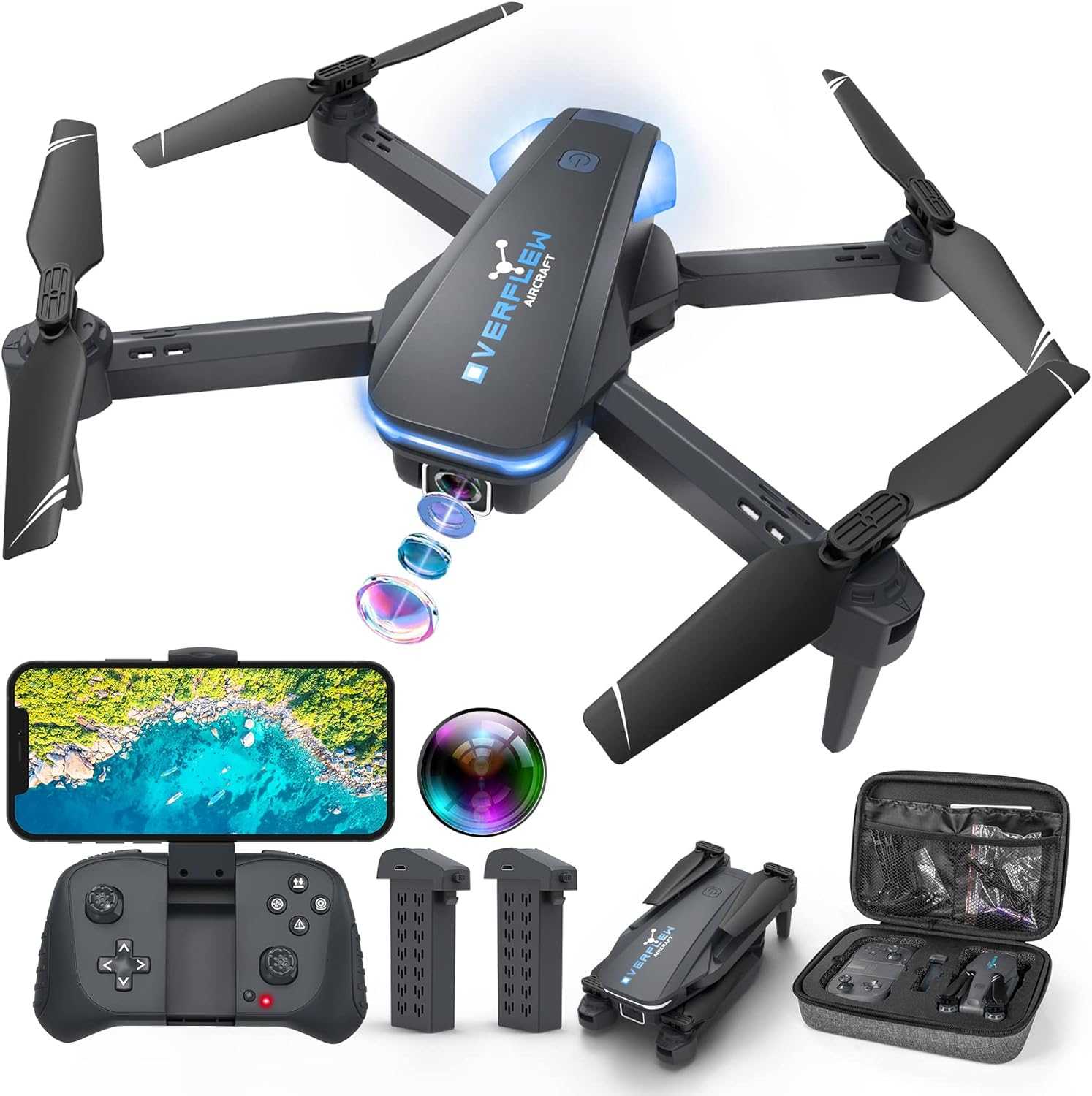
Drone with 1080P Camera for Beginners and Adults, Foldable Remote Control Quadcopter with Voice Control, Gestures Selfie, Altitude Hold, One Key Start, 3D Flips, 2 Batteries, Toy for Beginners
$44.99
Related Products




Product description


3D Flip
It has a crazy cool 360-degree flip function, and the drone can roll in any direction to make flying more exciting.

Gesture Control
Post “V” or do “Palm”, the drone will take photos or videos within 3 seconds, helping you to take complex photos, suitable for selfie.

Smart Voice Control
Turn on the app and click the “voice control” button. Voice command: Fly Land Forward Backward Left Right Photo Record.You can easily control the drone by voice control and enjoy more fun.

High/Medium/Low Speed
It has three speed levels. Press and hold the front left button. The number of beeps indicates its speed level. It is very fast and responsive for its size, especially in the third speed level.

Stable Hovering
Dual altitude held technology – optical flow and air pressure – makes hovering very stable and easy for use . When you release the throttle stick , the drone will hover at a certain height . Simple operation and endless fun . When properly trimmed , it will hover steadily in one place .

Headless Mode
Headless mode is activated by a button on the controller and is a nice feature that allows you to play with the drone without worrying about the direction it is facing. Headless mode brings more confidence to beginners.

FPV Transmission
With FPV transmission, you can see the sky from live video through your smartphone app. And take photos and videos during the flight, you can save photos or videos to your phone or share them to social media.

Propeller Protection
It’s a good idea to wear propeller guards so that you can protect yourself from propeller spin scratch and protect your drone from damage. This is easy to do because it’s obvious when propeller guards snap into place.

One Key Start/Landing
Drone S20 is magically simple, just tap the One Key Start/Landing button to start flying. Press the button and the drone will automatically take off and hover at the set altitude. If you need to land the drone, press it again. It is easy to control and maneuver, especially for beginners.

Emergency Stop
When the aircraft encounters an emergency during flight, long press the remote control “emergency stop” function key to make the aircraft stop urgently to avoid injury. After the aircraft emergency stop, the indicator light will flash and horizontal calibration is required.

Gravity Control
Gravity-sensing mode allows the user to control the drone by holding and moving the smartphone. When gravity sensing is on, you will need to long press and hold your fingers on the phone screen to control the drone, as this will prevent the drone from flying around when gravity sensing is on and the phone is not horizontal.

Remote Controls and Apps
You can fly the drone using the remote control or your smartphone. However, in order to capture video or images, you must be connected to the drone via WiFi and the “HITURBO FPV” app. If you need to use the voice control, trajectory flight and other functions which under the “control switch” button in the app, you need to disconnect the remote control from the drone and connect the drone to the app separately.


Drone with 1080P Camera: A camera mounted on it can be manually adjusted to see what’s in front of the drone while it’s flying, or it can be aimed down to see what’s directly below it. I’m sure you can take some interesting photos & videos, or even use it to inspect the roof of a house or other hard-to-reach areas. Friends can shoot each other skating & capture really cool videos. Please charge the product using the provided charging cable. Before using this item, make sure to fully charge it.
Play Longer: The FPV drone has two rechargeable batteries, each providing approximately 12 minutes of flight time. 2 batteries can be swapped & charged in rotation, greatly extending the fun time. Note that more flips & faster speeds will reduce the flight time per battery
Remote Control & App: You can fly the mini drone with remote control or a smart phone. But in order to capture video or images, you must be connected to the drone via WiFi & the ”Hiturbo FPV” app. If you need to use the voice control, trajectory flight & other functions which under the ”control switch” button in the app, you need to disconnect the remote control from the drone, connect the drone with the app individually.
Discover new adventures: 2 batteries provide you with up to 24 minutes of flying experience. Features such as altitude hold, 3D flip, headless mode, one key take off/landing, speed adjustment & voice control make it easy & fun for beginners or novices.
Suitable for Beginners: This drone is a little easier to operate than other drones (it has fewer steps to fly, no manual pairing required), so it’s suitable for people just starting out. If you’re considering learning how to fly a drone, make this drone your first one. You’ll be surprised at how easy it is to take your imagination to the next level with this starter drone
Helpful Tips: Make sure to calibrate the gyroscope every time the drone is turned on (and after a crash). Simply hold both joysticks in the lower right or lower left 45° position until the drone stops flashing, the whole process take only 2 seconds. We found it very helpful for drone control & stability.
Tip1: Put the drone on the ground, turn it on, and then short press to turn on the remote control, they will automatically connect. Then open the mobile phone wifi list, search and connect to the wifi named “Hiturbo_XXX”. Then move the left and right control sticks of the remote controller at a lower left 45°angle at the sametime to complete the horizontal calibration (This way the drone will fly more steadily and be easier to control.).
Tips2: Press the one-touch takeoff button on the remote control to take off(Please fully charge the battery, 90 minutes). Please click on the phone settings in advance to allow the APP to obtain camera permissions, so that you can see the drone camera screen on the phone. The blades of the drone are divided into two directions: A and B. Please make sure that they are in the right direction before taking off. When the quadcopter keeps flying forward / backward/ left / right side, you can correct it by pressing fine-tuning button down/up/right / left.
This product is a drone with 1080P camera for ages 14 and over. Hiturbo customer team provides 24-hour technical support, and quality warranty services. We are ready for your inquiry and will try our best to help every customer.
13 reviews for Drone with 1080P Camera for Beginners and Adults, Foldable Remote Control Quadcopter with Voice Control, Gestures Selfie, Altitude Hold, One Key Start, 3D Flips, 2 Batteries, Toy for Beginners
Add a review
$44.99
Mr. S –
Solid for beginners and intermediate
This is my fourth flying RC gadget. Had 2 Syma helicopters, and their drone. Wanted to kind of move up in difficulty.Girl flies simply, and has a few more bells and whistles. Great price point. Can’t beat two batteries. Battery life is great. Probably get like 10 minutes out of each one. I live by the beach, and this fella can handle the wind. Flies indoors controllably as well. It’s quick too. Haven’t played with the camera and the extra features yet, but I’m fully satisfied.
Danielle ball –
Great Option!
I bought this for my 8 year old for his birthday. This was perfect for him. Very easy to fly and couldn’t believe he learned how to flip it in just a matter of minutes. We loved that it comes with 2 rechargeable battery packs. The camera feature had easy to follow instructions. This is a great option for the cost. Will be buying another for my 5 year old.
Maria –
Amazing, sleek little drone!
This thing is so cool!!! I have been wanting a drone forever, so I finally pulled the trigger and got this little beast. I’m so glad I did!It is a perfect drone for beginners. I’ve only had a chance to fly it in my backyard, but am looking forward to taking it to an open field and practicing flying it.The instruction manual is very thorough, and guides you through its functions. It was easy to get it up in the air and going. It survived several collisions with my fence and came away scratchless.I love that it comes with two batteries. And the carrying case for it alone is worth the money – very sleek and protective.I am a big fan of my first drone, and am excited to take it out to open space to let it fly free!
Scott L –
Great for beginners
Really bought it late night just cause it was cheap. Good to learn flying drones. Read the instructions and probably watch some YouTube tutorials to be honest.The camera is pretty great for such a cheap drone but the part that gets me is the app connection. The error messages show up in mandarin (assuming since I’m not familiar with the different types of Asian languages) at least thats what I think.Was able to connect twice to my phone to have the camera POV view but haven’t been able to connect since. I would say to get it if you are on the fence if you are new to drones. Not great but not terrible eitherGood for the price.Battery life is quite low, maybe like 15 mins of flying.Video quality is great if you can connectThe propellers have optional guards that come with it you can add, which I recommend honestly. Overall, decent and remote control response is very quick.
chad and Taylor nuessle –
Great Drone
For this for my son’s birthday and he loves it ! Works great, easy to use ! Happy with the purchase.
D –
Maneuverability is Utterly Impressive
I recently bought the Hiturbo S20 drone, and I have to say, I’m thoroughly impressed. For anyone looking for a drone that balances fun with functionality, this is a fantastic choice.The camera on this thing is a huge plus. The photos it captures are crisp, clear, and vibrant, making it perfect for aerial photography. Whether you’re a hobbyist or looking to get some professional-looking shots, you won’t be disappointed.But what really sets this drone apart is its flight performance. It has three different speed levels, which is a game changer for control. The lower speed is great for beginners or for getting precise, cinematic shots, while the higher speeds offer an exhilarating flying experience. I was able to make INCREDIBLY PRECISE side-to-side and front-to-back movements with very little effort. The responsiveness is TOP-NOTCH, and it feels like the drone is an extension of your own hands.I really like the fact this drone comes with propeller guards. My previous drone of another brand didn’t come with them and I wish they did. These protectors will ensure my blades last a long time.And for those who like to have a little fun, the 3D flip feature is a blast. It executes the flips with ease and looks really cool in the air.Overall, the Hiturbo S20 is a great all around drone. It takes excellent pictures, offers fantastic control and responsiveness, and is just plain fun to fly. Highly recommended for sure. I will post a video soon once I have someone available to record while I man the controller. Best drone I’ve flown at this price point.
Thomasaleeds –
Stable it is not, will not stay in a stationary position.
I’ve only tried flying it a few times indoors so no wind and it drifts all over the place, kind of hard to control as well, but we’ll get easier with more practice I hope.Hopefully, much better in a wide open field than it is in the kitchen. But it will not stay in the stationary position unless it’s on the ground so you have to continually adjust it to keep it from crashing into something.But it was cheap so I guess I should not have expected too much.I will give it another week or so, but may return it and search for something more stable.
Bethany Burrell –
Decent for Price
I didn’t have super high expectations given the price, but this drone really surprised me! It’s easy to set up, simple to control, and feels more durable than I expected for a budget option. The flight is pretty stable, and it’s been a lot of fun to use for casual flying.The camera quality isn’t top-tier, but that’s to be expected at this price point—and it’s still perfectly decent for basic photos and videos.
Mehboob Ahmad –
Small price good quality everything is perfect
Amazon Customer –
👍
muzin mm –
The camera is not connecting, it’s just a dummy, a waste of money
Mohamed Ali –
Only one battery included.
khyati anandita –
horrible. didn’t work like when we put batteries in it (brand new expensive batteries) it just wouldn’t turn on n we tried everything so i know its not our fault.