

GravaStar Mercury K1 Purple 75% Wireless Mechanical Keyboard – Tri-Mode BT5.0/2.4GHz/USB-C Gaming Keyboard, Jelly Keycaps, Linear Switches, RGB Backlit Creamy Keyboard for PC/Mac, Cute & Stylish
$89.95
Related Products



Product description

Unleash your gaming with the GravaStar Mercury K1, a vibrant purple 75% wireless keyboard. Featuring linear switches, hot-swappable keys, immersive RGB lighting, and a compact aluminum frame, it delivers precise, responsive performance and bold style for gaming, streaming, or desktop setups.

The Refined and Streamlined Mercury K1
Be ready for anything with the next evolution of the K1 design clade. Aethereal catalysts have reforged the living metal, coalescing and condensing it into a streamlined form that still glows with its own inner radiance. The recursive metal branches have flowed around rows of custom Kailh Linear switches, ready for input and perfectly balanced for any challenge that lies ahead.
GravaStar Stellar Bloom Linear Switches
Featuring GravaStar Stellar Bloom linear switches for stable, responsive performance. Lightweight actuation with strong tactile feedback – the perfect all-around switch for gaming and typing without key wobble or floating sensation.


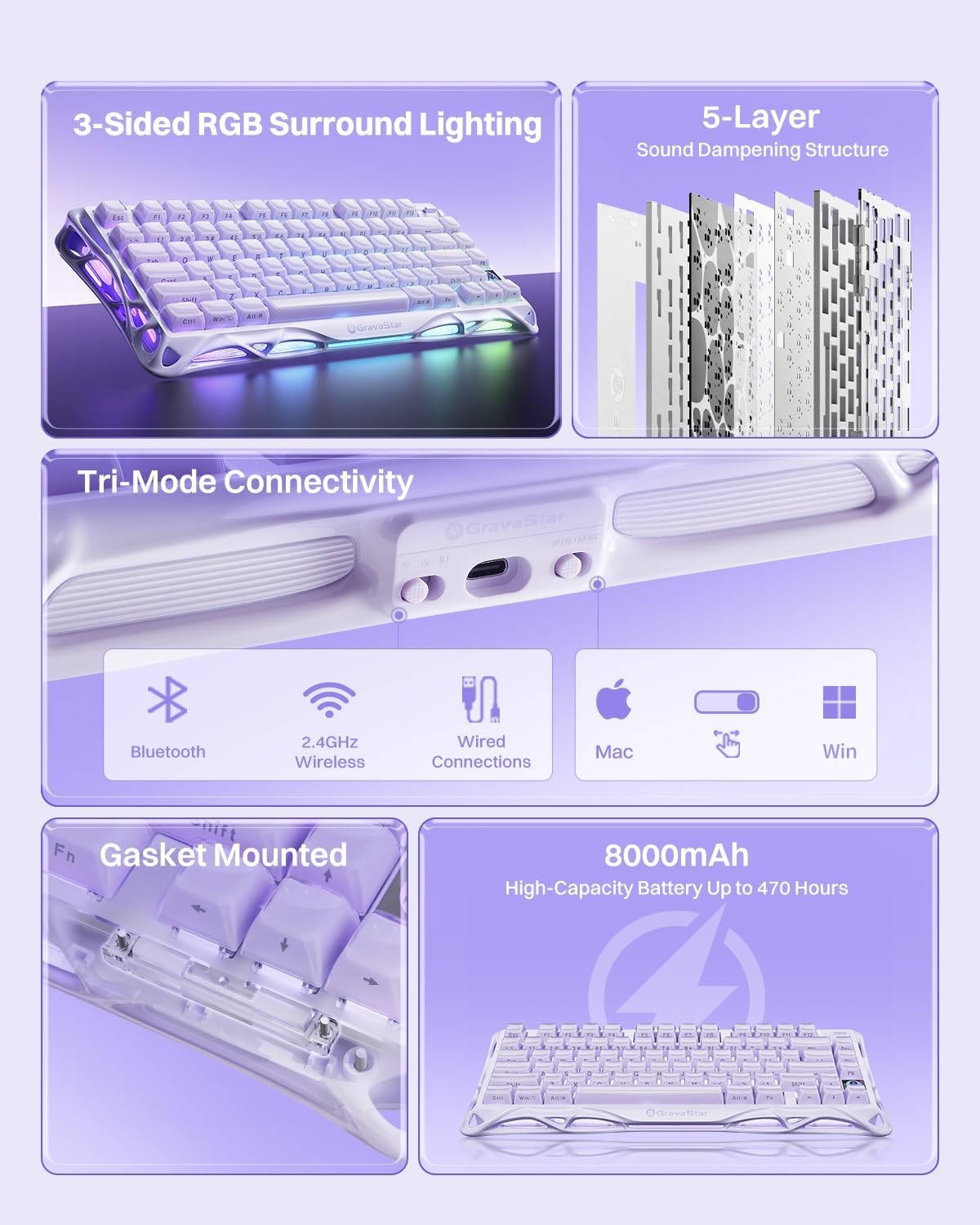
5-Layer Sound Dampening
Features embedded PORON foam padding to eliminate hollow sounds and reduce vibrations. Advanced sound dampening creates the satisfying “thock” sound enthusiasts love while staying office-friendly and quiet.
21 Customizable Light Effects to Set Your Mood
16.8 million RGB colors, 11 stunning RGB effects, and 10 sound-reactive lighting modes let you create the perfect ambiance for any time of day.


High-Capacity 8000mAh Battery
Massive 8000mAh lithium battery delivers long-lasting performance without frequent charging. Game anywhere, anytime with reliable power that keeps up with your most intense gaming marathons.
Triple Connection Modes
Unlimited Connectivity Options, the keyboard can connect wirelessly via Bluetooth 5.0 or 2.4GHz, or use the wired USB-C connection for versatile compatibility across all your devices.

💜✨【Premium Aluminum Alloy Base with Elegant Streamlined Design】 The Mercury K1 features a sturdy aluminum alloy chassis with a flowing, hollowed-out design that combines durability with sleek aesthetics. Its lightweight yet stable frame provides a solid foundation for gaming, streaming, or desktop setups. The vibrant purple finish creates a bold, stylish look, enhancing any creative or professional workspace.
💜🎮【GravaStar Stellar Bloom Linear Switches with Five-Layer Acoustic Design】 Equipped with GravaStar Stellar Bloom linear switches, the Mercury K1 delivers smooth, precise keystrokes with 40gf actuation force, 1.5mm pre-travel, and 3.5mm total travel. Combined with the 5-layer gasket-mounted sound dampening, it produces a deep, satisfying “thock” at moderate volumes, ideal for gamers, streamers, or typists seeking a high-quality, creamy keyboard experience.
💜🔮【Dual-Layer Jelly Keycaps with Immersive RGB Lighting】 The Mercury K1’s transparent keycaps showcase vibrant RGB lighting with 16.8 million colors, 11 preset effects, 10 sound-reactive modes, and 13 fully customizable settings. Dual independent RGB systems, including three-ring ambient lighting, create a visually immersive gaming, streaming, or office setup, emphasizing both performance and aesthetic appeal for a 75 percent keyboard.
💜🖥️【Compact 75% Layout with 79 Keys and Knob Control】 Featuring a streamlined 75% layout with 79 keys plus a multifunction knob, this black keyboard maximizes desk space while maintaining essential controls. The rotary knob allows intuitive adjustments of volume or media, making it perfect for gaming marathons, streaming sessions, or professional office workflows.
💜⚙️【Hot-Swappable Switches and Dual Gasket & Top Mount Compatibility】 This hot swappable mechanical keyboard supports effortless replacement of switches without soldering, and its dual gasket & top mount structure offers flexible customization. Gamers and keyboard enthusiasts can adjust key feel and acoustics to suit personal preferences, enhancing comfort and precision for every typing or gaming session.
💜🔋【High-Capacity 8000mAh Rechargeable Battery】 Equipped with an 8000mAh lithium battery, the Mercury K1 provides extended wireless use without frequent charging. Ideal for long gaming sessions, streaming setups, or professional workstations, this wireless keyboard ensures reliable performance for desktop or mobile setups.
💜🔌【Tri-Mode Connectivity for Maximum Versatility】 Connect seamlessly via wired USB-C, Bluetooth, or 2.4GHz wireless. This wireless keyboard easily switches between devices such as PCs, laptops, or tablets, delivering low-latency performance for gaming, content creation, or multi-device desktop setups. Its versatility makes it suitable for both professional and casual use.
9 reviews for GravaStar Mercury K1 Purple 75% Wireless Mechanical Keyboard – Tri-Mode BT5.0/2.4GHz/USB-C Gaming Keyboard, Jelly Keycaps, Linear Switches, RGB Backlit Creamy Keyboard for PC/Mac, Cute & Stylish
Add a review
$89.95
Laura –
Stunning and Smooth
The sound that the keys make is so so pleasing to the ears. The color is exactly how it looks in the photos. Quality is fantastic. I have a pink setup, but I loved the ice blue color so much that I just had to have it (that, and I enjoy collecting keyboards). Worth every penny. Typing is smooth and milky and creamy and nice — just perfect all around. Material is smooth too, it’s giving icy tundra. Beautiful. It’s easy to use, I have it setup for Bluetooth mode. Just a simple switch. Not sure of the battery life since I just got it today. May update later.I want to get the pink one too. I may just get that one next. Bye-bye, money! 😭
Jacob –
Everything you need to know about this keyboard.
I don’t normally write reviews but I’m really specific about my hardware. This keyboard is amazing. It has the aluminum frame with a powder coated black finish that makes it sleek for my setup. It’s sturdy, just the right amount of heavy and high quality.The lighting around the edges is a really nice touch. You can download the software from gravastars website but it doesn’t have controls for the lighting around those edges, just the back lighting of the keys themselves. The user manual does however tell you how to change the back lighting which makes up for it.The volume knob on the upper right of this keyboard is also perfect minimal design. I love that it feels so easy to turn the volume up and down and if you press it down it mutes the audio. If you download the software from their website it allows you to easily setup more music options like what I did with the F10-F12 keys.The keyboard is small so it doesn’t take up much desk space and truly is my all time favorite now that I’ve swapped the keys to some custom ones I got a while back.Last thing, the clicks on the keyboard are not resistant at all so you get that creamy feel and sound. It’s not quite linear switches but It’s also not clicky. If you like quieter typing then you may want to swap the switches. My old keyboard had much quieter switches but I dont mind the swap.If you were stuck on this board or another for an easy custom keyboard, do it now. This keyboard is so much better than any EPOMAKER or AULA or any keychron in my opinion. The price is also perfect for this type of board. There’s literally no better option.ONLY down side is no numpad but since the board is for gamers I understand why. I’ll just get a separate numpad later if I really feel that I need one.
Viktoriia –
❤️
I really like this keyboard. The design looks very unique and cool, not like обычные keyboards. It feels strong and high quality. The keys are very responsive and typing is comfortable, also good for gaming. Sound is nice, not too loud but satisfying.Wireless works good, no problems with connection. Battery life is also decent.Only thing is it’s a little expensive, but for me it worth it because of the quality and style.Overall I’m very happy with this purchase and would recommend 👍
Z. –
Fantastic keyboard!!! LOVE!!!
TL/DR (Updated): I now have this model in pink, black, and in blue, as well as a Mercury K1 Pro in black, and a GravaStar Mercury V75 HE keyboard in Lavender. They’re all fantastic keyboards that are terrific straight out of the box, with zero customization, although if you don’t NEED an HE keyboard, the mechanical keyboards offer better typing feel and sound by far – it’s just the nature of HE keyboards, although they keep improving, and GravaStar’s offering exceeded my expectations.GravaStar’s “bio-mechanical” styling is not for everyone (I love it), but it’s amazing how much you can change up the looks with a simple keycap swap (if desired) and get a totally different vibe. Battery life is fantastic – it feels endless if you forgo full RGB and just have keys light up as you type (40 hours default lighting, over 400 with no RGB). I tend to save the full RGB effect (which I love) for those (infrequent) times when I’m charging the battery.——–This is my second type of GravaStar keyboard. I love my GravaStar Mercury K1 Pro (kitted with KiiBoom Sweet Rebel MAO profile keycaps) SO much that I couldn’t resist picking up the Sakura Pink Special Edition K1 to go with my “Pixel Meow” MAO profile keycap set. Yet again, I could NOT be more delighted – both with the keyboard itself, and with how it paired with my keycaps of choice. I’ve included a quick photo (excuse the bad lighting), but it looks SO much better in person! Then, I had to get one in the pale blue. And then, I got one in black, because I had a different set of “pastel goth” keycaps and wanted a black keyboard for them.If the funky, “bio-mechanical” rear legs of the Pro model are too thematically strong for your tastes, or they clash aesthetically with preferred third party keycaps, the K1 offers a more adaptable appearance; how the case is perceived will be strongly influenced by how you accessorize it. With the “retro Kawaii” Pixel Meow keycaps, especially with that beautiful Sakura Pink color I chose, the K1 just looks a bit fancy, given the bio-mechanical-looking bottom is hidden while the keyboard is actually in use. If you paired the keyboard with, say, “Pastel Goth” keycaps, the keyboard case would go back to looking edgy and enhance that vibe.I love that GravaStar has a detail-oriented approach to their keyboards. Unlike the (wonderful) matte finish on my black K1 Pro, the Sakura Pink K1 has a glossy, silky look and feel. I own more than twenty aluminum keyboards, and none of them have a finish like this. It’s amazing! Interestingly, the volume rocker switch is in the same finish, instead of a metallic color, and I love how it feels to the touch.I was also impressed that GravaStar customized the dongle’s plastic body, instead of using the typical, generic (cheaper) shape. My black K1 Pro has a black plastic dongle (with a style that matches the keyboard body – awesome for easy visual identification AND aesthetics), while my Sakura Pink K1 has an identical-looking dongle, except in white. I love that I can look at either dongle and instantly know which keyboard it goes to. Not just between the two keyboards, but out of my entire collection.The stock GravaStar-Kailh switches sound and feel wonderful, and look great through the translucent stock keycaps. The lighting isn’t uniform, due to the opaque switch housing, which may bother some people, but for others, fully transparent switch housings may have made the RGB overkill.The typing sound/pitch did (unfortunately, to my tastes) get a bit higher with the MAO keycaps I installed on the keyboard vs. the stock, double-walled polycarbonate set, but it’s still an incredible-sounding keyboard. In a direct comparison, my PBT MAO keycaps sound slightly disappointing compared to the stock keyboard. In actual, ongoing use, the keyboard simply sounds delicious. The keyboard is so well-tuned that I don’t think you could make it sound bad unless you really tried.I did change out some of the OEM switches – only the ones under the see-through polycarbonate Pixel Meow keycaps – for ones with a clear housing; I happened to have the switches on hand, but the stock switches wouldn’t have looked bad, just (imho) not quite as good.Instead of having full-time RGB, I opted for the setting where a section of keys briefly lights up as you type. The default color for that was white, but I downloaded and used the proprietary software to set the effect to a light pink.With a firmware update (available on GravaStar’s site) you can disable the LED logo screen’s RGB, but the software does not appear to allow you to set a static color of your choice. By default, the LED logo acts as an indicator light, changing from RGB (default) to white (CapsLock). If you prefer, however, you can disable the indicator function with FN+CapsLock. I also couldn’t see a software option to customize the RGB color for the outer frame, although the onboard settings offer decent flexibility. They unfortunately just don’t have a very pale pink color option, despite the keyboard being pale pink.Having said that, I don’t actually have the border/ambient RGB on when using the keyboard in wireless mode – which is always, unless I need to charge the battery. Battery life feels infinite this way. Unlike many manufacturers, GravaStar didn’t stint on the non-pro keyboard’s batteries. The K1 Pro and K1 both use the same, huge, 8000mAh batteries. It’s only the Lite version where you see compromises (plastic top case, half the battery capacity, no front/side lighting).GravaStar support is also great, which I discovered when I had some questions about the keyboard. I will tell you now, if you buy the keyboard on Amazon (US), GravaStar wants you to communicate through GravaStar US, which you can do here on Amazon. Customer support got back to me within 24 hours during our back-and-forth discussion, were very customer service oriented, and both kind and professional.If you’ve had your eye on a GravaStar keyboard, seriously, just buy one. They’re truly fantastic!
Anna –
Cool and high-quality keyboard, I will order more
DDD –
El producto entra por los ojos nada más verlo. Es cómodo, rápido y de calidad. Pero el revestimiento de la parte metálica deja mucho que desear. Es como un galvanizado y in haber hecho nada, se hizo una raya y se estaba desprendiendo. Esto en un teclado que es blanco, viéndose una raya negra y sin ser barato, no es aceptable.
🌸Denzel –
Le GravaStar Mercury K1 est un vrai bijou pour les amateurs de design original et de matériel de qualité. La construction est très solide, le look est unique, futuriste, avec une excellente finition. Le rétroéclairage RGB est puissant et bien réparti, et les effets sont super stylés.Les switchs sont fluides, la frappe est agréable et réactive — parfait aussi bien pour le gaming que pour la frappe rapide. Le clavier est bien pensé, stable, et le câble détachable ajoute un côté pratique.Mon seul regret : il n’existe pas (encore ?) en disposition AZERTY. Du coup, pour une utilisation quotidienne en français, il faut soit s’adapter, soit changer les touches si on en a la possibilité. Ce n’est pas rédhibitoire, mais ce serait top de voir une version AZERTY officielle à l’avenir.En dehors de ça, c’est un excellent clavier premium qui allie style, solidité et performance. Je recommande à ceux qui cherchent quelque chose de vraiment différent.
Vonder –
Very clickable <3
Meecho Edwin Joson –
This is easily the coolest-looking keyboard on my desk. It has a heavy, high-quality “tech” feel. The typing sound is very “thucky” and premium right out of the box. If you are a Mac user, be warned: the customization software only works on Windows. You can use the keyboard on a Mac, but you can’t tweak the deep settings easily.