

Hohem iSteady V3 Ultra Gimbal Stabilizer for iPhone, AI Tracker with Light, 1.22″ Full-color Touchscreen Remote Control, Built-In Extension Rod & Tripod, 360° Infinite Tracking, Video Recording, Black
$169.00
Related Products



Product description
The video showcases the product in use.The video guides you through product setup.The video compares multiple products.The video shows the product being unpacked. Hohem iSteady V3 Ultra Merchant Video


1 Newly AI Tracker
2 Track Anything You See
3 Gesture Control
4 One-press to Track
5 3-color Fill Light


1 360° Infinite Tracking
2 205mm Extension Rod
3 Built-in Tripod
4 9H Battery Life


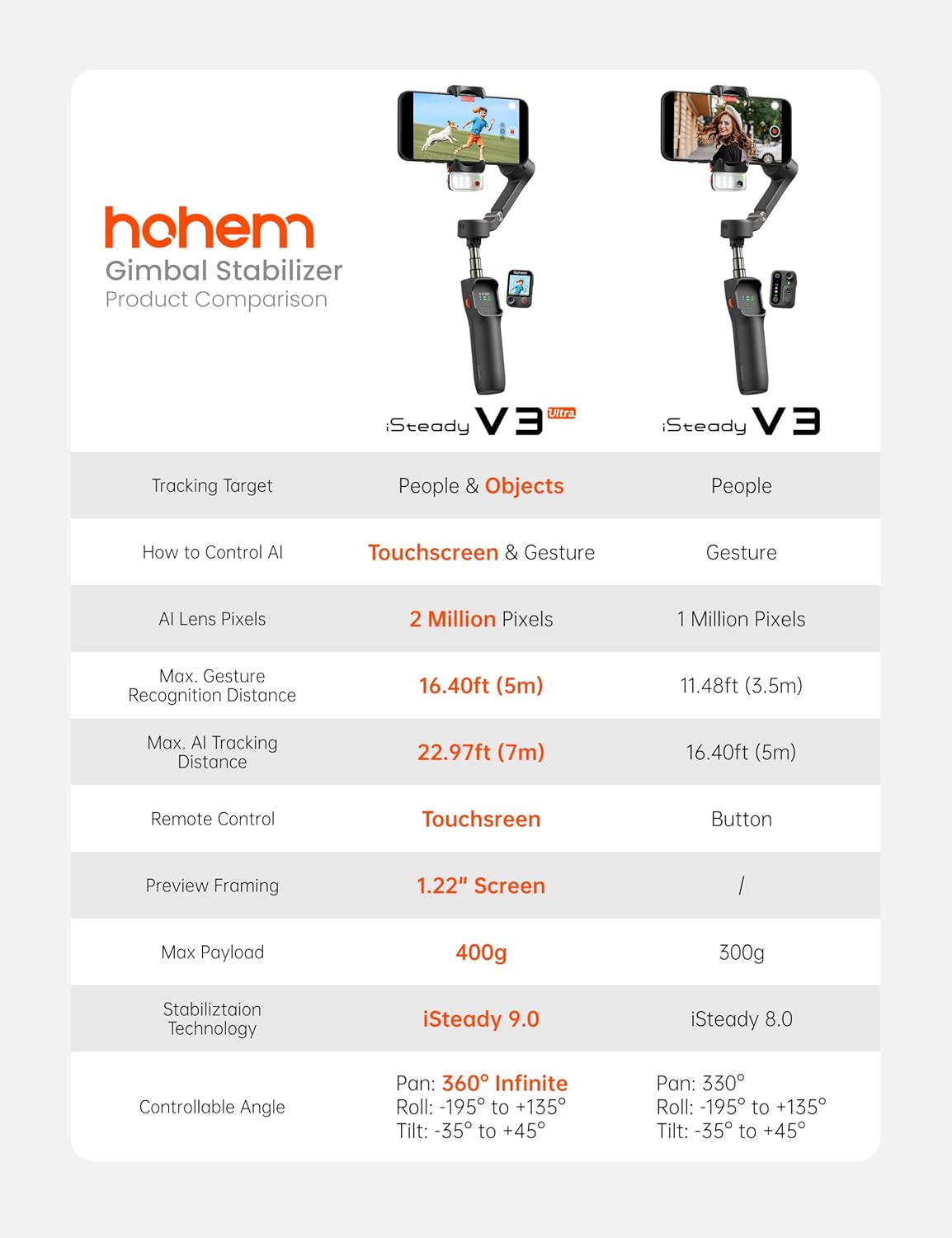
Tracking Everything You Can See: The new AI tracker of Hohem iSteady V3 Ultra smartphone gimbal can accurately track not only people but also pets, buildings, and everything else in your shot. Turn on the 3-color fill light on the AI module to film clearly even in low light.
Touch to Control, Shoot with Ease: New visual touchscreen detachable remote control makes gimbal operation more intuitive and easier. Preview, select the frame, and adjust the parameters when shooting; you have all things under your control.
360° Infinite Pan Following: Except for the new iSteady 9.0 stabilization technology ensures anti-shake, the 360° infinite pan tracking allows your movements are always be in frame, perfect for capturing sweeping landscapes or automatic recording in daily life and work.
Compact Design, Mighty Function: Featuring an all-in-one foldable design, the 205mm built-in extension rod and tripod can help with every shooting scenario, and the compact foldable body doesn’t take up much space for grab-and-go.
More Powerful and Creative: The Newly Hohem V3 Ultra phone gimbal payload increased by 30% up to 400g, making it suitable for any iPhone and Android smartphone. Up to 9 hours of running time for perfect condition in any shooting scenario.
Explore More with Hohem Joy App: Inside the Hohem Joy app, you can process the photos, edit your film, and customize the gimbal’s features you like. Multiple shooting templates like Dolly Zoom and Timelapse will make you a master photographer with one tap. Explore more photography ways in Hohem!
13 reviews for Hohem iSteady V3 Ultra Gimbal Stabilizer for iPhone, AI Tracker with Light, 1.22″ Full-color Touchscreen Remote Control, Built-In Extension Rod & Tripod, 360° Infinite Tracking, Video Recording, Black
Add a review
$169.00
Kristen G –
Really Impressed with its performance
I’m really impressed with the Hohem iSteady V3 Ultra Gimbal Stabilizer. Setup was quick and connecting it to my iPhone was very easy. The stabilization works extremely well and makes videos look smooth and professional compared to handheld filming.The AI tracking feature is one of the best parts—it locks onto a person and follows them automatically, which is great for filming yourself or capturing movement. The built-in light is also helpful when recording indoors or in lower lighting.The touchscreen makes changing settings simple, and the whole unit feels sturdy but still lightweight enough to carry around. Overall it’s a great tool for anyone who wants steadier, better-looking videos.
larry –
Awesome!
I really think these are awesome. Think the younger generation would benefit more than i would at 83 yrs. old. Very well made and they easy to understand the instructions because they include a video instruction. For the more active person? YEEEEES! If i was younger and did all the things in my life that i enjoyed with my kids? I wish they would of had one of these available. 🙂 Great product Recommend. price was reasonable.
Brenda G –
Great gift!
Granddaughter loves it. She is in college and uses it with her homework and her career as a designer. Loves that it follows her and is quite stable. Plus the remote gives her freedom to move about.
Lynne –
Too hard to use.
My husband is techy but said this was too hard to use. I have to return it.new message: I appreciate the refund coming so changing my stars to 4. Thank you.
MasterReviewer –
Not able to record in 4k 60fps without jitter
I like to record in 4k 60fps and the Hohem Joy app and gimbal won’t allow for smooth footage. When I switch to 30fps it works fine. In the native iPhone camera app it works without problems. Having to decide between apps and not being able to use the all features of the gimbal is unfortunate. The tracking for low angle shots near the ground are hit and miss. It is not that smart and what I first thought was a great idea to be able to use the remote didn’t turn out to be the case. Often it won’t start recording although I pressed the button. There is not light or anything on the remote that indicates that it is actually recording. Overall, not satisfied. App also seems heavily overloaded with ads and not relevant stuff. The combination of gimbal and app leads to footage that I can better record hands free.
Adam Geller –
Very helpful taking photos and videos
As beings a photographer I find this product very helpful and useful in taking great photos
Space Coast IT –
easy enough for a beginner but made for pros
Its a bit heavy but has all the buttons and whistles built in. I was looking for something to make my videos look more professional and I believe this gimbal will help. It has a tripod built in that will balance the device but not all too sturdy. With the follow me built in there is no guess work on that as well. All around this gimbal is well worth the money.
Ibett Reyes –
Great product
Great product ! Easy of use ! I love it
Ahmed Barre –
I upgraded from the DJI Osmo 6 and was planning to get the new Osmo 7P, but this one caught my eye and I decided to try it instead. Honestly, I’m impressed. The motion tracking is smooth and reliable, the battery lasts a long time, and the little touchscreen makes everything easy to control. It’s solidly built and just feels great to use. Overall, a really good gimbal that I’m happy I switched to.
Hani E. –
Excellent quality to price gimbal. I love it !
Proklaim –
There are a lot of things to like about this gimbal and not too many things to complain about.I’ll start with the setup, which is pretty straightforward. Like with other AI tracking gimbals this one requires an App to take full advantage of all the features. Yes, it does work as a simple gimbal without any app at all, but at this price I expect you’re looking for some of these features. According to the Apple App Store, the app does not collect any of your phone’s personal data, so I always consider that a good thing.The app was quick to pair to the gimbal, and it was very easy to get going. You can select all the options and features from the app easily. Most of the options are on the gimbal as well (or can be chosen from the touch screen) so you don’t have to constantly disconnect your phone from the gimbal to change any of the settings.One thing to note is that you do have to make sure you place your phone carefully on the gimbal. I have an iPhone 16 Pro, and so between the volume buttons, the Action button, and the camera control and power buttons, there are a lot of places the gimbal’s phone mount can clamp down on the buttons. Not a big deal – you can easily slide it around, but it does throw off the balance a little bit and it can be tricky if you’re not used to it.I found while testing the AI tracking features for them to be pretty good. As with other gimbals the motion when tracking can be choppy depending on how your subject moves. I also noticed that if the subject moves quickly it can lose track of it. For example, it lost track of my dog while she was running at the dog park but it only happened once and it happened after she was tangling with another dog, so the AI just might have gotten confused. But for tracking people and slow movements, this worked perfectly every time.One of the interesting features of this gimbal is the detachable screen so that when you’re filming yourself you can know what the shot looks like. I was expecting this to receive feed from the phone’s camera, but it does not – on the detachable light module there is the camera that feeds the screen and so you’re not getting a 100% accurate representation of what your phone’s camera is capturing. It’s close enough, but it’s not perfect, and so that was a bit of a disappointment to me.The battery lasts a good long time, and duration will of course depend on how much tracking and such the gimbal is doing, but you’ll very likely run out of storage space on your phone before you run out of gimbal battery, so it probably won’t be a big deal. The detachable screen module can charge while attached to the gimbal, or it can charge separately with its own USB-C port.The gimbal includes a storage bag to keep everything together. It also has an attachment on the bottom for a tripod.Overall this is a very flexible, versatile, and good quality piece of equipment that will definitely elevate your filming game. It has all the features you would expect and the added bonus of the detachable screen. Definitely consider this gimbal if you’re in the market for a high-end piece of kit that will take your phone filming to the next level.
adrian –
I really like this device overall, as it fits my needs. I like the detachable screen which helps with framing up shots by myself. Just keep in mind, the screen does not show exactly what your phone is recording, so the framing on the remote may be off slighty compared to your phone.I only gave three stars for 2 reasons. One, my first gimbal was faulty. The remote worked well for a while trying it in my apartment: but started freezing completely. This meant I could not control the gimbal or access the features or swipe over to the live view. The screen also went fully black for a period of time. This is with the remote attached to the gimbal, so it was fully charged. The second reason I gave three stars, is due to Hohem not having good customer service. I’m not referring to this seller, they are probably fine, but hohem themselves. I reached out to their customer service through they’re website, but never got a reply. They’re website also states there is no warranties is several situations, also stating they only have a 14 day return policy, and states they do not service people who bought through Amazon. All those things give the impression of a stingy company, that seems like a hassle to deal with. After not getting a response, i simply returned the faulty one and bought a new one from this buyer again.Hohem could improve their customer communication, but they make good gimbals… when they work! I use samsing ultra, and it handles the large phone well.
DoubleAA –
This gimbal comes with a carrying pouch, USB-A to USB-C cable, guides, and a hex key. There is also a Hohem app you can use if you don’t to use your phone camera app. When folded in on itself, it’s very compact. Also included is separate unit that acts as both an AI tracker and LED lights which has the 3 standard colour temperatures. You can also increase/decrease the brightness of these lights via the scroll wheel on gimbal. Controlling the gimbal, is mainly done via the detachable remote. There is a joystick on it as well as a record/take picture button. The screen on this remote is a touch screen. Although it’s small, it’s very much useable. The arm of the gimbal can be lengthened to act like a selfie stick or give you a further away shot from your face. On the bottom, there are 3 rods to pull out that act as a tripod. You can also attach a standard tripod mount as well as there is a screw hole.There are 4 different modes in which this gimbal can operate. Pan Follow mode, Pan and Tilt Follow Mode, Point of View Mode, and All Lock Mode. It’s easy to switch modes as you can do so via the touch screen on the remote. I found the videos smooth when taking and everything seems to work for my usage. The AI tracking using the tracker is the best I’ve seen on any gimbal. And with the remote detached from the gimbal, it gives you more freedom so you don’t have to be by the gimbal to operate.Although there are a lot of positives, there are some that I found. Firstly, this may not work with all phone cases on. I have a S25 Ultra and some of the cases are too bulky to fit into the clamps due to the clamping design. If the ends of the clamp were flat, then it would work. Unfortunately, I either have to swap to thinner cases or remove it entirely very time I use this gimbal. This really deters me from using it at all. Another thing is when tilting the gimbal past a certain point, it hits a barrier and it flips the other way around. This is annoying and this should not happen at all. One last thing, I didn’t like was that you cannot hold the gimbal horizontally in front of you and have the camera be pointing at a levelled position. It will point down a little. I have another old gimbal that’s able to do this and I really like that feature. Unfortunately, this one can’t do that.Overall, if it did not have these 3 issues, this would have been a 5 star gimbal, but unfortunately it’s not. These things may not matter to you, but it’s still worth pointing out.