

Redragon Wireless Mechanical Keyboard, 3 Mode Gasket Mounted RGB Gaming Keyboard with Volume Knob, Pre-Lubed Linear Switches, MDA-Profile, 98 Keys Hot Swappable Creamy Keyboard for PC/Tablet/Xbox/PS4
$68.99
Related Products






Product description


 Packing List
1 x mechanical keyboard
1 x USB Cable + 1 x 2.4GHz Receiver
4 x Replace Switch
1 x 2 in 1 Keycap & Switch Puller
1 x User Manual
 MDA-Profile
Rounded keycaps for a better feel as well as a better look.
 2 stage Adjustable Feet Stand
The feet stand has two adjustable angles, It also has an anti-slip design to improve the friction between the keyboard and the desktop.
 L-shaped cable
L-shaped cable
Download Steps
How to download the software for K688 Gasket Wireless Mechanical Keyboard
1. Enter Redragon website
2. Click the “Download” button.
3. Scroll down to the keyboard and find “Redragon K688GB-RGB-PRO Gaming Keyboard”, click “Download” to jump to the driver download path.
The video showcases the product in use.The video guides you through product setup.The video compares multiple products.The video shows the product being unpacked. How to download the software for K688 Merchant Video
【Multi-Device Connection】Redragon K688 wireless mechanical keyboard provides three connection methods, including Bluetooth 5.0, 2.4GHz wireless mode, and USB C wired mode. It can be connected to up to 5 devices at the same time, and switch between them easily by FN+ combination keys. No limits about your keyboard connection to meet the needs of work, gaming, and study.
【Hot Swappable & Pre-lubed Cream Switches】: Hot swappable mechanical keyboard comes with pre-lubed cream switch. These linear switches have a unique look, creamy sound and excellent smooth keystroke feel. Creamy and thocky sounding gives you unlimited fun while typing. High quality PCB board compatible with 3pin/5pin switches. You can have a high degree of customization
【Gasket Structure & PCB Single Key Slotting】This K688 computer keyboard features a gasket structure, extended integrated silicone pad, and PCB single key slotting, better optimizes resilience and stability, making the hand feel softer and more elastic. Five layers of filling silencer fills the gap between the PCB, the positioning plate and the shaft,effectively counteracting the cavity noise sound of the shaft hitting the positioning plate, and providing a solid feel.
【Mechanical Gaming Keyboard】K688 is a premium mechanical keyboard for both work and game. With 16 RGB lighting effect to adds a great atmosphere to the game room. All keys support macro customization, which allows macro recording and editing, customize key function and 16.8 million light colors, and supports cool music rhythm lighting effects with driver.
【MDA Profile & Widely Compatible】MDA-Profile keycaps provide a better tactile experience and appearance, a more comfortable hand feeling. In addition, this creaming keyboard is compatible with multiple devices (PC/Tablet/Xbox/PS4/PS5) and systems (Win/Android/Mac), works perfectly on all kinds of devices
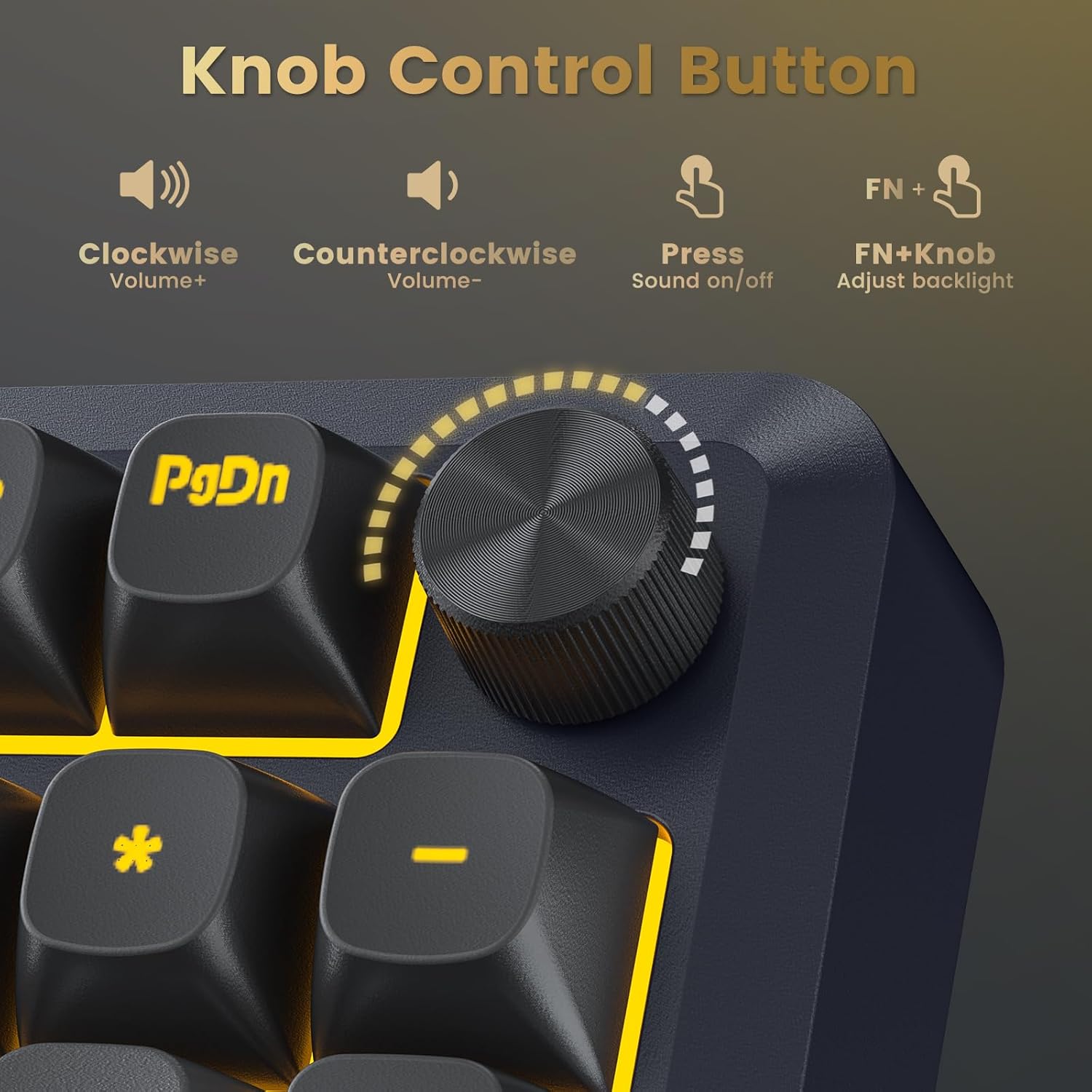
【Multi-function knob】Volume adjustment function by default, through the Fn + knob, enter the keyboard backlight adjustment mode, scroll the knob to adjust the brightness of the backlight. Short press the knob to enter the keyboard lighting mode switching mode;
10 reviews for Redragon Wireless Mechanical Keyboard, 3 Mode Gasket Mounted RGB Gaming Keyboard with Volume Knob, Pre-Lubed Linear Switches, MDA-Profile, 98 Keys Hot Swappable Creamy Keyboard for PC/Tablet/Xbox/PS4
Add a review
$68.99
Hannah –
Great small keyboard
I picked up the Redragon K734B Wireless Mechanical Keyboard because I wanted something compact but still solid for everyday use. It’s a TKL layout, so it doesn’t have a number pad and keeps the footprint smaller than a full-size board. First impressions were actually really good. The colorway looks great in person and gives the keyboard a clean setup aesthetic. The board also feels pretty solid, and I like that it has tri-mode connectivity (Bluetooth, 2.4GHz wireless, and wired) so you can switch between devices pretty easily. Typing on it felt nice overall. The keys are fairly quiet compared to a lot of mechanical keyboards, and the gasket-style design with sound dampening helps keep the typing noise down. However, the sound profile still had a bit of a clicky/poppy tone, which isn’t exactly my preference. I tend to prefer keyboards with a more creamy, smooth sound, so it didn’t quite match the typing feel I usually go for. The main reason I ended up returning it was the size. The TKL layout is definitely compact and great for saving desk space, but for my personal setup I realized I prefer a keyboard with a little more layout space (especially something with a number pad). Overall though, I actually liked the keyboard quite a bit. The design looks good, it feels well built, and the typing experience is solid for the price. It just didn’t end up fitting my workflow.
Aaron Alexander –
Extremely good keyboard!
This feels really nice. It’s like a very smooth click sound, but not loud that it makes it sound annoying in the video. I show my other keyboard which is a clack keyboard and this one just feels smoother and higher quality. I haven’t tested the battery life on this thing yet, but I’m pretty sure it’s good. It was really easy to set up. All I had to do was take the USB dongle out of the keyboard and just plug it into my PC so it was really easy. It weighs heavy, but not too heavy that it becomes unmovable. You can still move it really easily, but I think the weight kinda adds to the field. The connectivity to my PC is also very instant. I don’t feel any delay however, I will be trying to use the wired connection as well. Overall, this keyboard just feels nice and it functions really well with it also looking aesthetically pleasing.
DumisoSIW –
Great keyboard if you get under $50
Got this on sale for $40, and I honestly don’t have too many complaints. The typing experience is great, and the keyboard is not too loud. The RGB lights are quite vibrant, and the display screen is a nice feature to have. Battery life is decent and lasts me the entire week, even with the RGB lights turned on, albeit at 50% brightness.I mainly use the keyboard for work and, on rare occasions, gaming, and it excels pretty well in both use cases. I don’t think you’ll find a better keyboard for the money I paid (I could be proven wrong).The only gripe I have is that the keys are a bit too small compared to my previous keyboard. I don’t have big hands/fingers, but every once in a while, I do find myself accidentally pressing the wrong keys. I can see it being a big problem for people with above-average fingers.
Van Smith –
Well made, good looking keyboard that is better than my Corsair K70 RGB
I have a Corsair K70 RGB Rapidfire keyboard and the Redragon K550 was obviously influenced by Corsair designs. However, the feature set of the Redragon K550 is comparable to the Corsair K95 RGB.The Redragon K550 is better than the Corsair keyboards for the following reasons:* The keyboard can be programmed without drivers although a Windows program to control the keyboard is available.* Color modes can be programmed without an external application* The Outemu Purple switches are my favorite mechanical key switches* The keycaps are better than the keycaps on my K70 (e.g. textured and thicker)* More keys — more macro keys, more shortcut keys* The shifted keys have the characters/symbols side-by-side instead of upside down on the Corsair (which I find very annoying).* The Redragon K550 is less than half the cost of even the Corsair K70 RGB much less the K95 RGB.Other than the keys, the keyboards have similar build quality. The lighting effects are similar.The only two ways that my Corsair K70 is better than the Redragon K550 is:* Has a fabric covered, more flexible cable* The wrist rest is slightly betterI like the Redragon K550 so much that I now have both the Black and White versions. They are the best keyboards that I have ever used.Note: it took me a few weeks to get used to the feel of the K550. The keys initially felt stiff and seemed to grind slightly, but now I like the feel better than any other keyboard that I have ever tried.Here’s my original review of the white keyboard:I’ve been working with this keyboard for several days, and I’m getting used to the stiff keys and tactile feedback, so I’m increasing my rating to five stars. The volume roller was stiff and hard to turn, but has broken in. The keys are stiffer than those on my Logitech G910 Orion Spark RGB Mechanical Gaming Keyboard, which is much smoother, lighter and but has very little tactile feedback.It’s well made and looks good. It has a very thick, non-detachable, inflexible plastic cable sticking out the back, which is awkward. The cable splits into two USB plugs: one for the keyboard and the other for a pass through.Macros are easy to program and are stored in the keyboard, but timing is also stored, which is good and bad, but mostly good. I wish there was a way around the timing though because I have to record macros as fast as possible for them not to be annoyingly slow on playback.The illumination is attractive. I’m using the keyboard on a Mac, so I have not tried the Windows software.Initially, my biggest issue was that the keys were very stiff, requiring more effort than any other keyboard that I’ve used — and I’ve used many. As a writer and a coder, I was afraid the keys might become fatiguing. The keys initially seemed to grind a little when depressed; not much, but it’s noticeable. I thought I would have preferred a clicky, lighter, smoother key switch, but I was wrong — I have grown to prefer the Outemu Purple switches in the K550.Over time, the keys have become smoother and crisper. I am very satisfied with the Redragon K550W mechanical keyboard. It is an excellent keyboard even without considering its low price.
Xavier –
Affordable, Fantastic Mechanical Keyboard
An Amazing Mechanical keyboard for an affordable price.When typing, it sounds like hard candy clicking, which to me, is a very nice sound to listen to. The keyboard offers 3 methods to connect (Bluetooth, Wired, or Wireless Receiver). I had no issues with Wired and Wireless receiver. The computer recognizes the keyboard immediately and is ready to use. Typing on the keyboard is a pleasant and comfortable. With the Wireless receiver, I get nearly a week of battery life. I didn’t use the Bluetooth connection.The keyboard has lighting, which is always a plus. The lights do not shine through the default keycaps.
Anciviales arguelles juarez –
por si alguien le sirve la información no trae letra “ñ”
Dylan –
my first mechanical keyboard very pleased with it, good features i only wish it was easier to customize the keys.
Mohammed Ammar –
الكيببورد حلوه بس فيه عيوب لما تضغط عالارقام بتكتب رقمين في نفس الوقت كمان االمشكله بتحصل في بعض الحروف واضح ان فيه مشكله في البورده عشان كدا عملتلها ارجاع
Jose –
I have had this keyboard for a while now and I am generally happy with it. I like the size and specially the spacing between keys that make other keyboards look cramped. Mine is connected to a KVM which may explain why the volume rocker does not work. Also, I have a Logitech mouse connected to the keyboard which I need to re-connect to the keyboard every time I start the computer. Again, this might be caused by the KVM. Every now and then I get a “stuck” key press in that it prints the same character several times until I press some other key. Not very common but has happened a few times. Finally, I bought it because it is a white keyboard so I can actually see the keys (I cannot understand why black keyboards are so popular) and the key colors are nice.
moppoo83 –
delai un peu long. l’emballage etait un peu habime. le produit etait intact pas de souci de ce cote. le clavier est detecte sans probleme de mom cote sous windows 10. pas de cd d’installation. et pas de logiciel fournie ou a instlle. les macro ce font directement sur le clavier avec la touche rec. le retroeclairage est superbe. les touche en plastic et les touches sont tres souples aux clique. sous les touches cest en metal letout super rendu. par contre j’ai une question existe t il une application histoire de complete les configs mm si lon peux le faire sur le clavier directement. cette aide serai la bienvenue. je recommande ce clavier pour ce qui on un ptit budget et attention clavier QWERTY.