

Uineer Vertical Ergonomic Mouse, Multi-Device Wireless Mouse with Bluetooth 5.0/4.0 & 2.4G, Rechargeable Computer Mouse for Laptop PC Office Home Desktop,4 DPI Optical Mice (Business Style, Black)
$23.99
Related Products



Product description
The video showcases the product in use.The video guides you through product setup.The video compares multiple products.The video shows the product being unpacked. Ergonomic Bluetooth Mouse Merchant Video
This vertical mouse supports a natural handshake grip, delivering exceptional comfort and helping you stay relaxed and productive throughout your workday.


1 Multi Device Connection
2 How To Connect
3 4 level DPI Adjustment
4 Widely Compotibility
5 2.4G USB-A receiver


1 Say Goodbye To Wrist Pain
2 Handshake Posture
3 1-2 weeks Adaptation Time
4 USB-C Fast Charge
Hassle-Free Support 

25 dB Super Quiet 
Even in quiet environments like late at night or in a library, it won’t disturb those around you, allowing you to focus on work or creation wherever you are without worrying about disturbing others
Can this vertical mouse really help with carpal tunnel or wrist pain from long hours of office work?
Yes, Many customers who struggle with carpal tunnel or repetitive strain injury (RSI) have reported immediate relief. It’s a game-changer for anyone spending 8+ hours at a desk.
Is it easy to switch between my MacBook, PC, and iPad? How does the tri-mode connection work?
With Bluetooth 4.0/5.0 and 2.4G wireless, you can pair up to 3 devices and switch between your Mac and Windows PC with a bottom button. Perfect for multi-tasking.
Are the clicks truly silent? I work in a very quiet shared library and don’t want to disturb others.
Yes, You get the same satisfying tactile feel but with 90% less noise. It’s whisper-quiet, making it the ideal ergonomic mouse for open offices, libraries, or even late-night work at home without waking your family.
Can I use this for graphic design or light gaming? Is the tracking precise enough?
Definitely. ou can customize the sensitivity for different tasks. The 800/1200 levels are perfect for precision editing in Photoshop or Excel, while the 1600/2400 levels offer the speed needed for fast-paced browsing or light gaming.
Does the 2.4G wireless connection stay stable? I hate it when the cursor jumps or lags.
The 2.4G wireless technology provides a rock-solid connection up to 33 feet away with zero lag or dropouts. The included USB receiver is plug-and-play—no driver installation required.
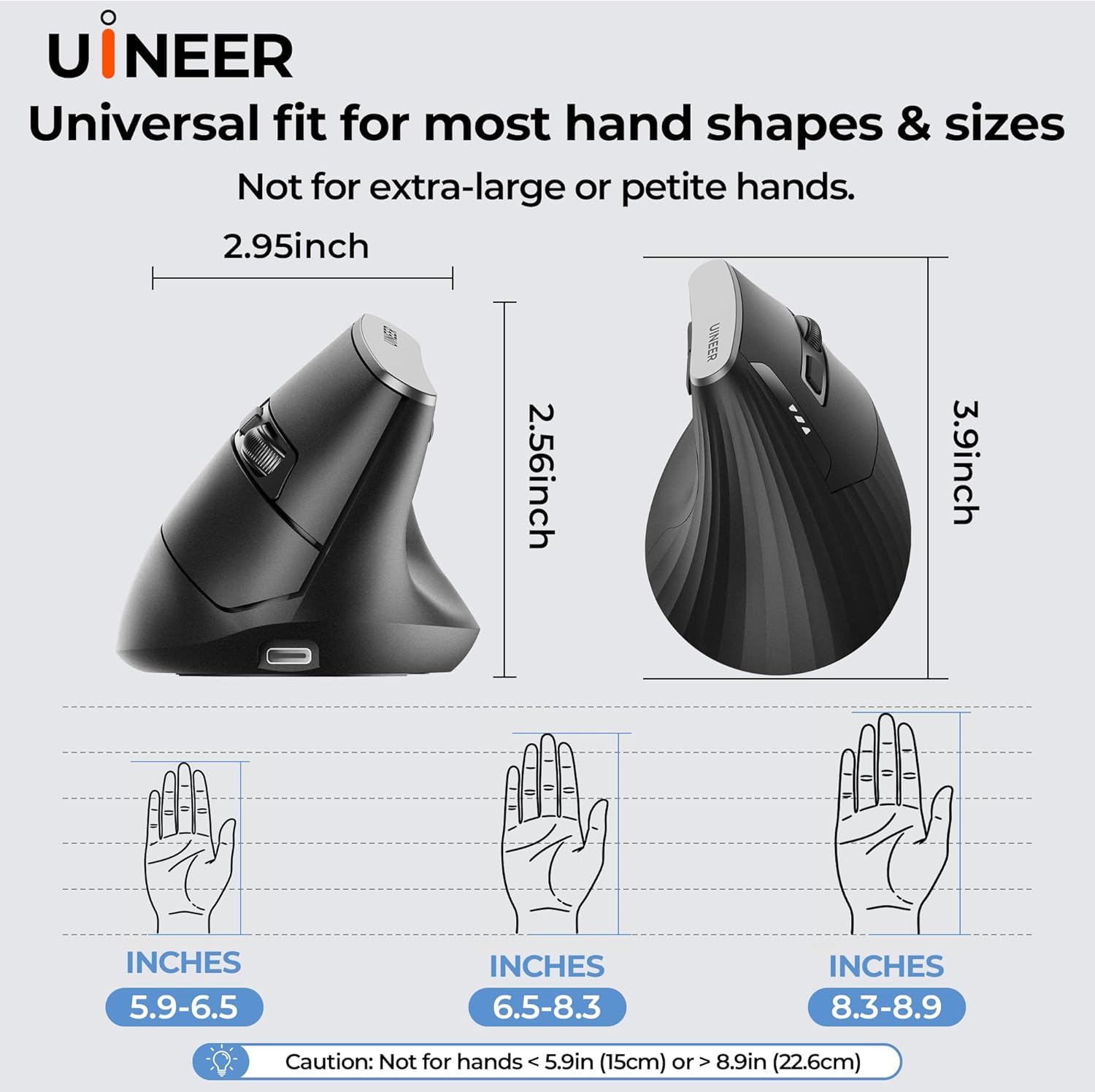
【Comfortable Ergonomic Design】Designed exclusively for right-handed users, this vertical ergonomic mouse features a curved palm rest, supportive side finger grip, and natural angled shape to keep your wrist in a neutral position. It effectively reduces wrist strain and hand fatigue during long hours of office work, study, or extended use, providing a comfortable and relaxed grip all day long.
【Tri-Mode Connection & Multi-Device Switching】Supporting Bluetooth 5.0/4.0 and 2.4G wireless, this tri-mode mouse can connect and switch seamlessly between up to 3 devices such as laptops, desktops, phones, and tablets. The 2.4G USB receiver is stored at the bottom of the mouse for plug-and-play convenience, delivering stable, lag-free performance without repeated pairing.
【4-Level Adjustable DPI for Versatile Use】Built with a high-performance sensor, this wireless vertical mouse offers 4 adjustable DPI levels (800/1200/1600/2400) for precise control over cursor speed and sensitivity. Ideal for document editing, web browsing, graphic design, and light gaming, it adapts smoothly to all daily and professional scenarios.
【Silent Click & Energy-Saving Function】Equipped with ultra-quiet click buttons that reduce noise without losing responsiveness, this mouse is perfect for offices, libraries, and shared spaces. It also features an automatic sleep mode for power saving and one-click wake-up, extending battery life and ensuring hassle-free daily use.
【Wide Compatibility & Reliable Support】Compatible with Windows 8/10/11, Mac OS, Chrome OS, and Linux, this vertical ergonomic mouse works with most laptops, PCs, and tablets. Please note it may take 1–2 weeks to fully adapt to the vertical design. We offer a 45-day no-questions-asked refund and 12-month warranty for worry-free purchase.
9 reviews for Uineer Vertical Ergonomic Mouse, Multi-Device Wireless Mouse with Bluetooth 5.0/4.0 & 2.4G, Rechargeable Computer Mouse for Laptop PC Office Home Desktop,4 DPI Optical Mice (Business Style, Black)
Add a review
$23.99
Khy Johnson –
Wrist Pain Gone!
This is a great comfortable mouse that erased my wrist pain almost instantly and I can now game on it for 8+ hours with no strain.The price is fantastic, the battery seems to last about 2-3 weeks of daily 5-8 hour use. The sensitivity settings are great and so far the scroll wheel hasn’t had any issues (this is a big problem with alot of mice nowadays so ill update on the wheel in 3-6 months which is when they normally give).Highly recommend this mouse!
DefinitelyUtopia –
This Is My Go-To Mouse Now
I love this ergonomic mouse. It has so many optional connection possibilities and user uses that I think it would satisfy at least all of the common ones.Packaging:- This mouse came in a nice product specific box with light static wrap protection around the actual mouse but enough of it to come fully functional and undamaged.- It also came with 1 AA battery and a small user manual.Setup & Ease of Use:- There is an impressively engineered feature underneath the mouse to remove and/or insert the AA battery. Most mouses that I’ve ever owned make it difficult to get to the battery, but for this mouse, all that you have to do is push into the notch below the On/Off toggle button under the mouse. This lifts the cover with minimal effort and you just lightly push it back in it’s place after replacing the battery. It stays in place from 3 strategically placed magnets and a little bit of a seal from the size of the cover itself.- The 2.4G Wi-Fi mouse dongle is also located next to the battery under this lid. It is also very easy to get out.- There is a toggle button underneath the mouse and above the optics that helps you link the mouse to 2 Bluetooth devices and/or a device that would support the 2.4G Wi-Fi dongle (i.e. a computer). There is BT 4.0 and BT 5.0 that can connect via Bluetooth to a phone or a tablet, and whenever you want you can use the mouse with any of them that have already been connected by toggling between them with this button.Performance and Features:- The scroll wheel is very smooth and accurate and includes the ability to press click it for auto scroll (if you prefer).- The feel of the mouse is amazingly soft, smooth, cool to the touch and made of high quality materials.- The dpi button under the scroll wheel is easy to toggle from a slow to a high speed, but still be very accurate at that speed (depending on your level of comfort and the usage of your mouse)- The 2 buttons on the inside of the mouse are great for going back and forth between browser windows.Tips for Buyers:- Be sure to remove the film underneath the mouse so that the mouse can slide on the mousepad or surface well.- Be sure to play around with the dpi toggle button on top of the mouse until it feels smooth and you are accurate with the curser. (Consider stepping up to the next dpi if it is becoming too slow). Basically, try moving the mouse initially and press the button on top until the cursor moves according to your individual liking.Verdict:- I’m not used to using an ergonomic mouse, but after a few minutes, not only did it feel natural, but I was highly accurate in my movement across the screen, my scrolling, and I found the dpi that felt most comfortable to me very quickly. Also, the angle that I sit in relation to my monitors (with the monitors to the side of me), helps my wrist tremendously from long term use since I’m not having to keep it twisted to maintain the angle on the surface and my angled body. Finally, the ease of opening this lid to the battery and the Wi-Fi dongle is a game changer and should be a standard for all mouses.
Chris –
Great ergonomics
Very good ergonomics from the vertical design.The 2.4G dongle is conveniently stowed away in the battery compartment.Slight down side is that older device would not work with BT5.0, so it takes a bit of effort to plan out connections.
LP –
Comfortable, affordable
Ergo/vertical mice; you either love ’em or hate ’em. This one is a very affordable option if only to see if an ergo-mouse is for you.This Uineer mouse comes in fairly standard packaging and mine arrived undamaged. It has a comfortable shape and size for average hands, and features a pleasant satin soft-touch coating. The button sizes and positions are quite good and the primary button clicks are very quiet. The “back” and “forward” buttons have a soft “pop” sound when pressed and the DPI and wheel buttons have a standard sharp “click” sound, indicating multiple switch types are used. The actuation force required for every button is reasonably light without being too sensitive, and most importantly seems very consistent.The mouse is truly plug-and-play, with no additional software or drivers required. The multiple connectivity options are quite nice, and both the Bluetooth and 2.4ghz options work flawlessly.I am not sure what material the “feet” of the mouse are made of, but I assume it’s some blend of black-dyed PTFE. The feet are somewhat soft, and may have suspect longevity, but they glide easily across most surfaces. Be sure to remove the protective film!Something I found particularly interesting is that the lid for the battery/receiver compartment is not the typical snap-fit arrangement, but rather uses multiple magnets that cling to some of the screws holding the mouse together. The lid is removed by pushing on an indent to rotate the lid up for removal. Unusual, interesting, and somewhat easier to use than the normal snap-fit type. Nice touch.The multiple DPI settings are nice (if fairly standard), but this leads into the less-positive aspects of the mouse. For one, the DPI level indicator is a small red LED placed under/beside the mouse wheel which flashes one to four times to indicate the sensitivity level. Not the most visible location. Odd, considering that this mouse appears to reuse many parts from Uineer’s other vertical mouse model which looks identical but has an integrated battery, meaning that this has the the battery level indicator pieces at the rear of the primary buttons but they are entirely unused on this model. Perhaps a minor cost add to utilize, but those would have been a great DPI level indicator. Additionally, the sensor appears to “angle-snap” which is to say that when moving the cursor vertically or horizontally it will “snap” into that angle. Thankfully, the angle-snapping is very subtle and is largely unobtrusive. I may not have even noticed had I not specifically tested for it. Uineer mentions “gaming use” but doesn’t really make it a major marketing feature in lieu of “home and office” use, so I’m not going to count it as a true negative. A similar issue is that there is a very slight input lag no matter which connectivity option is used. This persisted across multiple devices, so I’m confident it is an issue with the mouse itself. Once again, not a big deal for light/regular use.Overall, I think that this is an affordable and functional ergonomic mouse with far more positives than negatives. Worth a shot!PROS* Comfortable and natural grip* Very quiet clicks* Multiple sensitivity settings* Plug-and-play* Battery included* Multiple connection options – Bluetooth 5.0/4.0 and a 2.4ghz wireless receiverCONS* DPI indicator light is awkwardly placed “behind” the wheel* Minor angle snapping* Very slight, barely perceptible input lagOTHER* Perhaps a bit chunky for mobile use, but that is unavoidable with an ergo-mouse* Battery/receiver compartment lid release is innovative
Dave –
Ho sempre avuto problemi con il polso dopo ore passate al computer, soprattutto durante le giornate più intense di lavoro, e alla fine ho deciso di provare questo mouse verticale dopo averne sentito parlare da un collega che lo usa da mesi e si trova benissimo.La forma è effettivamente particolare, che ricorda quella di una stretta di mano, e devo dire che inizialmente sembrava un po’ strana da vedere ma appena l’ho impugnato ho capito subito la differenza rispetto a un mouse tradizionale.La posizione del braccio è completamente diversa, molto più naturale direi, e dopo qualche ora di utilizzo ho notato che il fastidio al polso che di solito avvertivo verso sera era praticamente sparito, il che mi ha fatto capire che forse tutti questi anni ho tenuto il braccio in una posizione sbagliata senza nemmeno rendermene conto, la scanalatura per il pollice è profonda quanto basta per dare un buon appoggio senza però bloccare il movimento, anzi il mouse scorre fluido sulla scrivania e non ho dovuto fare praticamente nessuno sforzo per abituarmi, anche se i primi dieci minuti sono stati un po’ strani perché il cervello doveva resettare anni di abitudini con i mouse classici.Una cosa che mi ha convinto parecchio è la possibilità di collegarlo sia tramite Bluetooth che con il ricevitore USB, perché io lavoro con il portatile e preferisco non occupare le porte USB quando posso evitarlo, quindi uso il Bluetooth e funziona perfettamente sia sul laptop che sul tablet quando lavoro in mobilità, il fatto che vada in standby dopo otto minuti è comodo per risparmiare la batteria, anche se le prime volte mi dimenticavo e pensavo si fosse scaricato, poi basta muoverlo o cliccare e si risveglia immediatamente senza problemi.I quattro livelli di DPI sono utili più di quanto pensassi, perché quando lavoro su fogli di calcolo o documenti uso la sensibilità più bassa per essere preciso, mentre quando navigo o guardo video alzo il DPI e il cursore si muove molto più veloce, basta premere il tasto apposito e cambia al volo senza dover aprire impostazioni o driver.I sei tasti sono posizionati bene, quelli laterali per andare avanti e indietro nelle pagine web li uso continuamente e mi hanno fatto risparmiare un sacco di tempo, anche se purtroppo sul Mac del mio coinquilino non funzionano ma io uso Windows quindi per me non è un problema.La dimensione è giusta per la mia mano che non è né troppo grande né troppo piccola, sta comodo sulla scrivania e non occupa molto spazio, inoltre il fatto che sia wireless mi permette di spostarlo facilmente quando devo liberare la scrivania o quando lavoro dal divano, la batteria che era inclusa nella confezione funziona ancora dopo quasi un mese di uso quotidiano, quindi direi che l’autonomia è ottima e non mi devo preoccupare di ricaricarlo continuamente come succede con altri dispositivi.Insomma se lavorate molte ore al computer e avete problemi al polso o semplicemente volete provare qualcosa di diverso dai mouse tradizionali, questo verticale è davvero una buona soluzione che migliora il comfort senza sacrificare la precisione.
Diego Montero –
Encantado, muy buen ratón
Jessica –
Excellent mouse, transitioned from my £80 Mamba Elite to this one just fine and it has helped to reduce forearm pain after a few days of use. Thumb portion of the mouse has a nice velvety touch.
John C –
This Vertical Ergonomic Mouse has completely transformed my desk setup. Its more vertical orientation really helps keep my wrist in a natural handshake position, which feels much more comfortable than traditional mice, and even more vertical than some leading ergonomic brand I’ve tried.From the moment I started using it, the comfort difference was noticeable. The upright grip reduces wrist strain during long work sessions, and the strong build feels solid and reliable without being bulky. Whether scrolling documents, editing spreadsheets, or just browsing, the smooth tracking and responsive clicks make everything effortless.It’s also easy to set up – just plug and playThe design looks clean and sleek on my desk. If you’re after a vertical mouse that actually helps improve your posture and reduces discomfort
Client d’Amazon –
Article conforme à la photo, une bonne prise en main, facile à connecter en Bluetooth