
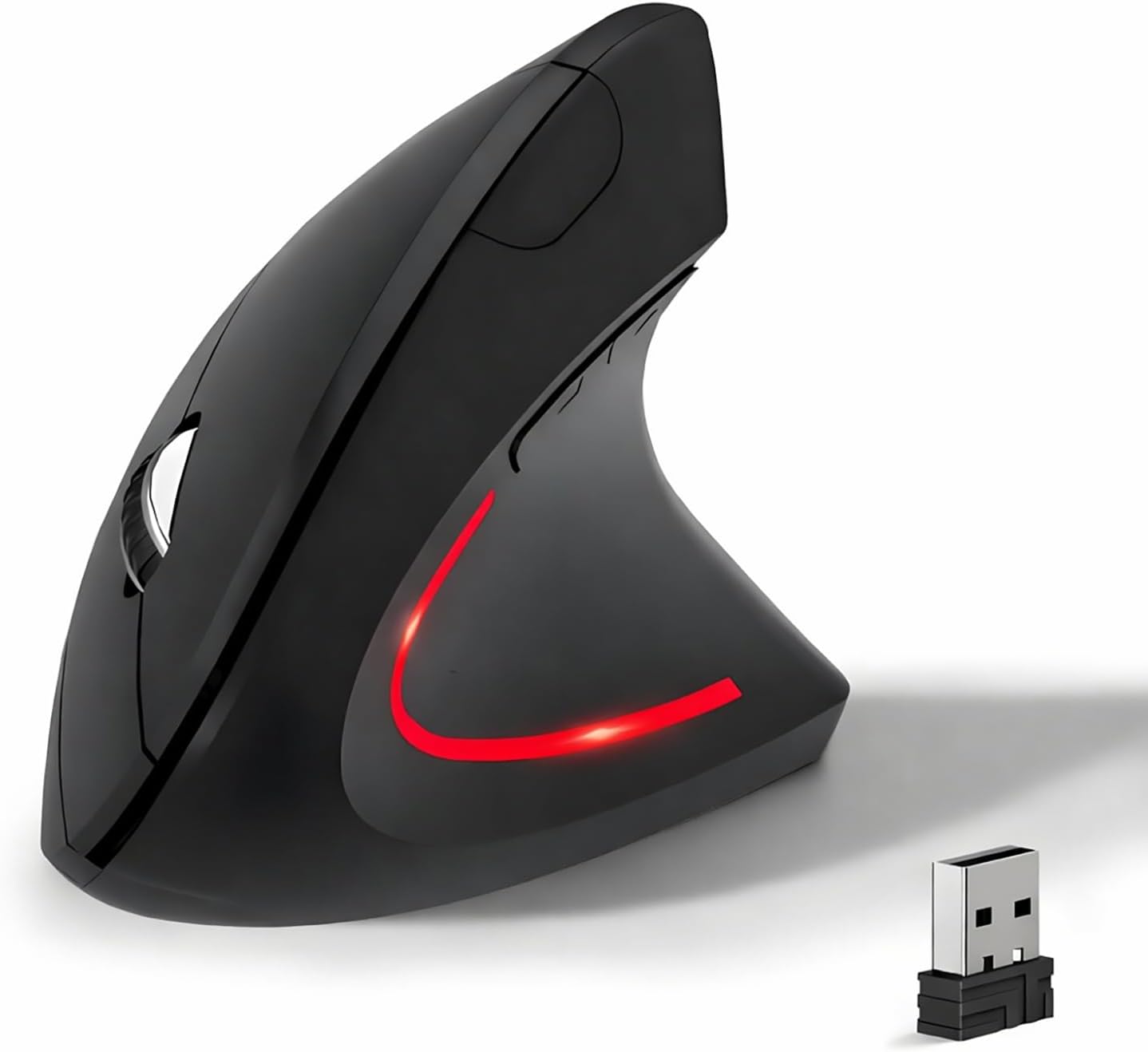
Wireless Ergonomic Mouse, 2.4G Wireless Vertical Ergo Mouse, 800/1200/1600 Adjustable DPI,6 Buttons Ergonomic Mouse for Laptop/MacBook/PC/Desktop-Black
$9.01
Related Products




Product description

Ergonomic Vertical Mouse: Angle for a natural handshake position
Features:
Ergonomic vertical design2.4Ghz USB wireless Connection800 / 1200 / 1600 three levels of adjustable DPINoiseless silent clickCompatible with all Windows/ Android/ Linux/ Mac OS (The previous/next page buttons are not recognized on the Mac OS)

2.4G USB Wireless Connection
built in 2.4GHz USB wireless connection, offering stable and quick performance with max working distance of 10M, just plug and play.

Ergonomic Design & Noiseless click
Ergonomic design for reducing wrist pain during long time use; Silent click offers noiseless working space.

Wide Compatibility
Compatible with all Windows/ Android/ Linux/ Mac OS (The previous/next page buttons are not recognized on the Mac OS)

Instruction Details
Battery Install Two AAA batteries should be placed within the battery compartment at the bottom of the mouse.Please make sure the battery has power. Power On Toggle the Power Switch to ON.The Power Switch placed at the bottom of the mouse.Indicator Status: The red laser light will flash for 3 seconds then off. 2.4G Connection Plug in the USB 2.4G receiver to your computer and click the right or left click on your mouse.Indicator Status: The red laser light will keep flash during moving the mouse. Dormancy The mouse enters dormancy after 10 minutes of inactivity.Indicator Status: The red laser light is off. Reconnection Moving the mouse around on your table or click any button on the mouse.Indicator Status: The red laser light keep flashing.. Adjustable DPI It has 800/1200/1600 three leves of DPI, DPI switch button placed at the top of the mouse. Next/Previous Buttons The Next/Previous buttons are placed around your thumb when you hold the mouse,click the Next button will go to next web page and Previous button will go to previous web page. Power Off Toggle the Power Switch to OFF.The Power Switch placed at the bottom of the mouse. Compatible Operating System Windows XP, Vista,Win7,Win8,Win10,iOS. Special Attention: iOS system device need to be upgraded to iOS13 or higher versions.
【Ergonomic Design】The ergonomic mouse has a vertical design conforms to neutral handshake position when you holding the mouse, allowing the arm and wrist rest naturally, relieve wrist pain and discomfort during work.
【2.4G USB Wireless Connection】The ergonomic mouse has built in 2.4GHz USB wireless connection, just plug and play, offering stable and quick performance with max working distance of 10M.
【High Sensitivity with Adjustable DPI】The vertical mouse has 800 / 1200 / 1600 three levels of adjustable DPI, providing higher sensitivity than traditional mouse.
【Convenient with Next/Previous Buttons 】The ergo mouse has added Next and Previous buttons provides convenience with web page browsing(Note: The forward/back buttons are unavailable on Mac OS systems).
【Packing List 】: One Wireless Vertical Ergonomic Mouse (2 AAA batteries not included), One 2.4G USB receiver (in the bottom of the mouse).
8 reviews for Wireless Ergonomic Mouse, 2.4G Wireless Vertical Ergo Mouse, 800/1200/1600 Adjustable DPI,6 Buttons Ergonomic Mouse for Laptop/MacBook/PC/Desktop-Black
Add a review
$9.01
mholland1972 –
My original hurt no more for using this I love it
Works great love it
Lisa Kelly –
Easy to use
Very comfortable and easy to use. Highly recommended.
Daisy Dederick –
Great for recovering hand after surgery
Love it!!! I bought this after trapeziotomy surgery and it’s really a great mouse!!!
Moe –
Solid mouse
Pretty good so far, but shuts off every now an then when you’re not using it. Feels better than regular mouses.
Marietta –
Super cómodo de usar
Me gustó el agarre , se ve raro pero es súper cómodo para la mano y descansa muy bien .
R.O.B. –
Seems Uncomfortable to Use
It’s supposed to be ergonomic, and maybe it’s because I am in my 60’s, but I did not like the feel of it. I had trouble controlling the mouse, I couldn’t work it correctly. I didn’t know how to rate something I simply can’t use. I’m returning it if they let me. Can’t comment on functionality because it was just awkward
Yeison –
Ergonómico aún para manos pequeñas
Totalmente ergonómico, tengo manos pequeñas y aún así es facil de usar, tengo la versión de baterías, no es recargable pero funciona excelente, es rápido, cómodo, práctico, con un complemento puedes darle una función a cada botón, es suave al tacto y no necesita mayor esfuerzo. Hasta el momento aparenta ser de buena calidad y con buenos terminados
Eliyahu C. –
Functional – But Only – Imitation of Ergonomic Design NOT COMFORTABLE
It looks comfortable, but the surface is slippery and doesn’t fit in your hand right. So it ends up slipping out of one’s hand continually. There are too many buttons, and in order to grip the slippery mouse to move the cursor, one is continually pushing the random buttons by mistake.The device works almost as if it were designed to trick the user into making as many mistakes as it can. The shape is all wrong and the surface is slippery and the device keeps slipping out of position, the harder a person tries to grip it, the less comfortable and useless it becomes.