
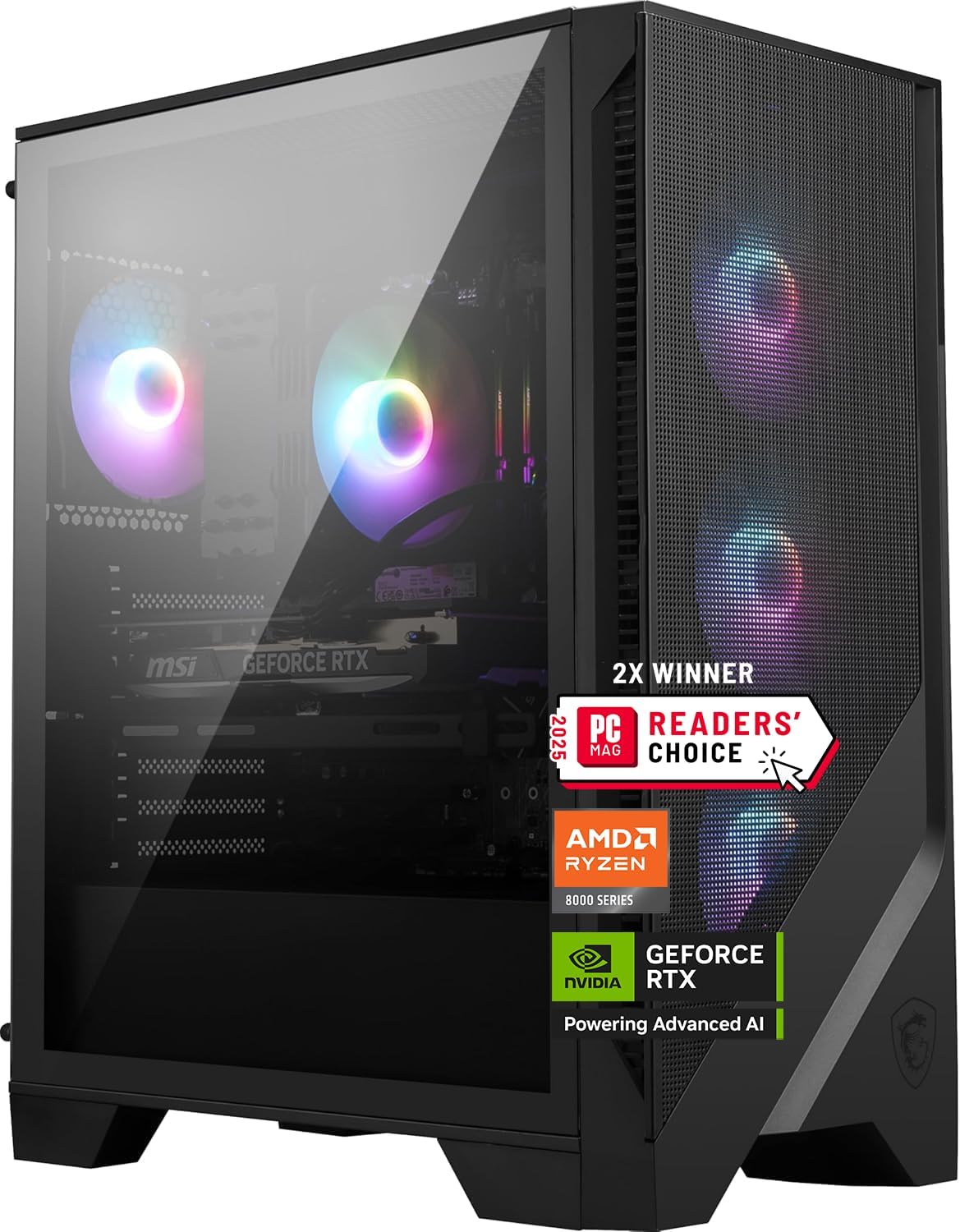
msi Codex Z2 Gaming Desktop: AMD R7-8700F, GeForce RTX 5070, 32GB DDR5, 2TB m.2 NVMe SSD, USB Type-C, VR-Ready, Windows 11 Home : A8NVP-436US
$1,929.99
Related Products



MSI Codex Z2 Gaming Desktop: AMD R7-8700F, GeForce RTX 5070, 32GB DDR5, 2TB m.2 NVMe SSD, USB Type-C, VR-Ready, Windows 11 Home : A8NVP-436US
POWERHOUSE 8-CORE GAMING PERFORMANCE — Driven by the AMD Ryzen 7 8700F with 8 cores and 16 threads, boosting up to 5.0 GHz for smooth, responsive gameplay and the ability to handle AAA titles, streaming, and background tasks all at once
NEXT-GEN BLACKWELL ARCHITECTURE — The NVIDIA GeForce RTX 5070 is powered by NVIDIA’s cutting-edge Blackwell GPU architecture, delivering a massive generational leap in rasterization and ray tracing performance so you can experience your games the way they were meant to be played.
Simplistic Design: Enjoy the latest generation of Windows 11 Home for your everyday needs. *MSI recommends Windows 11 Pro for business use.
Cool While Gaming: In conjunction with an ARGB fan Air Cooler, the Codex R2 features four system cooling fans; three in the front and one in the rear to pull in cool air and push heat out of the PC.
Turn on the Bright Lights: With the built-in RGB lighting, take your gaming experience to the next level by pressing the MSI LED button to cycle through lighting options. Customize lighting even further with MSI Center software.
11 reviews for msi Codex Z2 Gaming Desktop: AMD R7-8700F, GeForce RTX 5070, 32GB DDR5, 2TB m.2 NVMe SSD, USB Type-C, VR-Ready, Windows 11 Home : A8NVP-436US
Add a review
$1,929.99
Kevin Cooper –
Great Gaming computer with great online assistance!
I’ve had this computer for a couple months playing intense FPS games. After downloading the graphics card program and setting up the card, the picture is great. At one month it notified me that the Event Log file was full. Sure enough, thousands of warnings and failures. The computer runs the games at 160hz as set, and handles every higher setting you can set it to. It’s fast and runs cool. I did crash it while trying to fix an error and messed up. I took it to a shop for a factory image, but it did not work. A full diagnosis later it was said I needed a new SSD. So, I contacted MSI and they told me to get an RMA. That would take 2 1/2 weeks or more. So, after getting it back, I started checking it and found that the WIFI was reporting an error, so I deleted it. The computer would not shut down or sleep. After I did the delete, it started working again. After several more deletes and restarts it was working better, but still had issues. So, I hit F3 and did a complete factory image recovery on it again. It had an issue trying to set it up with WIFI. Quick chat with MSI, and he gave me info on what to do. It’s up and running perfectly now. Their online chat and personal phone call are great! Strongly suggest you register online as you get 3 months added to your Warranty! Yes, I would buy this computer again
Bashir H. –
Excellent high performance PC
I’ve been really happy with the MSI Codex Z2 overall. It feels like a solid, well-built gaming PC that does what it’s supposed to do without any issues. The case has good airflow, so the system stays cool during gaming and doesn’t slow down because of heat. Performance is smooth, games load fast, and it handles multitasking easily thanks to the fast storage and plenty of memory. I also like that it’s easy to upgrade later, which isn’t always the case with prebuilts. The fans can get a bit louder when the system is under heavy load, but that’s expected and helps keep temperatures under control. Overall, it’s a reliable gaming desktop that offers good performance and value for the price.
Javier –
Awesome Pc!!👌
I’m extremely happy with this purchase. This is my first PC, and I absolutely love it. From the moment I turned it on, I was impressed. It looks amazing, has a beautiful design, and it’s very quiet, which really surprised me. It runs great and performs exactly as I expected. I’m very satisfied with my purchase and would definitely recommend it.
Ross –
Disappp
Worked well for the first month. As soon as the return window had closed, I began having problems. Slow and glitchy startup but once it settled down it still worked well. Now no matter what I do, I end up at the Blue Screen of Death. It runs its diagnostics and gives me recommended solutions. I’ve reinstalled Windows 11 twice and I still end up at the Blue Screen of Death. I’ve been using PCs since 1985 and I’ve never run into anything like this. So now I’m looking for another PC and I just have to write off my large expenditure on this thing. Very disappointing.
Clayton Natho –
Great Gaming Computer (But Update the Bluetooth Module)
I come from the Mac side of the world, and wanted to get into PC gaming (I have a PS5 and got Frostpunk 2 and it had horrible studder, and thus began my journey into PC gaming). The PC gaming world is frankly pretty nuts… I’m a techy and was even intimidating for me and decided to go with a prebuild.After spending countless hours researching (youtube tech reviews, AI, and everything in between), I landed on this one. I bought a couple dozen games off Steam (if you don’t know about Steam, get familiar), and this ran every single modern game I bought beautifully. Frostpunk 2 that was horrible on PS5… buttery smooth on this PC. Also I run 3 27″ 4k monitors and runs them without even breaking a sweat.ONE SIDE NOTE. I think most gaming PC’s have this issue, but the bluetooth is frankly horrible (has to do with the radio going through the metal casing). Upgraded it with a TP-Link BE9300 PCIe Wifi and Bluetooth card (it has an external antenna module) and now is rounds this thing out perfectly. I’ve had this a couple months now and love it.
Teri C –
Graphics on monitor is excellent. Quiet, speed, multiple outlets.
Amazing, so many outlets, I can remove my USB strip! Very easy to set up. This is my first MSI desktop/tower. It’s a bit smaller in size then cheaper one so I like that and it was one of the reasons I chose this. I’ve been getting MSI laptops for more that 12 years I do graphics and need the space and speed. The other day my MSI laptop got over heated, I’m on the computer 12 hours + a day and it was just too much. So, I took the hard drive out of the laptop and connected C to C to new MSI tower and got all my info. I do have an external hard drive also, but it didn’t have the latest files I needed from the day it shut down. I panicked but got it just in time to file quartiles today.
WarBuzzard –
A superb gaming platform with sometimes squirrely behaviors.
This is a great computer and runs graphics-intensive games at really, really high settings, and at frame rates that will curl your hair.But the first few days with it were… An adventure. Strange behavior, freeze ups, slow responses, and freakishly invasive Microsoft bloatware. I still get a weird freeze-up when watching YouTube videos and it happens randomly – just the kind of computer lunacy that drives you to drink.
Rob S. –
Amazing PC
An absolute powerhouse of a pc for the price. I took advantage of prime days and saved 30% which was how I was able to get my wife’s approval. I am so glad I bought it! I read some reviews reported that the box was damaged in shipping but mine arrived in perfect condition and very well protected. It was very easy to setup from the initial boot and quickly had me playing my favorite games at 100-140+ fps in 1440p. The fans are quiet and the RGB lighting provides great aesthetics. I did a lot of research on a new rig, weighing the pros and cons of major components and happy I went with this build. Glad I finally made the switch from console after all these years!
Buyer –
Awesome
Twang –
Outstanding machine.Documentation not so much.No idea how run things like leds in the case, what the buttons are for, what USB ports are what speed, etc.There was no supporting documentation.None.
ChashuPork –
The system offered good value for the specs, arrived damage free and well packaged for transit. Set-up was easy and while it came preinstalled with the usual first-party bloatware it was easy to clean up windows of all the detritus. The bundled keyboard+mouse were not used but expect the usual freebie quality. Performance was on par for the specs and I enjoyed my time with it but I needed more power and ended up returning the PC.Actual specs: MSI Pro B650-P Wifi motherboard, Ryzen 7 8700F, a single 32GB stick of T-Force Vulcan DDR5 6000 taken from a 64GB kit, a 2TB WD Green SN3000 SSD, RTX 5070 Ventus 2X, an OEM 750W non-modular power supply,Value: Pricing out the individual components, the Z2 came out a few hundred bucks ahead of building it myself. However, the ram and SSD were standout items as they are not the best performing pieces of the system. Single-channel DDR5 isnt as bad as previous generations, but I would have much preferred two sticks of 16GB over a single 32GB stick. The WD Green SN3000 SSD is an okay storage drive from a reputable manufacturer for light use, however it has a poor TBW endurance rating and just isn’t cut out for more intensive productivity applications over the long term; its definitely an area where MSI cheaped out due to the DRAM shortage.Packaging: A nice thick outer box holds thick closed cell foam which protects the system from the usual bumps and jostles of shipping. The tower itself is inside a fabric bag witha handle used to pull it out of the shipping box. Do be mindful that the bundled peripherals are on one side of the box and take them out before lifting the tower. A little accessories bag is included the contains extra sata and PCIe cables and the usual paperwork.Performance: Won’t get into the details since you can watch reviews for the components but it hit all the expected values for the specs. It is pretty quiet even under load, and temperatures were not concerning even considering the small 100mm single tower CPU cooler.Conclusions/TLDR: Overall good impressions. Good value proposition, generally decent components apart from ram configuration and SSD choice, adequate performance for the specs, personally needed more.