

Android 14.0 TV Box 2025, LEFFOT M2 Plus 4K Ultra HD Streaming Device for TV, 4GB RAM + 32GB ROM, Support 4K Video Playback, 8K Decoding, Voice Remote, WiFi 6, BT 5.4, HDR10, 3D, RK3528 Quad-Core A53
$49.99
Related Products






Product description


Tips:
About compatibility, Appls downloads, or any other issues, please let us know and we will provide you with a solution as soon as possible.
In daily use, most of the problems encountered can be fixed by first restoring the factory settings and then upgrading the system.
Restore factory settings path: Click on “Settings” → dropdown, click on “Device Preferences” → click on “About” → click on “Restore factory settings or reset”.System upgrade path: On the homepage, click on “More APP” to enter the “More APP” page ->find the “FOTA Update” APP, click on this application to enter the system upgrade.If you want to solve the problem as soon as possible, you can use your phone to take a picture of the problem and upload it to the website: wetransfer Generate a link and send it to my outlook, LEFFOT2025. In order for engineers to analyze the reasons and provide solutions.
Application compatibility:
Our TV box comes pre-installed with apps such as Ggle Play, Netfl, Prim Video, YuTub, and more. It should be noted that these application manufacturers recommend using pre installed applications as they are already compatible with the TV box’s system. Manufacturers do not recommend installing or upgrading other versions to avoid compatibility issues that may prevent the application from functioning properly.If upgrading these applications results in compatibility issues or inability to use them properly, you can restore the normal use of the applications by resetting them to factory settings.If there are compatibility issues with the product during normal use, a system upgrade can be performed to fix them.
Application installation:
Most applications can be installed from Ggle Play, and it is recommended to choose the 32-bit system version or the universal version;Download and install the required apps, through the APKPure app store;Download and install the required applications through the Aptoide TV app store;Download the APK file and install the application through a USB drive:
USB installation method: Download the APK format (32-bit or universal version of the application, non ZIP/RAR compressed file) application installation package to the USB drive, and download the TV version (mobile version may not be compatible with remote control operation); Format the USB drive in FAT32/exFAT format (NTFS may not be recognized); Then, open the USB drive through “Media Center” or “File Manager”, long press the APK file and select “Package Installer” to install.
【Home Entertainment TV Box】This Android TV box 2025 serves as a versatile box for family streaming, local media playback, light office tasks, communication, and casual gaming. With 4GB RAM and 32GB ROM, it supports smooth multitasking and ample app storage, making it an ideal smart TV box for every household need.
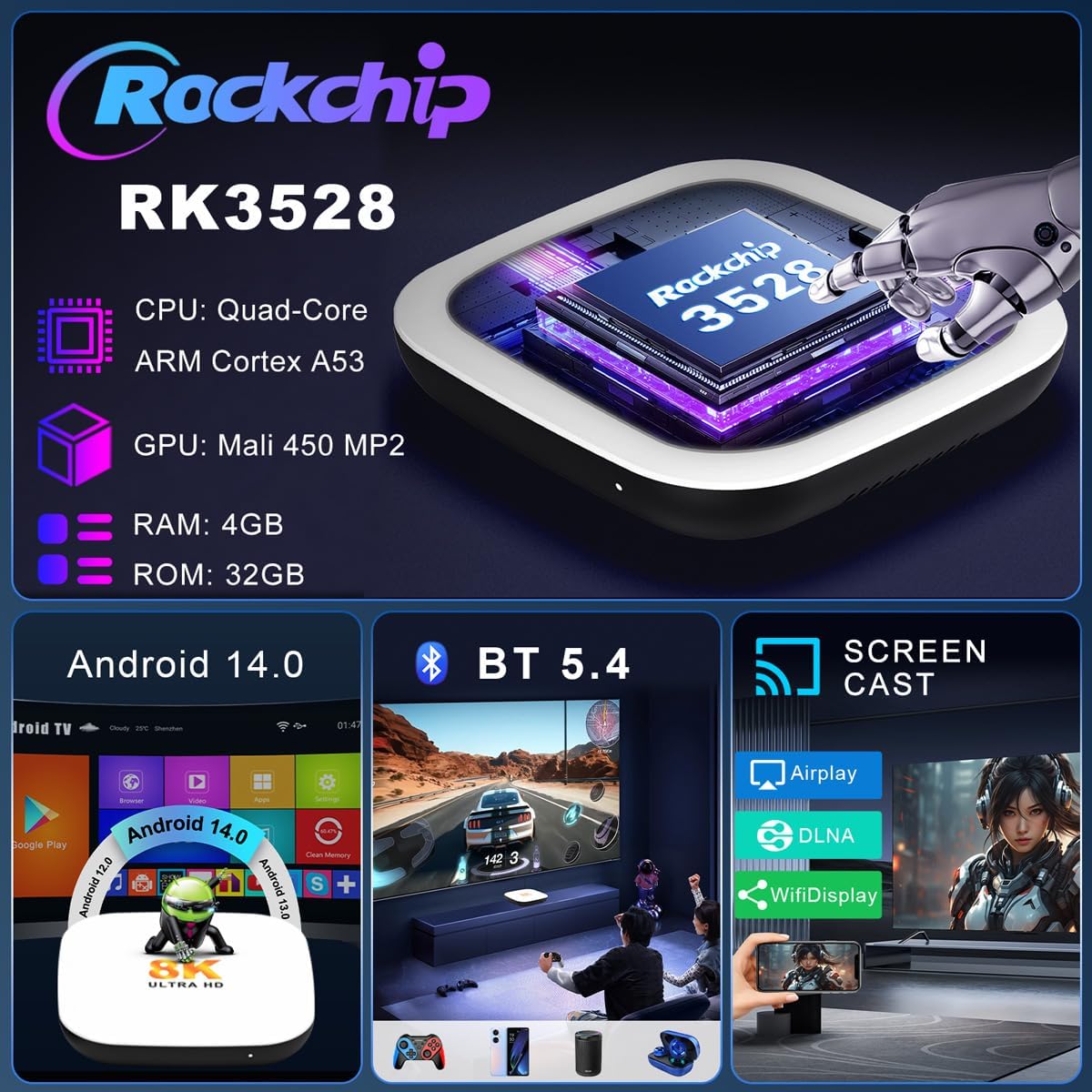
【4K UHD & Immersive Visuals】Elevate family movie nights with stunning 4K@60fps and 8K@23fps video decoding, supporting H.265/HEVC, H.264, and HDR10. This TV box Android delivers crystal-clear details and vibrant colors, transforming your TV into a private cinema with theater-grade picture quality.
【Smooth Performance & Reliable Operation】Powered by a Rockchip RK3528 quad-core processor and Mali-450 GPU, this Android box 2025 ensures lag-free navigation, quick app launches, and stable video rendering. It’s built to handle daily entertainment without slowdowns, perfect for busy family usage.
【Android 14.0 & Broad Compatibility】Running the Android 14 OS, this 4K streaming device for TV seamlessly integrates with platforms like Netf, YuTub, and Hulu. Enjoy a user-friendly interface, regular OTA updates, and enhanced security for a future-proof entertainment experience right in your living room.
【Dual-Band Wi-Fi 6 & Wired Connectivity】Equipped with Wi-Fi 6 and 100M LAN, this streaming box offers flexible networking options. Enjoy buffer-free 4K streaming on both 2.4GHz and 5GHz bands, with reliable connections that keep your favorite shows playing smoothly throughout the home.
【Voice Control with Gogle Assistant】Search for content, adjust volume, or launch apps using built-in Gogle Assistant. This IP-TV box makes interaction hands-free and simple, offering a smarter way to control your entertainment—just speak and watch your commands come to life.
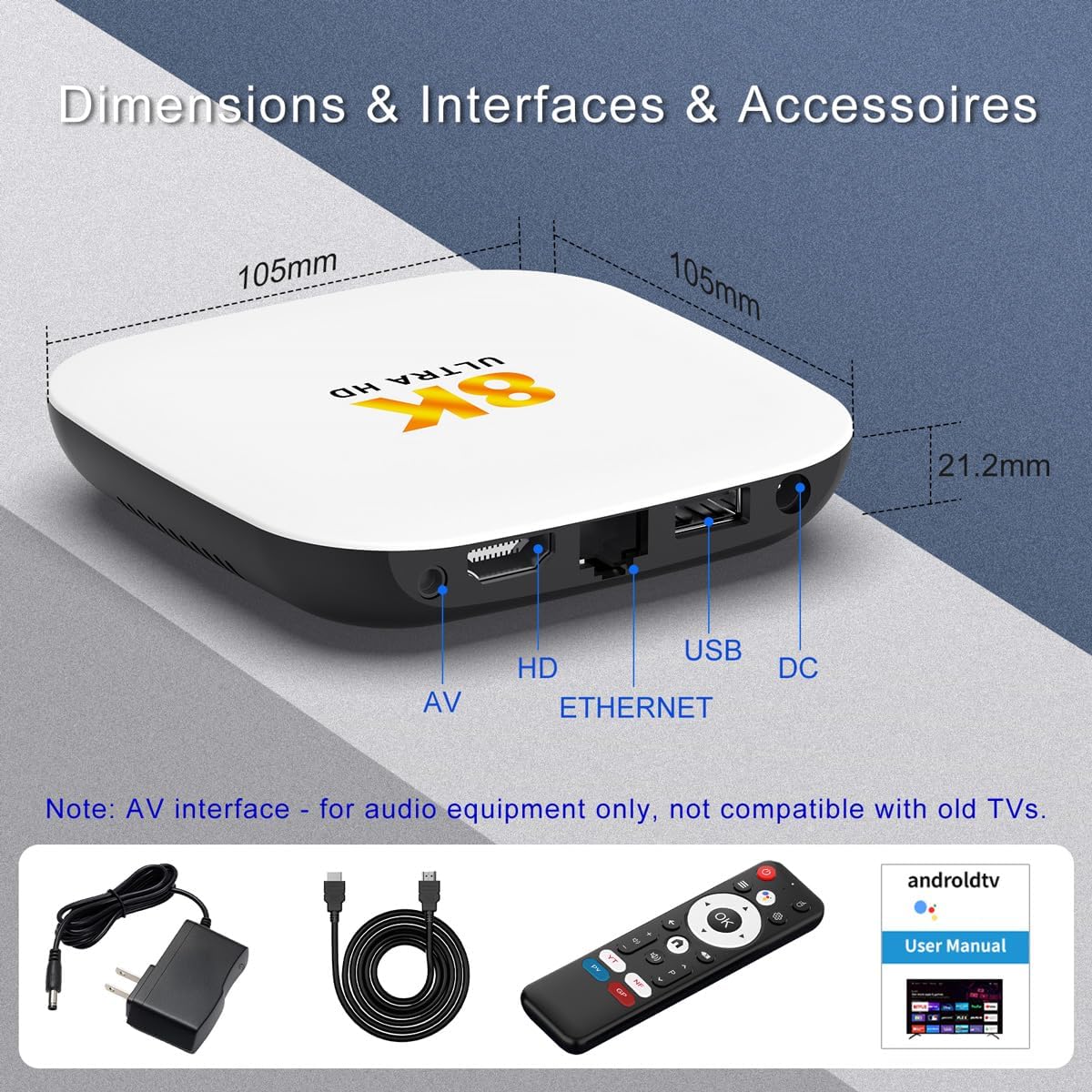
【BT 5.4 & Rich Ports for Expanded Use】Featuring BT 5.4, HDMI, USB, AV, LAN, this TV streaming box easily pairs with speakers, headphones, or game controllers. Expand your setup and create a customized audiovisual or gaming environment with minimal effort.
【Easy Screen Mirroring & Office-Ready Functionality】Support DLNA, Airplay, and Wi-Fidisplay to cast content from phones or tablets directly to your TV. Use the included 2.4G wireless keyboard/mouse for light office tasks, turning this device into a flexible home workstation.
【What’s Included】Your purchase comes with a set: HD cable ×1, BT remote ×1, user manual ×1, and power adapter ×1. Everything you need to start enjoying your new 4K TV box right out of the box.
User Reviews
Be the first to review “Android 14.0 TV Box 2025, LEFFOT M2 Plus 4K Ultra HD Streaming Device for TV, 4GB RAM + 32GB ROM, Support 4K Video Playback, 8K Decoding, Voice Remote, WiFi 6, BT 5.4, HDR10, 3D, RK3528 Quad-Core A53”
$49.99
There are no reviews yet.