
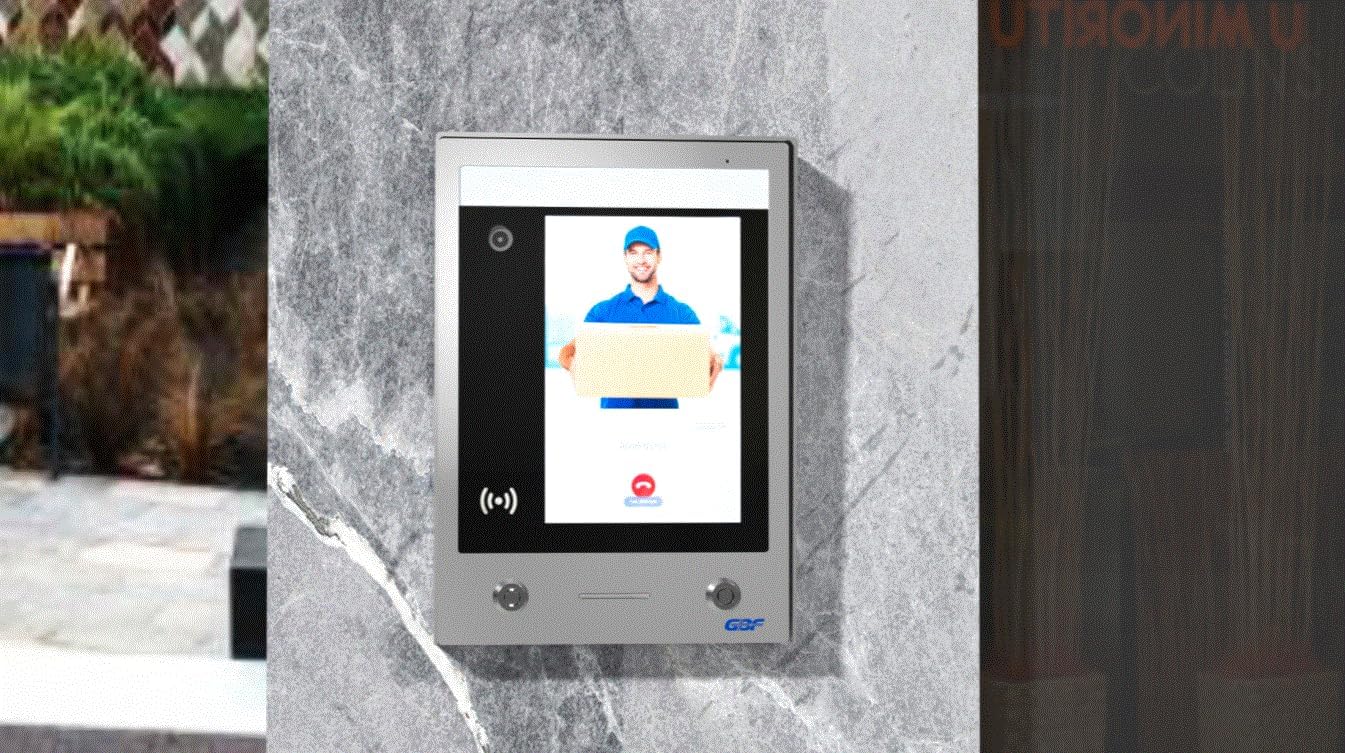
GBF SentryLink Smart Full IP Video Door Station/ Smart Video Intercom System for 8-1000 Units Apartment (Surface Mounted)- 1080P HD camera, Control Two Locks remotely, Built-in card reader
$1,649.00
Related Products





Product description
Smart Video Intercom System for all requirements: HD Camera, Tenant Directory, Access Keypad, Control Two Locks Remotely and Advertising …

GBF Sentrylink Smart Video Intercom For Multi Units Apartment
GBF SentryLink full IP smart video doorbell system is the solution for a smart access control system for 2-1000 units apartment building.
GBF Sentrylink smart video intercom is one standalone outdoor station which requires only three types wires:
power wire, one RJ45 cable and door unlocking wire.
This standalone unit is the most friendly installation intercom system, wiring inside each apartment is not required. It saves you lots of installation labor and cost. ( Probably less 2-3 hours for installation). This smart intercom system supports two-way voice communication and remote door release function. Unlock door with IOS/Android devices (Iphone, Ipad and other smart phones). You can watch, hear and speak to the person at your door and unlock the door with your smart phone, no matter where you are or what you are doing. The application is available for IOS and android mobile phone and tablet.
With GBF SentryLink smart entry system, you are always home no matter where you are travelling.

Friendly User Interface For Visitor
The 10″ touch screen has all tenants directory. Visitor can easily search room no. or tenant name to find the right person to call.
Tenant name could be shown his or her real name or display name.
Property manager can remotely login GBF PMS to manage all tenants information, including:
add or delete tenant name,
add or delete key fob or key card,
update building information
check the building entry activities from SentryLink log file etc.
Upload your own custom images as screensaver pictures to outdoor Station screen for advertisement.

Access codes configuration through your smart phone
Each tenant will have his or her own permanent access code and tenant can share his or her code to anyone from GBF Doordeer APP.
Indoor monitor could be added to this system as well, order the indoor monitor directly from GBF store and scan the barcode to bond indoor monitor with your account.
You can change your master account to someone else in case you might want to rent out your apartment.

Easy to manage your building entry for your visitors
Each tenant can easily create multiple temporary codes for his or her visitors or guests from their own smart phones at any time from anywhere, even you are in different country.
The temporary codes can be set at daily or hourly base. Easy and convenient to set different codes for delivery, cleaner, Airbnb residents or guests to access the building temporarily. All activities could be managed by your smart phone from GBF Doordeer APP.

Controlling two different locks by your smart phones
Use your smart phone to control two different gates from anywhere at anytime.

Check your missing calls or delivery from your smart phone remotely from anywhere
All gate activities are recorded into GBF cloud server. Each tenant can use his or her smart phones to check the log file for the SentryLink entry system from anywhere at anytime.

Working with GBF wifi IP indoor monitor Wirelessly
The GBF IP Video Indoor Monitor is an ideal addition to any GBF smart video doorbell system. When paired with our GBF IP Video Door Intercom, the Indoor Monitor delivers a live video stream, two-way audio communication as well as control of doors and gates. The Indoor Monitor is compact and designed to complement any environment. The GBF Indoor Monitor has a 7″ touch screen made of scratch-resistant tempered glass with intuitive user interface.

Indoor monitor simple interface
Simple interface has all features you are looking for: Live view, Play Back, Setting etc..

Talking and unlocking
Get a instant alert from your Sentrylink smart outdoor station, talking and unlocking.

Multiple channels
You could add maximum 4 outdoor stations into one indoor monitor, and view all channel live from this indoor monitor.
Removable
Interface
Talking and unlocking
Multiple devices
[CONVENIENCE]- Answer and view callers at your door remotely via your mobile iOS or Android device, whether you are at home or abroad. The smart video doorbell intercom system sends a push-notification to your smart phones and you could watch, talk and remotely unlock your gate through your smart mobile devices. Never miss a delivery or visitor again.
[FLEXIBLE]- 2-way live video and audio monitoring can be initiated from your mobile device, even without pressing the bell button at the door station. Watch live video and snap a picture into your smart phone at anytime from anywhere. Multiple clients (smart devices) can be connected to a single apartment. Multiple entry’s can be accessed together on the GBF Doordeer App. Use a 10″ industrial touch screen which could work in any temperature from -30°C to +80°C ( or 22°F to 176°F).
[VERSATILE]- Integrated dual-stream full-featured 1080P HD camera, Wide Dynamic Range (WDR) IP camera offers a 160 degree wide viewing angle with no optical distortion, ideal for viewing details at longer distances. Integrated two SPDT relays can trigger two remote door locks or gates, which can be activated directly from your mobile devices, and also with permanent access code. Built-in IC proximity reader for 13.56 NFC Mifare key card or key fob to trigger the door lock.
[COST-SAVING]- No wiring for this apartment building intercom system is necessary, only three wires: one power line, one RJ45 internet cable and one unlocking wire. Save lots of installation labor cost. Premium full touch screen with tempered glass panel. Weatherproof IP65 rated construction. 2 years manufacturers warranty. Upload your own custom images as screensaver pictures to outdoor Station screen for advertisement.
[Easy-Manageable]- Integrated PMS allows administrators to edit tenant lists and room information remotely. Tenants can view their apartment entry history, visitor images, and activities via their smart devices. Maximum 4 users per unit under one cloud plan could share this system access with full features.
8 reviews for GBF SentryLink Smart Full IP Video Door Station/ Smart Video Intercom System for 8-1000 Units Apartment (Surface Mounted)- 1080P HD camera, Control Two Locks remotely, Built-in card reader
Add a review
$1,649.00
Shawn Otto –
Every multi-tenant building in America should be using this
We purchased these for two 8-unit apartment buildings we are updating. We wanted an entry system that’s simple and intuitive for visitors, easy for residents, and that we can manage remotely from anywhere. Our old systems looked terrible and extremely dated: scratched up aluminum boxes with push buttons and little slips of paper for the tenant names and unit numbers, and grubby phones and call boxes next to the doors inside the units.We wanted something that would communicate to residents and visitors that this was an up-to-date, well-maintained building, and also something that would future-proof us somewhat, and we wanted to get rid of those ugly and unsanitary phones and call boxes, along with the maintenance responsibility for them.We figured that everybody has a cell phone or tablet, so let the residents handle that side of things. Plus, if they were at work or something they could still buzz Amazon or the dog walker in from there. We’d installed internet for our other IoT — the new boilers that send us alerts before something’s wrong, the keyless unit locks, the solar panel egauges, etc. It’s pretty much the way everything is going.First we went with an LTE system. Big mistake. It was confusing for visitors and not customizable, and kind of a pain to manage through send it text codes. When it got cold out, like below ten below – these buildings are in Minnesota – it called every number in the directory all night long over and over. We didn’t want to make another mistake like that so we did a ton of research and settled on two options: this GBF Sentrylink system, and a similar system by Alphatouch.Both Sentrylink and Alphatouch do what would seem obvious: take a tablet with a touch screen and use it for an entry system. It’s really hard to believe how backwards the building management space is, but almost nobody is doing this yet, and there are tens of millions of buildings that need it. These two systems are on the cutting edge and really they should be in every new and remodeled multi-tenant building in the country.We ultimately went with the Sentrylink system because it offered more flexibility, it had lower long-term subscription costs for the cloud plan (Alphatouch requires a minimum 20-unit monthly subscription; Sentrylink does not, and is currently free for buildings with less than 15 units because they have such minimal cloud use) so I didn’t feel like the entry system was a loss-leader for the cloud fees, and finally, the GBF customer service team was exceptionally responsive even to questions we had before purchasing, and we figured that kind of responsiveness and support would be important in adopting a new technology.Installation is about as idiot-proof as you can possibly get, and far, far simpler than our previous system. For a front entry system, that means you plug in 3 wires per their wiring diagram: a 12-volt power wire (or nearby 120v plug for the included adapter), a 12-volt doorbell wire run to the door’s electric strike, and an ethernet cable run to the building’s internet router (or to an ethernet wifi adapter, which you can buy for about $50). That’s it. You run them through the hole in the back of the stainless steel housing, screw the housing to the wall, plug them into the three spots in the back and lock the thing in place. Done.Then you email all your residents a link to download the app (available in iPhone and Android), log into the property management portal from your computer, and set them up. However you type in their names and unit numbers/letters is how they appear on the system’s touch screen. Totally up to you. After they have created an account, you also have the option of entering a “display name” like “Resident” or “Penthouse” for them if they don’t want their actual name listed for privacy reasons. This is uploaded to the cloud and pushed to the system in about 5-10 minutes.When a visitor touches a resident’s name to get buzzed in, the app pops up on their phone with a notification and they have the option of opening up a video call to see who it is or they can decline or slide a bar to buzz them in. They can also set up a temporary passcode if they have a visitor staying with them or to let in a delivery person or a dog walker or similar. The great thing is most people have their phones close at hand so they don’t have to get up and walk across the unit if they’re watching a movie or cooking dinner or something, and if someone bypasses the system and just calls them on their cell, they also have the option of opening the app and swiping to buzz them in.From our perspective as building owners, it’s easy to manage and update. If a resident moves out, we open the property management portal and delete their access and within ten minutes they and any roommates, visitors, or other associated authorizations are also deleted. When adding, we enter the name, email, and unit number and email them a link to the app, and we’re done in less than a minute. So much easier and more professional than our old system.Also, it’s tough. It weighs about ten pounds. The housing and integrated rain hood are thicker than either of our past systems. It’s held in place by a couple of Allen screws and also locked in place using tubular locks. I do have concern about how they will stand up to the weather and need to remember to spray some silicone in them.It’s also a more secure system, even as it give residents and managers more flexibility, because it logs every access, as well as photos or videos of visitors, and those records are available to the building management, so the mass button-pressing until someone lets you in becomes a thing of the past because the anonymity and unaccountability are taken out of the equation.The GBF support people say they will soon provide a link for updating the screen-saver images so you can load custom images of your building, or advertisements even. That is an important feature for us. Also, the system has an external API that can be used to integrate it with other equipment in your LAN if that’s important.But it’s not perfect (yet, anyway). There are a few glitches we’ve encountered.First, for some strange reason, a resident has to create an account in the app before you as manager are able to save a display name for them. This seems backwards to us.Second, you can only create one resident per unit number. The system regards them as the primary contact for the unit, and then it is up to them to share system access via their app with other residents of that unit. This, again, is backwards from the way we’d like it as building owners. We want to be able to provide system access to each person on the lease from our end, which is also better for visitors, so they only buzz the person they are coming to see. The work-around for this is to create a unit record for each individual resident, instead of one for each unit, but the system requires each resident to have unique unit numbers, so if you had, say, 3 residents in unit 304, you’d have to list them as being in unit 304-1, 304-2, and 304-3. Not ideal, and possibly confusing to visitors. Unit numbers should not have to be unique to a single resident.Finally, the unit currently only uses ethernet for internet access. But the underlying Android architecture does make it possible that the system firmware could be set to function over wifi or even using LTE. Making these options available, since the hardware and system software is already in place, would seem to be an inexpensive way of improving the system’s flexibility and appeal while saving customers money.While they leave some room for further improvement, these faults were not dealbreakers and the system’s many other benefits still placed it at the front of the pack for us at this time, and heads and tails ahead of most of what’s out there.In summary, if you want to compete for the best residents at any price point, all other things being equal, the GBF Sentrylink is a solid investment with big returns in terms of improving your building appearance, tenant convenience, security and flexibility, management convenience and professionalism, and the ability to manage the property and provide service access remotely.
Cashew –
No lag from mobile app to intercom system to door strike!
I have both the GBF “DoorDeer” Sentrylink and the DoorBird D21DKH intercom systems. The wide user touch screen on the GBF is very user friendly versus the tiny screen on the DoorBird. The sound speaker is louder on the GBF versus barely hear anything on the DoorBird.The app experience is instant on GBF while you will experience a lag on the DoorBird when you unlock the front door via the app.These issues maybe minuscule, but it becomes very annoying for the daily users such as myself.Install was easier on the GBF also with only 3 wires to connect.
klaus –
Great system without problems
I bought 3 years ago first system for a new construction of 45 residential units. Easy to install.You need a good interned cat 5 connection and to download the app.It’s running now seamlessly for last 3 years.You can update from your computer the tenants info when needed and generate temp codes for cleaners and deliveries.It’s so good that I bought the 2nd the 3th system for my other buildings.“ perfection” it’s one word for this system.
DC –
Works Great
We had a Butterfly MX system, It was getting too costly. We switched to GBF SentryLink and are very happy
Nicolas Leroux –
Good product
Very happy with it. It works as advertised. Their customer support is very good and eager to help and answer any questions.
Matt McHale –
Challenging to Install
The biggest problem that I had with this is that no one does installations. There is one person in Chicago who can install this. It’s almost impossible to do yourself.
H3K27ac –
Not functional for android users
GBF SentryLink mobile app does not work on Android. Useless.
Amazon Customer –
100 points A plus
Amazing product highly recommendedOutstanding tech supportSystem extremely easy to use and setupA plus