

llano V12 Ultra Laptop Cooling Pad with Smart Software Control, RGB Gaming Laptop Fan Cooler Stand, 5.5″ Turbo Fan, Adjustable Speed, 3-Port USB 3.0 Hub, 3 Height Stands, for 15.6″-19″ Laptops, Black
$129.98
Related Products





Product description
The video showcases the product in use.The video guides you through product setup.The video compares multiple products.The video shows the product being unpacked. llano V12 Ultra Laptop Cooling Pad Merchant Video


1 2,800RPM Brushless Motor
2 44°C Drop in 90 Seconds
3 Fits 15.6″-19″ Laptops
4 36W Max Cooling Power


1 Ergonomic Comfort
2 Dust-proof Protection
3 Built-in 3-Port Hub


1 Software Customizable
2 Real-time Wheel Control
3 Advanced AI Control
V12 Ultra Laptop Cooling Pad Specifications
Model V12 Ultra Dimensions & Weight 16.9″L x 12.9″W x 2.7″H ; 4 Pounds Compatible Laptop Size 15.6 ” and above (including 17.3″, 18.4″, and 19″ laptops) Power Supply 36W Power Adapter: Type A – 2 pin Plug, 12V / 3A, 5.5×2.1mm DC, 6.6ft Cord Fan Speed Range & Size 300-2800 RPM ;5.5 inches Rich Feature Integration 3 x Position Adjustable Stand; 5 RGB Color Options; 3 x USB 3.0 Hub; Removable Dust Filter Control Mode 3 Intelligent Modes ( Low / Medium / High) & 2 Manual Modes (software customization, custom settings adjusted via software / scroll wheel customization, physical adjustments using a scroll wheel) -44°C in 90s Under full load, the 2800 RPM turbo fan delivers up to a 20–25°C temperature drop for both CPU and GPU in just 90 seconds. (Data provided by llano Laboratory) What’s in the Package Laptop Cooler * 1, 36W Power Adapter * 1, USB-A to C Cable * 1, Dust Cover * 1, Memory Foam * 1, User Manual * 1 Noise & Cooling Note Higher fan speed (2800 RPM) provides strong cooling but may generate noticeable noise. The V12 Ultra improves noise control with intelligent frequency conversion via the Myth.cool software, offering better sound optimization than V12. How to Download the Software Visit llanolife.com and navigate to the “Download” page to download the software package.(Note: The software is compatible only with Windows 10 64-bit and above. It is not compatible with macOS or Linux. In addition, without software, you can manually control.) Usage Steps Step1: Power the laptop cooler using the DC power adapter. → Step2: Connect the laptop cooler to your laptop using a USB-C to USB cable. →Step3: Download the software and identify the laptop cooler (ensure the USB-C to USB cable is connected between the laptop cooler and your laptop). Q1 Software Fails to Recognize 1. Check USB Connection: Try using a different USB port or USB-C cable; verify if the power indicator light is green. 2. Update Drivers: Download the latest software version from the official website. 3. Restart the Device. 4. Contact llano: If the above steps fail, please contact llano. Q2 Cooling Performance The V12 Ultra Gaming Laptop Cooling Pad features a 5.5-inch turbo fan capable of reaching up to 2800 RPM. Lab tests show that it can reduce CPU and GPU temperatures by up to 25°C in just 90 seconds, effectively preventing thermal throttling and enhancing both gaming and work performance. Q3 Noise Levels At low speeds, the noise level is approximately 27dB, which is nearly silent. When the fan reaches its maximum speed of 2800 RPM, the noise level may rise to around 70dB. To minimize noise, we recommend using the smart AI control mode, which automatically adjusts the fan speed based on your laptop’s workload, ensuring efficient cooling with lower noise levels. Q4 Compatibility The V12 Ultra Gaming Laptop Cooling Pad is designed for laptops with screen sizes of 15.6 inches and above, including popular models such as the ASUS ROG Strix G16, MSI Katana 15, and Alienware M18. Ensure your laptop fits within these dimensions for the best experience.
llano Laptop Cooling Pad Series, Keep Your Laptop Ice Cold!
Add to Cart
Customer Reviews
4.6 out of 5 stars 382
4.5 out of 5 stars 2,627
4.5 out of 5 stars 1,002
4.5 out of 5 stars 563
4.4 out of 5 stars 294
4.5 out of 5 stars 2,627
4.5 out of 5 stars 2,627
Price
$129.98$129.98
$95.99$95.99
$89.99$89.99
$89.99$89.99
$84.99$84.99
$89.99$89.99
$98.99$98.99
RGB
12 Dynamic Modes
10 Dynamic Modes
/
12 Dynamic Modes
/
/
10 Dynamic Modes
Turbo Fan Size
—
5.5″
5.5″
4.72″
4.72″
5.5″
5.5″
RPM
2800
2800
2800
3500
3500
2800
2800
Adapter Power
—
36W
36W
18W
12W
36W
36W
Compatible Laptop Size
15.6″-19″
15.6″-19″
15.6″-19″
13″-17.3″
13″-17.3″
15.6″-19″
15.6″-19″
Extend Ports
3 * USB-A 3.0
3*USB-A
3*USB-A
2*USB-A & 2*USB-C
/
3*USB-A
3*USB-A
Intelligent Control
✔
✘
✘
✘
✘
✘
✘
Adjustable Height
✔
✔
✔
✔
✔
✔
✔
Removable Dust-Filter
✔
✔
✔
✔
✔
✔
✔
Intelligent AI Temperature Control with Myth.cool Software: Safeguard your laptop with our cutting-edge cooling technology! The llano V12 Ultra features three smart cooling modes (Low/Medium/High) that automatically adjust fan speed based on your laptop’s workload. Experience efficient cooling with minimal noise—perfect for gaming, working, or streaming. Download the software from “llanolife.com/Download” for seamless control, or opt for manual operation with a simple scroller.
Turbo-Pressure Cooling for Rapid Heat Dissipation: Unlock your laptop’s full potential with our powerful 5.5″ turbo fan, reaching speeds of up to 2800 RPM. The AI-enhanced 360° airflow design has been lab-tested to reduce CPU/GPU temperatures by an impressive 22°C in just 90 seconds. This high-performance cooling solution minimizes noise while preventing overheating during intense gaming sessions or heavy multitasking, ensuring optimal performance when you need it most.
Built for 15.6-19 Inch Laptops: Designed specifically for large, high-performance gaming laptops (compatible with Alienware, MSI Titan, ROG Strix, Razer Blade, etc.).
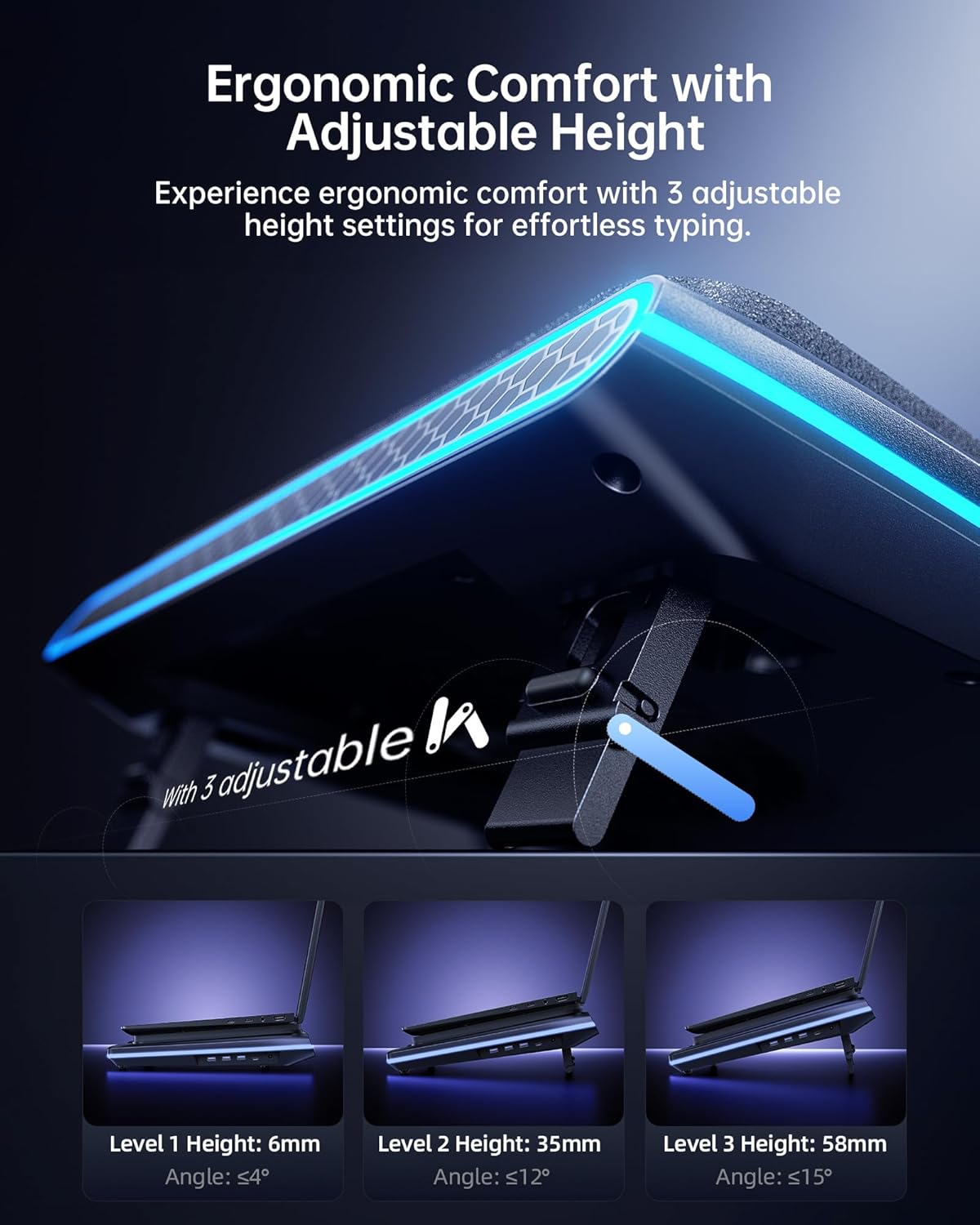
Ergonomic Design with 3 Adjustable Heights: Work and play comfortably with our ergonomic design featuring three adjustable tilt options (15°, 12°, 3°). Customize your viewing and typing angles to alleviate neck and shoulder strain, making it ideal for long gaming marathons or extended work hours. The sturdy adjustable foot stand ensures stability and promotes better posture, enhancing both comfort and performance.
Easy-to-Clean Removable Dust Filter: Maintain peak performance effortlessly with our detachable dust mesh filter. Designed to trap dust and debris, it ensures consistent airflow while extending the lifespan of both the cooler and your laptop. No tools required—simply remove the filter, clean it, and reattach for hassle-free maintenance, keeping your cooling system running like new.
Vibrant RGB Lighting & Versatile USB 3.0 Hub: Elevate your gaming setup with dynamic RGB lighting featuring 4 effects and 5 vibrant color options to match your style. The integrated 1-in-3 USB 3.0 Hub expands your connectivity, offering ultra-fast 5Gbps data transfer for your mouse, keyboard, and hard drives, ensuring you never run out of ports.
What’S in the Package: Laptop Cooler * 1, 36W Power Adapter * 1, USB-A to C Cable * 1, Dust Cover * 1, Memory Foam * 1, User Manual * 1
High Power Output: Equipped with a 36W power output, the cooling pad provides robust performance, ensuring that your laptop remains cool even during demanding tasks.
10 reviews for llano V12 Ultra Laptop Cooling Pad with Smart Software Control, RGB Gaming Laptop Fan Cooler Stand, 5.5″ Turbo Fan, Adjustable Speed, 3-Port USB 3.0 Hub, 3 Height Stands, for 15.6″-19″ Laptops, Black
Add a review
$129.98
Robert R. –
Worth the money, it cools my desk furnace with ease.
Summary: I have an ASUS ROG Zephyrus M16 that likes to run hot when I play graphic intense games. This cooling pad was expensive, but it made my uncomfortably hot laptop the same temp as if it were powered off.Pros: The llano works better than I expected. It has the ability to adjust the fan with the temperature of the machine, but I just run it low and then adjust it when I know the laptop is going to hot. I couldn’t believe how effective it was at cooling my incredibly hot 16 inch laptop. In the past I’ve bought cheaper cooling pads that didn’t really effect the laptop’s run temp, but the seal must be key to get the air into the computer.Cons: When I turn the fan up to play Red Dead Redemption 2, it is a bit loud. Granted, I only turn it up to about 30% of its total fan speed to do the job. Also, the thing is a pretty big, I will have to get a monitor stand because now my screen is about 4 inches higher than it was sitting on the desk.For the price, it was a hard pill to swallow, but I’m glad I bought it. It works exactly as advertised and settles my nerves around provoking thermal shutdowns during high output uses.
Amazon Customer –
Must have for a gaming laptop
I’m using a lenovo legion 7i 10 pro laptop and the pictures in my review are playing battle field 6 where the cpu is hitting around 100% utilization. There is a 10-12 degree difference when using the cooling pad. This is a must have cooling pad for gaming laptops and is worth every penny. The temperature difference that the pad achieves will help the longevity of your laptop. The fan noise can be loud at the higher rpm but that is the trade off but if you are wearing a headset even at 100% you don’t hear the fan while gaming and at least for my laptop i did not need to run at 100% rpm to get “my max” cooling after around 1500 rpm i didn’t see much meaningful improvement. But even at lower rpm there is defiantly a benefit in temps having it running. A nice feature is the laptop is sealed with foam and the fan where the air comes in has a foam filter to block dust. This filter can be removed and cleaned too. The pad also has legs to be able to adjust the height at three increments and little pegs to stop the laptop from sliding. The usb ports on the side are perfect too for connecting peripherals like your keyboard and mouse then one cable into your pc. Last but not least the fan software which runs well. The custom mode lets you set a fan curve and works very well and the pad can be turned on/off and control the rgb too. The software is great to not have to manually change the fan speed every time you start doing something else and changes the speed for you depending on temps. FYI the difference between the v12 and v12 ultra is being able to use the software to control the cooling pad from what i have seen that is the only difference.
Claus –
Must have for video editing and gaming laptops
Using this with my Lenovo Legion 7i:Specs:Intel Core i9-14900HXRTX 4070 Laptop GPU (8GB)64GB DDR5 RAMDual Samsung 990 Pro 2TB NVMe SSDsSetup was quick and easy. The software takes just a minute to configure, then it’s basically set it and forget it.The RPM AI low, medium, and high modes automatically adjust fan speed depending on what I’m doing, which makes it easy to balance cooling and noise without constantly changing settings.Cooling improvement was noticeable right away. During heavier use like gaming and editing 4K video, temps dropped about 8–15°F depending on fan speed. Airflow lines up well with the intake on this laptop compared to other cooling pads I’ve tried.Build quality feels solid, and the adjustable height makes longer sessions more comfortable.Running cooler temps helps reduce thermal stress on internal components over time, which should help extend the overall life of the laptop. Fan noise increases at higher settings, but medium mode provides a strong balance between airflow and noise. Overall it does exactly what I wanted it to do.
Tim –
Functional but not as much as documentation shows
It’s very loud. Functional but the software does NOT match the description online. IDK if they’ve removed some of the functions but the color control is lessened, and the ai fan control doesn’t seem to want to turn on properly in all modes. But on the low mode it keeps my laptop cool enough.
Dan Clampit –
Is it loud? Yes! Does it work? VERY much yes!!!
Quality cooling, and “quiet” do not go in the same sentence! Yes, it is loud. At full RPM, will drown out the TV kinda loud. But it actually WORKS!I have used a cheap, no-name laptop cooling stand for a couple years on my MSI GS76 gaming laptop. i9 with a RTX 3070 and 32gb ram. It has always ran “warm”. Running BeamNG on Ultra settings really worked that GPU, most often being maxxed at 99% use.Honestly that cooling stand did little more than keep my lap cool, with almost no noticeable difference in operating temperatures.The llano V12 is a gamechanger! Instantly, and I mean INSTANTLY temps dropped. And not just a little, a lot!!40°F drop in CPU temps and 35°F drop on the GPU!! The attached photos show my operating temps on ‘Extreme Performance’ mode with the GPU and CPU overclocked 200mhz, with ‘cooler boost’ (all 3 laptop fans at full RPM), while running BeamNG. Left to run for 30 minutes to heatsoak the entire package.”Fan on” temps are 30 seconds after turning on the cooling fan! Yea, its that fast!!!Hands down, worth Every. Single. Penny!
Daniele Tagliabue –
Addio caldo alla tastiera. Must have per ogni utilizzatore di notebook da gaming. Il problema caldo si è risolto usandolo anche sotto 1000 di potenza (su 2800 max). 4 stelle solo perchè il rumore è un po’ fastidioso, ma tollerabile se tenuto sotto un certo livello
T Vlahiotis –
Below is my review that I wrote after receiving my first Llano V12 Ultra but this is actually my second purchase. I was so blown away that I bought another V12 Ultra as I often run two laptops at the same time. The noise is even more significant with both units running but, in the short time I have had the two units I have found I can minimise the noise by running them both between 500-900 RPM and still keep my laptop temps down to 50-60 degrees Celsius each. The trick I have found is to run the fans as soon as I turn on my laptops. This seems to stop the laptop building up heat and hence I can just keep the coolers running at a lower RPM from the get go. This is particularly important as one of my laptops is a gaming laptop that not only constantly runs hot (95-98 degrees Celsius) but, its fans are insanely loud (much louder than the V12) and just constantly ramp up and down. By comparison the V12 makes significantly less noise than my laptop’s fans and the V12’s noise is constant because I set it the RPM’s via the dial (none of the insane ramping up and down that my laptop fans do). And with that the V12 has my laptop running at between 35-59 degrees Celsius whereas my laptops own fans can never drop the temp below 91 degrees, even when at full throttle. Whereas the V12 is running at 900 RPM, and currently the CPU temp is 35 degrees Celsius. I’ve never seen this before and on top of that the laptop fans are now running quiet because the V12 is doing all the work. For reference my laptop is an i9 with and NVIDIA RTX 4050 and since getting it it has never never run cool until now. The Llano V12 isn’t cheap but, it’s definitely worth it. One last positive observation that I neglected to mention in my original review is the absence of any errant vibrations. The V12 foam seal that the laptop sits on acts not only as an air seal but also as a shock absorber for vibrations. In the cheaper coolers I had bought in the past I often experienced vibrations when using them. Not sure if they just weren’t sitting flat on my desk or whether their hard construction left nowhere for vibrations to go but, I frequently found myself moving my older coolers to different locations on my desk or adjusting my laptop’s position on the coolers themselves so as to try and stop the vibrations. However, with the V12 there are no errant vibrations at all – even at 2800 RPM. I think the foam gasket that the laptop sits on must act as a vibrational isolator/dampener. Either way, no weird or unexpected vibrations at all . Anyway, reason for such a long review is that I genuinely am so glad I bought the two V12’s I now have because Llano literally does what it claims to do and it does it so well. [Original Review: In the past 5 years I’ve bought 3 different coolers for my laptop. The first one (about $40) seemed to work reasonably well and was from a local computer store but, after about two years it seemed to get less effective and the fan speed noticeably slowed down. It wasn’t that expensive so I cut my losses and bought a similar budget replacement from Officeworks (about $30) which I used for not much more than a year before coming to the conclusion it wasn’t doing much if anything at all, as my laptop was regularly hitting 90 degrees Celsius. So I went back to my local computer store and bought what was supposed to be a higher performing unit (higher CFM rate) for about $60. I’ve been using it for the past 2 years or so but again never really felt it was holding its end of the bargain because my laptop was always fluctuating between 80 – 94 degrees Celsius. So, after getting concerned my laptop was slowly working itself to an early grave I decided to go back to my local computer specialist store and buy an even more expensive unit with an even higher CFM rate (but same generic design). Before I pulled the trigger however, I decided to look on line for reviews and came across reviews of the Llana V12 Ultra and the IETS GT600. The reviews and comparison for these were pretty close but the Llana consistently seemed to edged out the IETS on performance so I decided to go for it. The purchase price was almost 4-times what I had paid for my last cooler (around $60) which is a lot of money and to be honest there was a part of me that was genuinely worried this was hype. But, most of the reviews looked legit and weren’t paid promos and since I had already thrown money away 3 times previously on generic laptop coolers I decided to take the risk. To cut to the chase this thing is incredible. When the unit arrived I was already working on my laptop which was on my existing cooler and running between 81-94 degrees C. So I set up the Llana and then just lifted my laptop as it was running, from my previous cooler and onto the Llana and within about 15-30 seconds my laptop temps had dropped by about 20 degrees Celsius but were still fluctuating around the new lows. After about 2 minutes both my CPU and GPU temperature stabilised with my CPU sitting around17 degrees lower than when on my previous cooler and my GPU about 7-8 degrees Celsius lower. And I should point out that this is with the Lana set at 1100 RPM. Initially I pushed the Lana to 1700 RPM but its was loud so I pulled it back to 1100 and the temp on my laptop continued to stay constant so I’ve left it 1100. I did briefly push the Llana to 2800 RPM as I was writing this review but not only was the noise ridiculously loud but I started getting resonance from my laptop fans so pulled back pretty quickly. I definitely would not run it that fast because I’m pretty sure it will drive my laptops fans too fast and either damage them mechanically or even worse create a reverse current and blow circuitry on my laptop itself. But that said, it’s not an issue because the resonance only kicked up at about 2600 RPM and I’m getting the results I hoped for at 1100 RPM. So in a nutshell, this thing is incredible. It is loud though, even at 1100 RPM. I don’t personally mind it as its background noise I can live with. What’s more important to me is that my laptop doesn’t cook itself. In my attached photo I’ve highlighted the point at which I moved my laptop to the Llana, and you can clearly see the change in temperature profile. So long as you don’t mind or can live with loud fan noise, I highly recommend this cooler. Regarding the RGB and “Ultra” software capability they aren’t a factor for me which is why I haven’t mentioned them above. I dont think I’ll use the Ultra software but, the RGB is on by default and works well enough if that’s your thing. Again, so long as you can handle the fan noise I genuinely recommend this cooler. It’s fantastic. ]
Mosab Eltom –
Great performance, with temperatures reduced by about 15–20°C.
Cliente Amazon –
No he probado otras, esta cumple con su función , si q es verdad que a máxima velocidad es ruidosa, pero hace su función , refrigerar !
Julio Ramón Carrero –
Solicite factura al menos 2 ocaciones y nunca me la hicieron llegar ni llego el producto en la fecha indicada. Ni hubo previo aviso. Fuera de eso el producto bien.