

ProtoArc Ergonomic Mouse, EM11 NL Bluetooth Rechargeable Wireless Vertical Mouse, 3 Multi-Device Connectivity for Computer/PC/Laptop, 2.4GHz USB-A Optical Mice for Windows, Mac OS, Black
$21.99
Related Products






Product description
ProtoArc Bluetooth Rechargeable Vertical Mouse
The video showcases the product in use.The video guides you through product setup.The video compares multiple products.The video shows the product being unpacked. ProtoArc Bluetooth Rechargeable Vertical Mouse Merchant Video
ProtoArc ergonomic mouse features an ergonomic design, specifically crafted for users who spend long hours on the computer, effectively reducing wrist strain
Note: All buttons are not programmable and the forward and back buttons are not compatible with Mac OS systems
Easily connect your ProtoArc vertical mouse to boost your productivity


Connection Guide: This mouse pairs via Bluetooth or the included USB-A receiver only. Note: A USB-C receiver is not included. The Type-C cable is for charging
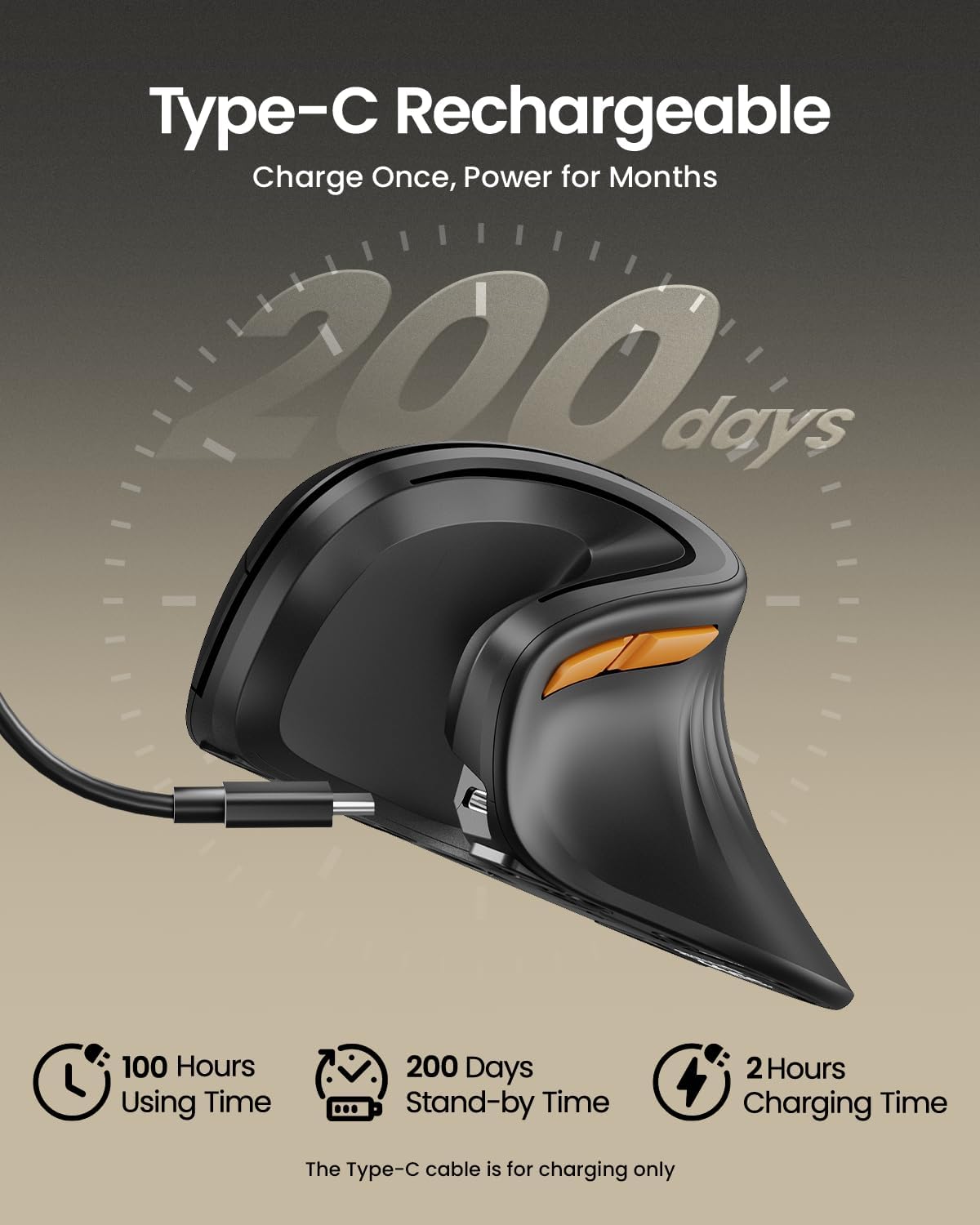
All-Day Power with Fast USB-C Charging
 (The Type-C cable is for charging only)

 Gift Of Productivity


ProtoArc EM11 NL ergonomic mouse delivers exceptional comfort for long hours, seamless multi-device connectivity, and impressive battery life in a premium ergonomic design.


1 Ergonomic Vertical Design
2 1-2 weeks Adaptation Time
3 Natural Handshake Posture
4 3 Adjustable DPI
5 Product Features
Measure Your Hand First 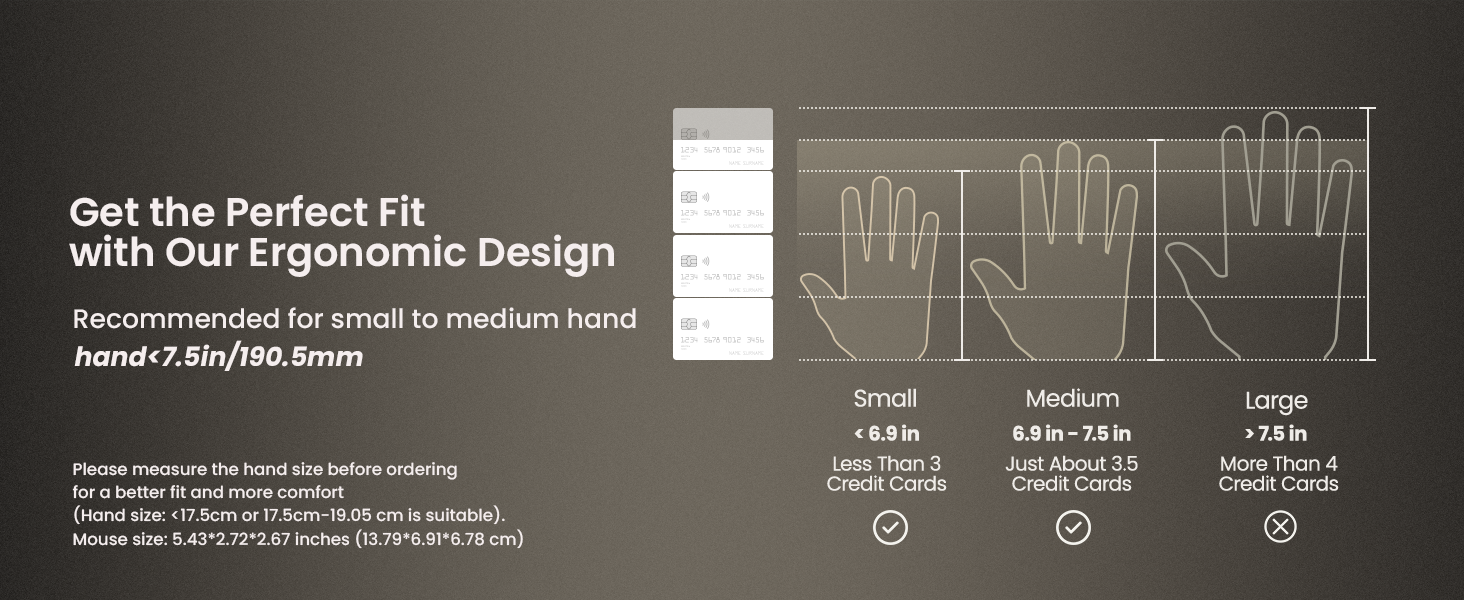
Warm tips: Since it takes a learning curve to get used to the shape when using our ergonomic mouse for the first time, it may cause inconvenience to your mouse grip, but our ergonomic design will help reduce the pressure and pain on your wrist caused by long-term use of the mouse
Wireless Ergo Combo is Designed for Comfort and Productivity
 Pair with EK01 Plus Backlit Ergonomic Keyboard
Type more naturally with ProtoArc EK01 Plus. The ergo keyboard with cushioned palm rest, curved split keyframe and responsive scissor keys – Reduces wrist strain, keep your hands and shoulder relaxed
 Pair with EK04 2-in-1 Wireless Ergonomic Keyboard
ProtoArc EK04 wireless ergonomic keyboard with separate number pad provides greater flexibility for your workspace setup, greatly helps to improve your work productivity.
 Pair with MP50 Ergonomic Mouse Pad with Wrist Rest
ProtoArc ergonomic mouse pad features an 8-degree tilt to provides stable support for your wrist and palm, effectively alleviating fatigue from prolonged use, while also helping to improve discomfort
 Pair with EK04 Mini Wireless Ergonomic Keyboard
ProtoArc EK04 Mini compact bluetooth ergonomic keyboard offers a space-saving solution to maximize workspace efficiency without sacrificing comfort and functionality.
 Pair with EK04 N Ergonomic Wireless Number Pad
ProtoArc EK04 N ergonomic number pad with wrist rest can enhance work efficiency and provide typing comfort for long-term data entry work.
 Pair with MP10 Leather Office Desk Pad Protector
ProtoArc MP10 Leather Office Desk Pad Protector features high-quality vegan PU leather, it shields your desk from scratches caused by hard surfaces like phones and watches
Is the EM11 NL ergonomic mouse compatible with Mac OS?
EM11 NL is compatible with Windows 8, Windows 10 or higher, Mac OS X 10.12 or higher, and Android 4.3 or higher. Please note: the side buttons are not compatible with Mac OS
Does the EM11 NL support programming?
We’re sorry, the EM11 NL currently does not support customization. However, our upcoming upgraded version, the EM11 Pro will offer this feature
What hand size is the EM11 NL designed for?
Recommendations for Hand Size: We recommend that small to medium hands use our ergonomic vertical mouse. Please measure the size before ordering for a better fit and more comfort.(Hand size: <17.5cm or 17.5cm-19.05 cm is suitable)
Does the EM11 NL have LED or RGB lighting?
No, the EM11 NL does not feature LED or RGB lighting
What is the battery life of the EM11 NL?
It takes only 2 hours to fully charge. The mouse offers up to 200 days of standby time and provides 100 hours of continuous usage. Based on 4 hours of use per day, this translates to approximately 25 days of battery life
Connection Guide: This mouse pairs via Bluetooth or the included USB-A receiver only. Note: A USB-C receiver is not included. The Type-C cable is for charging
Connect up to 3 Devices: This ergonomic wireless mouse features dual BT 5.0 and 2.4G USB-A connectivity modes for simultaneous connection of up to 3 different devices, and is compatible with Windows 8, Windows 10 or higher, Mac OS X 10.12 or higher, and Android 4.3 or higher
Rechargeable Ergonomic Mouse: The Bluetooth Vertical Mouse has a built-in 500mAh Li-Ion battery that can be conveniently recharged using the included Type-C cable(The Type-C cable is for charging only)
Ergonomic Vertical Design: The ergonomic mouse wireless keeps your wrist naturally straight, putting your forearm and wrist in a more natural and relaxed position, which can reduce discomfort and strain, helping to improve productivity and reduce the risk of repetitive strain injuries compared to a standard mouse. Warm tips: We encourage you to relax your palm and hold the mouse naturally when using a vertical mouse
Perfect Fit for Small to Medium Hands: Designed specifically for hand lengths under 7.5 inches (19.05 cm), the EM11 NL reduces wrist strain by aligning with your natural grip. Please measure the size before ordering for a better fit and more comfort
Learning curve: Since it takes a learning curve to get used to the shape when using our ergonomic mouse for the first time, it may cause inconvenience to your mouse grip, We recommend that you take 1-2 weeks to get used to it, as many users find that it will help reduce the pressure and pain on your wrist caused by long-term use of the mouse and improve comfort
Adjustable Dpi & High Performance: 1000/1600/2400 DPI levels provide higher sensitivity than standard optical mice for precise optical tracking; with the back and forward buttons, you can easily navigate websites and increase work efficiency. Note: All buttons are not programmable and the forward and back buttons are not compatible with Mac OS systems
Quiet Clicking: The silent click sound of the left and right mouse buttons help you focus on your work, Note:the middle scroll wheel and and the back/forward buttons are not silent
10 reviews for ProtoArc Ergonomic Mouse, EM11 NL Bluetooth Rechargeable Wireless Vertical Mouse, 3 Multi-Device Connectivity for Computer/PC/Laptop, 2.4GHz USB-A Optical Mice for Windows, Mac OS, Black
Add a review
$21.99
Squid –
It’s cheaper than medical bills
Work gave me free rein to buy a mouse. I could’ve gone with much more expensive options. I asked for this one.I’m a digital artist and repeat motion injuries are a huge concern. The shape holds your hand up in a way that’s much more natural. I cannot go back to normal mouse controls. This is just so much more comfortable.The mouse is responsive and durable and feels high-quality. The charge seems to last a good while. I’d just plug it in every once in awhile when you’re not going to use the computer.The matching protoarc mousepad adds to this to make things just so much less painful than they were.I’m 5’5”, I have smaller hands. If you have big meaty claws because you are a Large Man of Great Heights you might want a bigger mouse. If you are an Average Size Man if Normal Height it might be alright. I am a Woman of Average Height and this is the perfect mouse grip size for me. Keep that in mind when ordering – there’s much bigger types of this sort of mouse out there if you know you have big hands.
CTdasMe –
Perfect for Office Work
I use the ProtoArc EM11 NL Vertical Mouse every day at the office, and it’s made a noticeable difference in wrist comfort. The vertical design keeps my hand in a more natural position, which really helps during long hours on spreadsheets and emails.Bluetooth setup was quick, tracking is smooth, and the clicks are quiet—great for a shared workspace. Battery life has been solid so far, and I love that it’s rechargeable.Great value and a big upgrade from a standard mouse. Highly recommend for office use!
Trev –
Surprisingly Comfortable and Versatile — Budget Ergonomics Done Right
This ProtoArc EM11 NL is one of those “low cost, high impact” upgrades—especially if you’re grinding long hours at a desk. It’s not flashy, but it quietly fixes one of the biggest problems in modern work: wrist fatigue.The vertical design is the star here. It puts your hand in a more natural handshake position, which genuinely reduces strain compared to a traditional flat mouse. The built-in wrist rest helps support your palm, making it easier to stay comfortable during long sessions. Connectivity is another win. You can bounce between multiple devices (Bluetooth + USB) without constantly re-pairing, which is clutch if you’re running a laptop + desktop + tablet setup.  It just makes your workflow smoother.Performance is solid for everyday use. Adjustable DPI (1000/1600/2400) gives you enough control for productivity, browsing, and even light design work.  It’s not a precision gaming mouse—but that’s not what it’s built for.Battery life holds up well, and being rechargeable means no constant battery swaps—small thing, big quality-of-life upgrade.Now, keeping it real:• It’s a budget mouse, so the buttons feel a bit basic• Takes a few days to get used to if you’ve never used vertical mice• Might feel large if you’ve got smaller hands But once you adjust, it’s hard to go back.Bottom line:If you want a cheap, effective way to improve ergonomics and reduce wrist strain, this is a no-brainer. It’s not luxury—but it’s practical, comfortable, and gets the job done without overcomplicating your setup.
Emily Kirby –
Much smaller than other handshake/vertical mice
This is my third vertical or handshake Mouse , I have had one each of the Lekvey and Anker. Those mouses worked fine until they completely stopped working essentially, this one seem to be a little bit more ergonomical and nicer looking so I took the leap on it. Initially out of the box seems like a really nice Mouse, I like the way it looks and some of the grip pattern on it, but ultimately within a few moments realized that it was not ideal for my hand. In my opinion the mouse is too small for my hand, the previous versions I had are maybe three quarters of an inch taller, on this mouse my hands feel very cramped, almost like if my hand is shoved into too small of a mitten. Additionally this Mouse has a nice taper off the back which is presumably meant to support the bottom of your hand and wrist better but I find that my hand continually slides down the back of the house and onto the desk and further disrupts my hand position. I do not have exceptionally large hands or anything, just normal size hands for normal size man.I tried to take a photo of the mouse in my hand to show the size of it, but my hand completely obscures the view of the mouse , that’s how small it is relative to my average size hand.So if your hands are any larger you will definitely have issues if you’re used to the taller Mice from other brands. The buttons all felt like they worked great it was just a matter of getting my fingers in the right places to use them and after one day of using it in my hand felt cramped from being in sort of a weird grip position. It felt like my hand was always about to squeeze the mouse out of my grip.It synced up seamlessly and was compatible with my pC and that was very easy but ultimately the hand cramping and potential wrist pain are not starters for me.
Mark R. Gereau –
Excellent budget friendly ergonomic mouse
What an awesome buy for me! I’ve been in the technology field for over 20 years and was a technology enthusiast for many years before. Using a standard mouse had been detrimental to both of my hands. I have been using external track pads for several years now. I discovered this mouse at a great price and decided to take it for a spin. I can’t stress how comfortable it is to use and the functionality and control over my mouse pointer is fantastic! Amazing to include three device connections switch too! What a great value. It’s rechargeable and feels like a quality product in my hand. Highly recommend but do check if you have very large hands this may not be for you. I would recommend this mouse to family and friends to prevent issues with their hands and have a more comfortable computing experience. I did pick up a mouse pad for better pointer control. My wood desk was not great with the optical lasers and the pad fixed that issue.
Edgar Gonzalez Romero –
Excelente mouse, probé varias marcas y modelos, pero este es el. Único ergonomico qué tiene un excelente agarre y rinde bien en videojuegos. Tiene buen sensor se nota.
Jatin –
This thing is really award winning good. And very cheap pricewise. I couldnt find a single ergonomic mouse with this quality and price.Pros: usb c charging , connectivity with 3 devices and very good material feel on the hands and great holding angle for the palm.Longevity will be seen over time
Jake Ner –
De gran calidad
Ace –
This ProtoArc ergonomic vertical mouse is such a good buy. It has two connectivity modes (USB-A and Bluetooth) which work great out of the box with no need for any software installations.With the Bluetooth connection, you can connect up to two devices. While you cannot use them simultaneously, you can easily switch between them with the click of a button.Other features include:1. Power: It is powered through USB-C, and you will find yourself recharging only about every three to six months depending on your use. It charges quickly.2. Navigation: It has two side buttons for moving forward or back on a webpage, although there is no built-in native app to edit these buttons.Overall, it is great for your hand and recommended for people with big hands.
Mahmoud –
Okay