
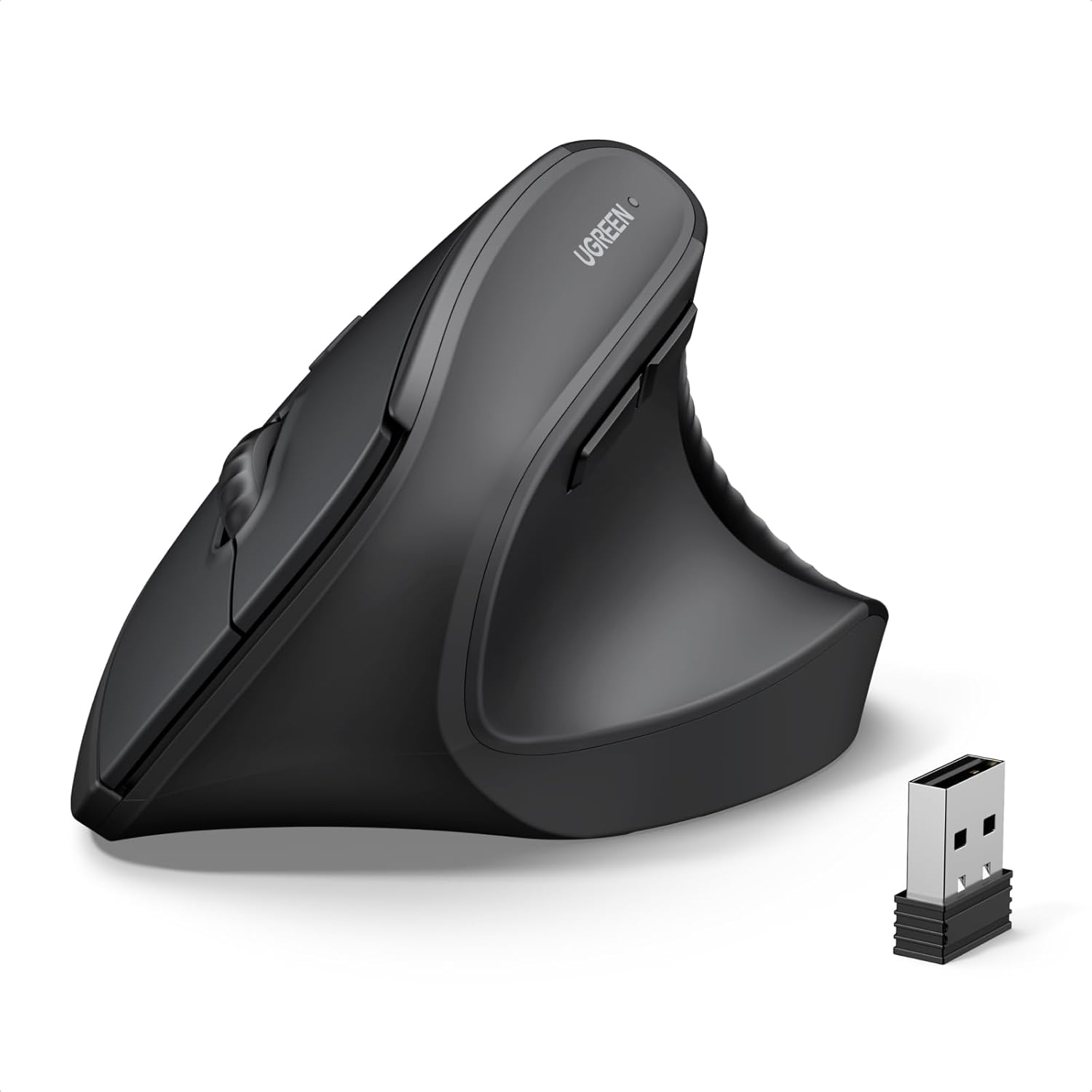
UGREEN Vertical Mouse, Wireless Bluetooth Ergonomic Mouse, Dual-Mode (BT 5.4 & USB 2.4G), Quiet Clicks, 4 Adjustable DPI (1000/1600/2000/4000), Compatible with Windows/Mac/Linux/Android/ChromeOS
$14.99
Related Products






Product description


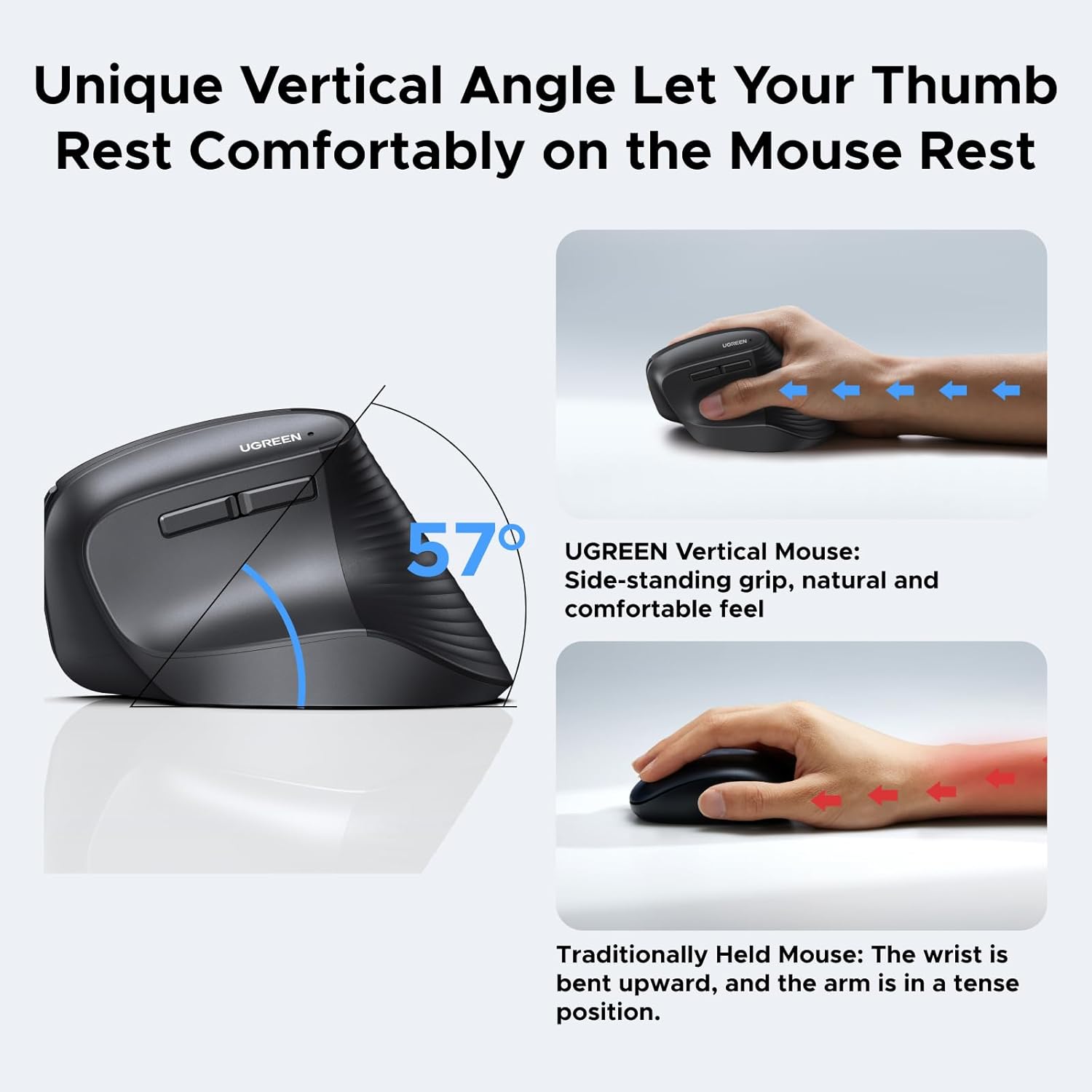
Ergonomic Vertical Design for Natural Comfort: Designed with a natural vertical handshake position that reduces wrist rotation and muscle strain. A great choice for users with larger hands or anyone who spends long hours on the computer
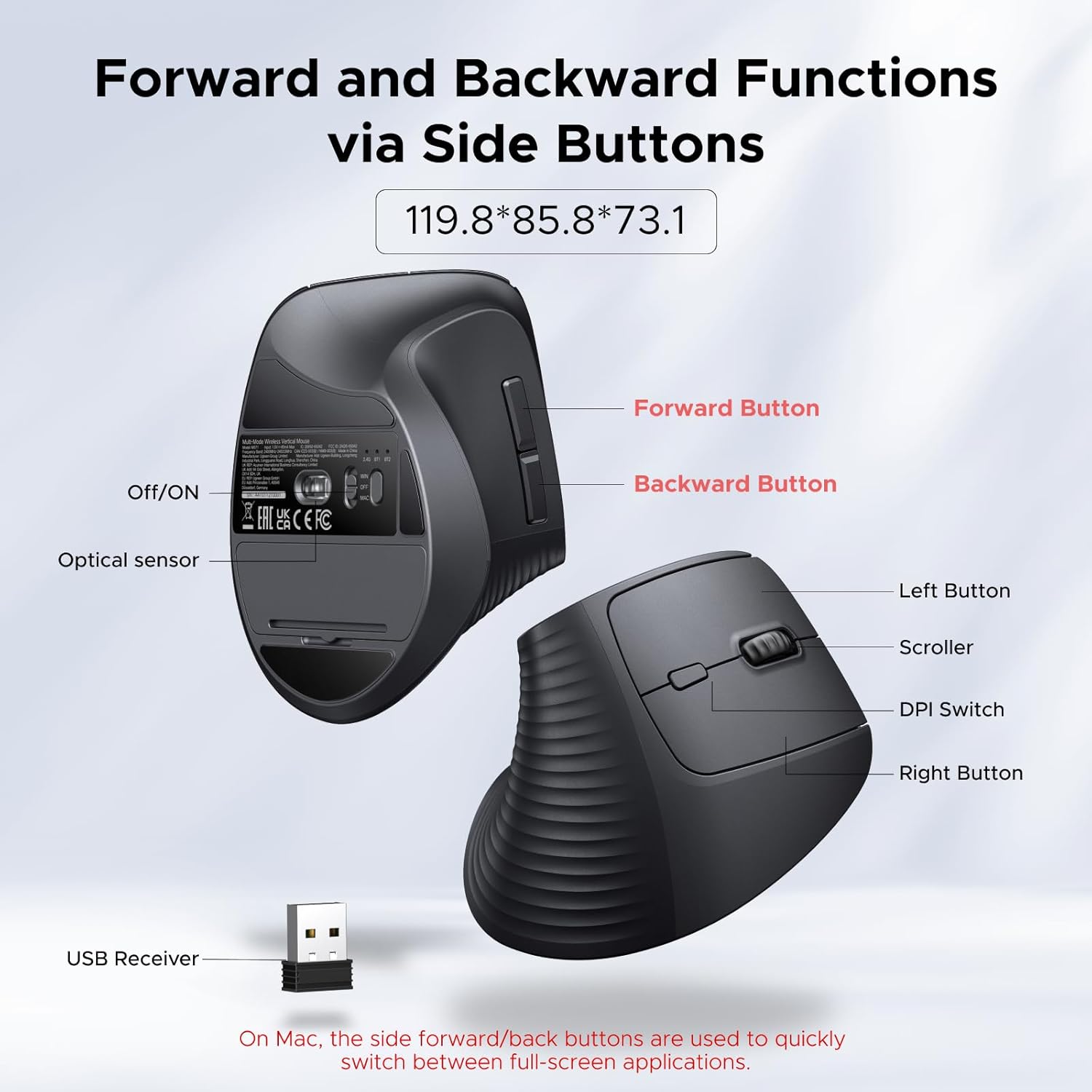
Silent Click & 5-Button Layout for Better Productivity: Quiet-click buttons help keep your workspace peaceful, while the practical 5-button layout lets you navigate, browse, and work more efficiently every day
4 Adjustable DPI Levels (1000/1600/2000/4000): Easily switch DPI settings to match different tasks — from precise document editing to fast scrolling and gaming. Smooth and accurate cursor control for every scenario
Smooth & Quiet Tracking with PTFE Glide Feet: Built with durable Teflon (PTFE) glide pads to ensure effortless movement and reduced surface friction — offering smoother tracking and quieter operation
Dual Wireless Connection & Long Battery Life: Connect via 2.4G wireless or Bluetooth with up to 10m range, and switch between up to 3 devices with ease. Powered by one AA battery and featuring smart sleep mode to help extend battery life
Wide System Compatibility: Fully compatible with Windows, macOS, Linux, ChromeOS, and Android, making it a versatile choice for laptops, desktops, tablets, and office workstations
13 reviews for UGREEN Vertical Mouse, Wireless Bluetooth Ergonomic Mouse, Dual-Mode (BT 5.4 & USB 2.4G), Quiet Clicks, 4 Adjustable DPI (1000/1600/2000/4000), Compatible with Windows/Mac/Linux/Android/ChromeOS
Add a review
$14.99
Deryk Su –
Great mouse
Feels great overall. The non-slip sticker is a great addition. Still getting used to it, but it works well. Plug and play, nothing to install. I like how it only requires one battery instead of two.
A. C. –
Save some money and your hand.
Bought this mouse on sale for $16. This is a great budget ergonomic mouse. I have an expensive $70 Logitech and like it. I didn’t want to spend that much on a mouse but there wasn’t any alternatives when I purchased it.The UGREEN build doesn’t feel as premium and the mouse is bit little larger, however it works great and the price can’t be beat.
Far –
Great mouse for the price
Helped with my wrist pain. Great size for folks with larger hands. It felt natural to use from day 1.
J. R. Knutson –
Mouse Experiment
Bought this as an experiment. It’s a little cheap feeling but it is comfortable and easy to use. It’s worth the money.
CAJ –
Best ERGO Mouse I have ever had!
Game changer for my hands! I suffer from Carpal tunnel and arthritis in both of my hands and this made a major difference. No more aching and throbbing throughout the day as I work thanks to this mouse’s natural hand positioning. It glides smoothly and was easily paired with my computer for use in no time. I’d your having issues with your hands while working, this is the product you didn’t know that you needed.
B. C. –
Great mouse at a great price
Strongly recommended for anyone with elbow/forearm tendon/wrist pain. Nursing an injury, the change was immediately noticeable with reduced pain the day I switched to this from a standard mouse. Ergonomics are fantastic for right-handed users at a price that’s a fraction of similar peripherals. On Windows, the complaints in the lower-star reviews are not present. The mouse is plug and play, the resolution button lets you quickly adjust cursor speed, buttons and wheel all work as expected, I’ve had no problem with tracking on several different surfaces, the non-slip sticker is an easy install, and basically everything works the same as every more expensive mouse I’ve used. So long as it lasts–build quality seems on par with all the major brands so no reason to believe it won’t–great product at a great price.
Johnny Y –
It’s usable…but it also has it’s flaw
I bought this UGREEN vertical mouse to help with ergonomics, and it definitely serves its purpose. The tilted angle is great and feels much more natural than a flat mouse. It is truly plug-and-play with no setup issues.However, there are a few drawbacks to consider:Weight & Grip: The mouse is on the heavier side and the thumb surface is quite slippery. It offer a sticker on the pinky side which helps a bit but not enough to keep the mouse on hand. This makes it difficult to move around without a significant amount of grip force, especially when you need to move the mouse backward, which actually makes it more tiring to use than a regular mouse after a while.Wrist Pressure: Because of the specific angle, I found that a lot of my weight and force shifted directly onto my wrist bone where it touches the table, which became uncomfortable during long sessions.Overall, it’s a well-built device, but if you have smaller hands or prefer a lightweight, “grippy” mouse, this might take some getting used to.
David Pereira –
It’s a great large ergonomic mouse for its value
Its a great ergonomic mouse for big hands. Materials feel a bit cheap but they are solid and durable, its even better because buttons don’t get nasty or sticky over time. Slides smoothly over any surface, it is silent and has good range, battery life is acceptable, it does the job. Nothing to complain at all. NOTE: if your hands are small you will hate it. This is a big mouse.
Ferdinando –
UGREEN Mouse Wireless 2.4G Bluetooth 5.4 Ergonomico Verticalearriva in un buon packaging, scatola resistente, all’interno il mouse verticale (la batteria stilo AA non è inclusa) ed un manuale di istruzioni ben fatto con lingua anche italiana.Attualmente ho avuto la possibilità di usare tre mouse (compreso e oltre a questo, uno di una marca conosciuta mentre l’altro abbastanza diffuso).Faccio una breve premessa:ho una cerviobrachialgia (dolore cervicale che poi a catena si dipana nel collo, dietro la spalla, nel gomito fino alla mano), non è il tunnel carpale ma…Quindi lavorando molto al computer ho fatto delle ricerche e pensavo di agevolare/alleggerire ulteriormente le azioni del polso/mano destra.Faccio presente che ho sempre usato un mouse leggero e normale, due tasti con rotellina e filo, ovvero espressamente non bluetooth/wifi in quanto solitamente sono a batteria e pesano di più, da circa inizio di quest’anno mi sono convertito al mouse verticale.Pertanto nelle mie ricerche iniziali e scelte i fattori principali sono sempre stati: cercare una buona ergonomia (ovviamente una comodità rispetto alla dimensione e forma della mia mano – la mia è una mano media/grande, dal polso in battuta fino alla punta dell’indice di 18,5cm e larghezza palmo 11,5 cm), un peso leggero e una buona reazione/reattività in riferimento ai tasti/rotellina non solo il DPI che riguarda velocità/controllo del cursore.Il peso piuma del mio precedente mouse normale con filo era di 61 gr contrapposto al peso del mouse verticale UGREEN WiFi che è di 135 gr con ovviamente compreso il peso della batteria (ricaricabile nel mio caso per scelta), nel tempo il peso l’ho trovato accettabile.Il mouse verticale UGREEN reagisce bene premendo i pulsanti, anche il DPI è accettabile, la rotellina fa un pò di rumore, se si gira contemporaneamente tenendo premuto il tasto si sente un pò di resistenza (a me capita quando insieme mantengo premuto il tasto per agganciare/spostare un file ed insieme utilizzo la rotellina laterale premendo anche il tasto shift per lo scroll orizzontale, per poi quindi trascinare il file nella cartella dove ho deciso che vada).Funziona sia bluetooth che tramite WiFi con un connettore usb (che si attacca al computer), se non si usa si può semplicemente conservare nell’incavo/nell’alloggio della batteria).Talvolta quando utilizzo lo stesso mouse verticale su due computer in uno inserisco il connettore WiFi e faccio lo switch tra l’uno e l’altro tramite un pulsante sotto la base del mouse, accanto all’interruttore di accensione.Dall’interruttore di accensione si può selezionare Mac o PC, in realtà il mouse è per entrambi i sistemi operativi (io lo uso su un MacBook Pro Retina con Big Sur e su un MacBook Air M3), ma la selezione dell’interruttore ha a che fare invece con la direzione (su o giù) dello scroll in rapporto al movimento della rotellina (verso avanti o indietro).Il tasto posizionato dietro la rotellina laterale seleziona il DPI (la sensibilità del movimento, lento o veloce), quando si preme si può vedere nella parte alta del mouse (accanto alla scritta UGREEN) un led rosso che si illumina/pulsa tante volte in base alla modalità scelta.Vicino al pollice due tasti comodi per andare avanti o indietro (io li uso spesso quando navigo per le pagine internet).L’inclinazione è di 57° che trovo ottimale (gli altri che avevo provato erano uno anche di 57° mentre l’altro di 38°), costruttivamente il mouse ha la parte in cui si appoggia il palmo che continua accompagnando la mano fino a quasi il piano (nessuno degli altri due mouse usati la accompagnava/sosteneva fino a quasi il piano, solitamente avevano uno stacco almeno 1 o 2 cm).Questo mouse non è perfetto per il suono della rotellina (oltre ad una specifica circostanza in cui fa un pochino di resistenza), la parte dei gommini sotto vanno bene ma potrebbero essere migliori come anche la scalanatura/grip (dove poggia il palmo della mano, uno degli altri mouse aveva un grip migliore), ma lo trovo comunque del giusto peso e quasi giusta grandezza, con un mouse più piccolo si trascinava forse un pò troppo il mignolo (uno dei mouse precedenti che anche se lo usavo ho notato subito la differenza con questo), ma cosa più importante è che accompagna e sostiene la mia mano fino al piano.Quindi in definitiva mi sono convinto che il mouse è un pò come un materasso o una sedia da ufficio, ogni corpo o schiena o mano è ovviamente diversa, ci abituiamo a ciò che abbiamo ma a mio avviso tolte alcune resistenze/abitudini credo che bisogna provare se l’ergonomia ci convince personalmente.Questo credo sia un buon mouse anche se non lo ritengo perfetto ma ha anche un grande vantaggio, ovvero ha un rapporto qualità/prezzo davvero ottimo anche solo per iniziare a provare una nuova ergonomia.Solo una nota a margine:io ho impiegato circa 3 giorni per abituarmi al mouse verticale (in generale), dopo una settimana per il mio polso/mano era già una posizione migliore a quella che avevo precedentemente.
Tahmid –
The UGREEN ergonomic wireless mouse is clearly designed with comfort in mind, particularly for those with bigger hands who spend long hours at a desk.The mouse has a two-tone design with a matte dark grey body and a textured, rubberised grip area on the sides and lower part of the palm rest, which helps with hold without feeling sticky. The contoured shape includes a pronounced hump and thumb rest, giving it a very ergonomic profile. As shown in my photos, it sits nicely in a larger hand with fingers resting naturally on the buttons. Compared with a more compact, lightweight gaming mouse (like the one pictured alongside it), this UGREEN feels noticeably taller and more supportive under the palm. The build seems sturdy with no creaks or flex when gripped firmly, though the scroll wheel has a slightly lighter, less defined feel than some premium models.It supports dual connectivity: Bluetooth 5.4 (with two device profiles for quick switching) and 2.4GHz via the dongle, which is very convenient for moving between laptop and desktop without re-pairing. The four DPI levels (1000/1600/2000/4000) are adjustable via a button on the underside and work smoothly. Tracking is accurate on a standard desk mat, and the silent clicks are a genuine benefit during calls or in quiet environments. Battery life is impressive; after several weeks of daily use (mostly 2.4GHz mode), the indicator still shows plenty of charge left, supporting the claimed 12-month lifespan on a single charge. It charges via USB-C, which is modern and handy.For office work involving spreadsheets, databases, or similar tasks, this mouse excels once you tweak Windows settings (disable enhance pointer precision and adjust the speed slider to taste). The ergonomic shape reduces wrist strain over long sessions, and the seamless profile switching between dongle and Bluetooth devices is seamless in practice. The side buttons are well-placed for thumb access but are not programmable out of the box. Smaller-handed users might find the size and reach a bit much, as the palm doesn’t sit as flush and the thumb rest feels stretched.This is a strong contender if you need a reliable, comfortable wireless mouse for productivity work rather than gaming. The ergonomic design really shines for bigger hands, and the quiet operation plus stellar battery life make it a practical daily driver.
Willem –
Handige goed werkende muis fijn en Bluetooth en 2.4g. Zowel voor Windows als Mac te gebruiken max. 2 devices
Carlos –
super comodo, facil de usar y silencioso.
Melchiorum –
This is probably the most comfortable mouse I have ever used, and it costs lest than a fifth of the closest alternative I tried!I don’t suffer from any wrist issues, so I can’t comment on whether this mouse helps alleviate them – I simply find vertical grip to be more natural and comfortable. Unfortunately, there aren’t that many options on the market that I like. Considering the low price of Ugreen, I thought it wouldn’t hurt giving it a try. And… wow! I’m glad I did!Here are just some of the benefits:- The mouse is very comfortable and feels very natural to hold.- You can connect it simultaneously to 3 different devices (two BT connections, and one 2.4G through a dongle).- It’s totally quiet – the clicks are “soft” like in some much more expensive productivity-focused mice, but they are also very tactile and well-defined.- Works totally fine on every surface I tried: white desk, wooden surfaces, black mouse pad – no issues whatsoever.- DPI settings are easy to adjust on the fly, and you don’t have to install any third-party software for it.- It’s cheap!Not everything is perfect, of course, but the criticism I have for this mouse is pretty minor:- The build quality is a little plasticky. It doesn’t feel too cheap, but don’t expect anything exceptional here. I do, however, prefer hard plastic over “rubberized” surfaces of more expensive products simply because it doesn’t act like a dirt and grease magnet. So I would even say I like the plastic build.- The polling rate for this mouse is not advertised (at least I failed to find it), but my testing showed around 125Hz. On one hand, it’s not a lot if you are coming from “gaming” mice, but then again… MX Master 4 that costs literally 10 times as much still has the same 125Hz polling rate, so there’s that. 120Hz is still perfectly fine for non-competitive gaming and more than enough for productivity work.- One of the feet on my sample was glued crooked, so one of the corners was catching slightly on the mousepad. Not a huge issue, and easily fixable too.Overall – it’s a phenomenal product. Highly recommended and worth every cent.